Quiz creation has always been one of education’s quiet time thieves — and nobody budgets enough hours for it. That’s exactly why Kahoot’s AI Quiz Creator has been generating so much buzz in staffrooms and training rooms alike. But what is it, really? How does it work? And — spoiler alert — is it actually the best tool out there for the job? Let’s dig in.
- What Is the Kahoot AI Quiz Creator Tool?
- How Does the Kahoot AI Quiz Generator Work?
- Step-by-Step: How to Generate a Kahoot Quiz with AI
- Benefits of Using Kahoot’s AI Quiz Creator
- OnlineExamMaker: A Smarter Alternative for AI Quiz Making
- Kahoot AI vs. OnlineExamMaker: Side-by-Side Comparison
What Is the Kahoot AI Quiz Creator Tool?
The Kahoot AI Quiz Creator is a built-in AI-powered question generator embedded directly inside the Kahoot creator interface — available on both the web platform and the mobile app. Think of it as a smart assistant sitting beside you while you build your quiz, ready to draft the questions while you sip your coffee.
Its core purpose is to automatically generate quiz questions from a variety of input sources, including:
- A topic or keyword you type in
- A URL (a webpage, blog post, or Wikipedia article)
- A document you upload (such as a PDF, lecture notes, or a textbook excerpt)
It’s designed for educators, corporate trainers, marketers, and students who need quiz content fast — and it’s typically available on Kahoot’s paid or upgraded plan tiers.
How Does the Kahoot AI Quiz Generator Work?
You don’t need a computer science degree to understand this part. Here’s the plain-English version:
When you feed Kahoot’s AI a topic, URL, or document, it uses a large language model (LLM) — the same type of AI powering tools like ChatGPT — to analyze the content. It identifies key concepts, important facts, and logical knowledge-check points, then automatically constructs question-and-answer pairs around them.
The AI tries to vary the phrasing, match the difficulty you specify, and produce distractors (the wrong answers) that are plausible enough to be a genuine challenge. Pretty clever, right?
One important thing to remember: the teacher is always the final editor. Every AI-generated question is a suggestion, not a guarantee. Accuracy, tone, and appropriateness are your responsibility to review before the quiz goes live.
Step-by-Step: How to Generate a Kahoot Quiz with AI
Generating from a Topic
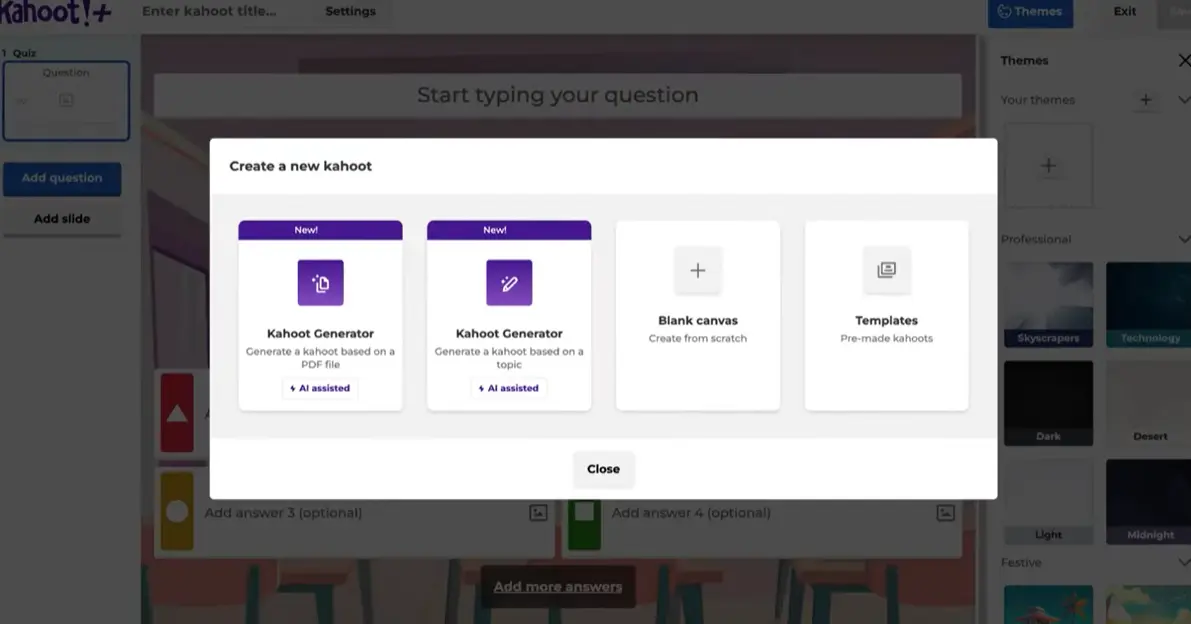
- Open Kahoot and click Create, then choose Kahoot or Blank Canvas.
- Open the “AI question generator” tab in the editor.
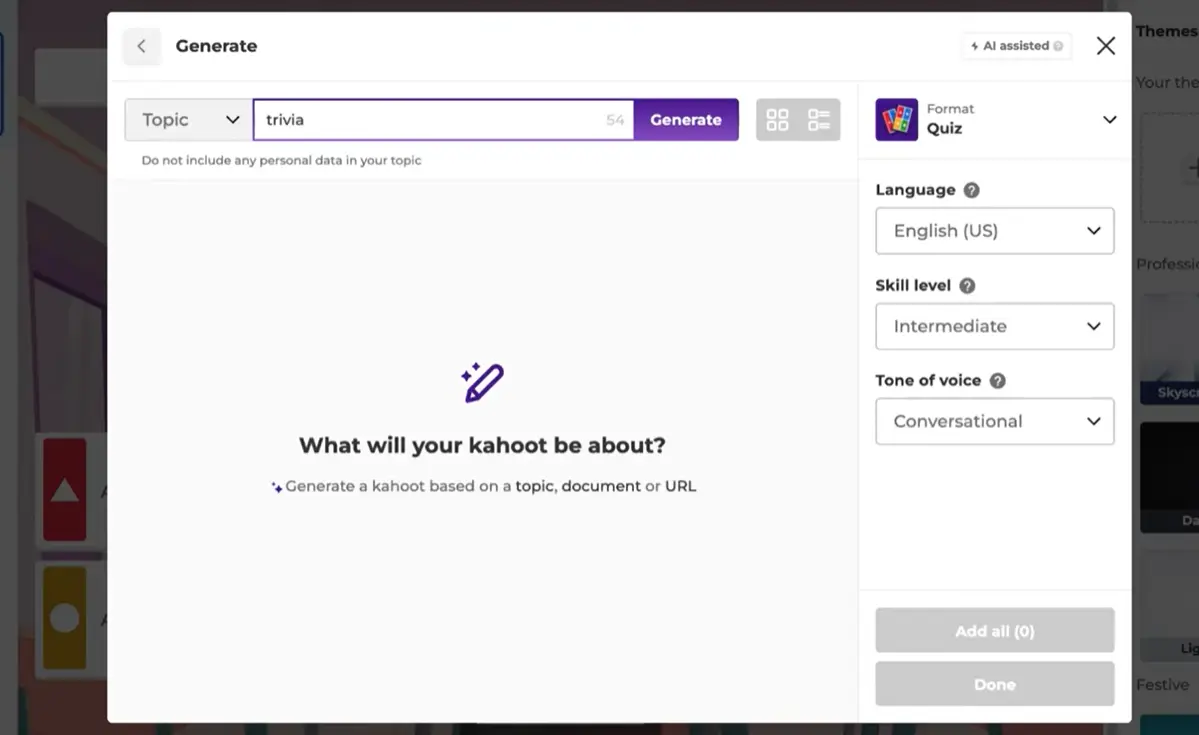
- Type in your topic or keywords (e.g., “The French Revolution” or “Python programming basics”).
- Adjust your settings:
- Number of questions (e.g., 5, 10, 15)
- Difficulty level — Beginner, Intermediate, or Advanced
- Language — Kahoot supports multiple languages
- Tone of voice — Formal, Conversational, or Humorous
- Click Generate and give the AI a moment to work its magic.
- Review the suggested questions. Add individual ones you like, or hit “Add All” to bulk-import them. Click Done to insert them into your kahoot.
Generating from a URL
- In the AI generator tab, switch the input mode from Topic to URL.
- Paste in the link to any publicly accessible webpage — a Wikipedia article, news piece, or your school’s online textbook.
- Click Generate. The AI reads the page and produces questions based on its specific content.
- Review and select the questions you want to keep.
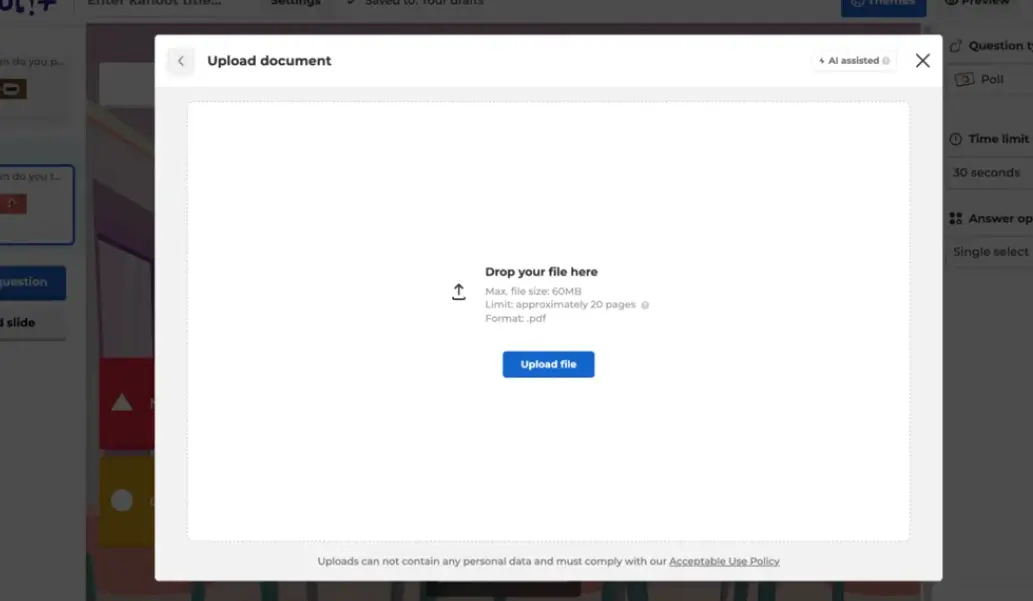
Generating from a PDF or Document
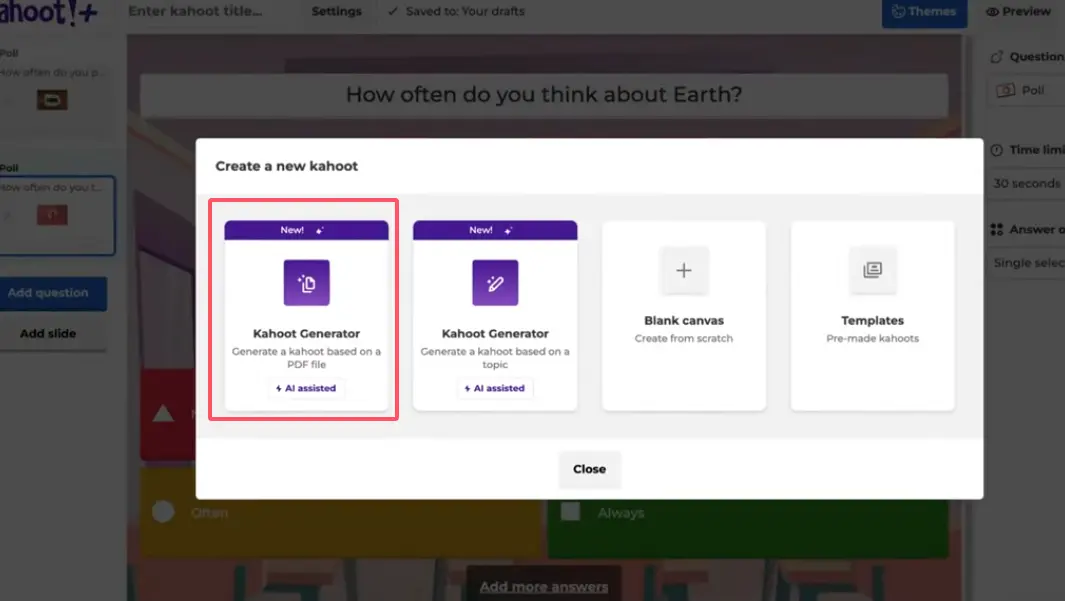
- In the Generate tab, select Document as the input type.
- Upload your PDF, study guide, or other supported file directly from your device.
- The AI scans the pages, extracts key information, and generates relevant quiz questions.
- Choose which questions to add and you’re done.
Benefits of Using Kahoot’s AI Quiz Creator
Let’s be real — this tool genuinely solves some long-standing pain points for educators and trainers:
- Massive time saver — What once took 45 minutes now takes under 5. That’s not a small deal when you’re planning five subjects a week.
- Idea generator — Hit a creative block? AI can surface angles on a topic you hadn’t considered, especially useful for unfamiliar subjects or last-minute sessions.
- Multi-language and difficulty support — Great for differentiated instruction, international classrooms, or bilingual teams.
- Encourages more frequent assessment — When quizzes are easy to create, teachers run them more often, which benefits student retention and engagement.
Limitations of Kahoot Quiz Maker Tool
No tool is perfect, and Kahoot’s AI generator is no exception. Here’s what to watch out for:
- Accuracy isn’t guaranteed. AI can hallucinate facts or generate misleading questions — always review before using.
- Limited question types. Kahoot is primarily a multiple-choice platform. If you need true/false, open-ended, fill-in-the-blank, or essay questions, you’ll hit a wall quickly.
- Locked behind paid plans. The AI feature isn’t fully available on free tiers, which is a blocker for budget-constrained teachers.
- No advanced analytics. Kahoot’s reporting is fun and visual, but thin on deep learning insights like item analysis or learner progress tracking.
- Primarily designed for live play. It’s less suited to self-paced learning, certification testing, or formal assessments.
OnlineExamMaker: A Smarter Alternative for AI Quiz Making
If Kahoot’s AI quiz creator leaves you wanting more — more question types, more control, more data — then OnlineExamMaker is worth a serious look.
OnlineExamMaker is an AI-powered quiz and exam creation platform built specifically for professional assessment. It combines the speed of AI generation with the depth of a full-featured exam system. Here’s what sets it apart:
- AI quiz generation from topics and documents — just like Kahoot, but with broader question format support
- Multiple question types: MCQ, true/false, fill-in-the-blank, matching, short answer, essay, and more
- Anti-cheating tools: webcam proctoring, browser lockdown, IP restrictions, and randomized question order
- Rich analytics: detailed reports on learner performance, question difficulty, pass/fail rates, and more
- Certificates: auto-issue branded certificates to learners who pass
- Suitable for formal assessments: training certifications, employee onboarding, compliance testing, and academic exams
- Free plan available with meaningful functionality — no credit card needed to start
While Kahoot excels at making learning fun and competitive in live settings, OnlineExamMaker excels at making assessments thorough, secure, and insightful. They’re solving different problems — but if your goal is serious evaluation, OnlineExamMaker has a clear edge.
Create Your Next Quiz/Exam Using AI in OnlineExamMaker
Kahoot AI vs. OnlineExamMaker: Side-by-Side Comparison
| Feature | Kahoot AI Quiz Creator | OnlineExamMaker |
|---|---|---|
| AI Question Generation | ✅ Yes (topic, URL, PDF) | ✅ Yes (topic, URL, PDF, text) |
| Question Types | Mainly multiple-choice | 10+ types (MCQ, essay, matching, etc.) |
| Live Game Mode | ✅ Core feature | ❌ Not focused on live games |
| Anti-Cheating / Proctoring | ❌ No | ✅ Yes (webcam, browser lock, etc.) |
| Detailed Analytics | Basic leaderboard stats | In-depth learner & item analysis |
| Certificate Issuance | ❌ No | ✅ Yes (auto-branded certificates) |
| Free Plan | Limited (AI behind paywall) | ✅ Yes, with generous features |
| Best For | Classroom games, engagement | Formal assessments, certifications, training |
Final Verdict: Which Tool Is Right for You?
Here’s the bottom line, without any fluff:
If you want to energize a classroom or training session with a fast, fun, competitive quiz — Kahoot’s AI creator is a genuinely useful feature that’ll save you real time. It’s well-designed for the live game format it supports.
But if you need serious assessment power — varied question formats, proctored exams, learner tracking, certifications, and richer AI generation — then OnlineExamMaker is the more professional and versatile choice. It covers the full lifecycle of an assessment, not just the question-writing part.
The good news? You don’t have to choose forever. Many educators use Kahoot for engagement and OnlineExamMaker for evaluation. Try both, see what fits your workflow, and let the AI do the heavy lifting either way. Your Sunday evenings will thank you.
