In a Sunday evening, you’re staring at your computer screen, trying to craft yet another geography quiz. You need questions that challenge your students without being impossible, cover the right topics, and somehow make the Amazon rainforest seem as exciting as the latest Netflix series.
Sound familiar? You’re not alone.
Enter artificial intelligence – your new teaching companion that’s about to transform how you create geography exams. Think of AI as that incredibly organized colleague who never gets tired, never runs out of creative ideas, and can generate quiz questions faster than you can say “continental drift.”
Quick Reality Check: AI won’t replace your teaching expertise, but it will amplify it. You’re still the captain of this educational ship – AI is just providing you with better navigational tools.
Table of contents
- Why AI-Powered Geography Exams Are Game-Changers?
- The Technology Behind the Magic
- Step-by-Step Guide: Creating Your Geography Exam with OnlineExamMaker’s AI
- Advanced Features That Make the Difference
Why AI-Powered Geography Exams Are Game-Changers?
Let’s be honest – traditional exam creation is like trying to fill a swimming pool with a teaspoon. It’s time-consuming, repetitive, and often leaves you questioning whether you’ve covered all the essential concepts.
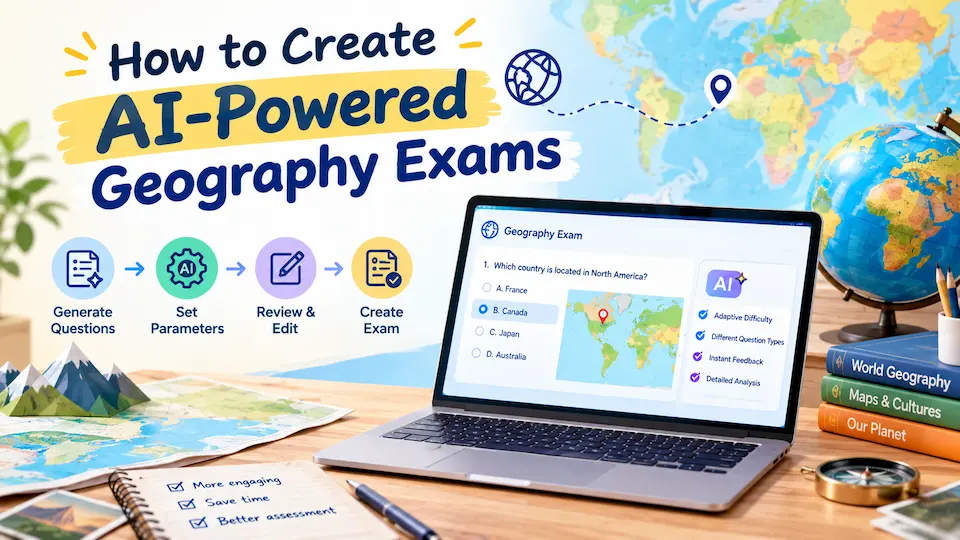
AI geography quiz generators solve this puzzle in ways that feel almost magical:
Time Liberation
Remember those late nights spent crafting questions about tectonic plates? AI can generate comprehensive geography exam questions in minutes, not hours. We’re talking about freeing up enough time to actually have that weekend coffee without guilt.
Endless Question Variety
AI doesn’t get writer’s block. It can create multiple variations of questions about the same topic, ensuring your students can’t simply memorize answers from previous tests. Think of it as having an infinite question bank that never runs dry.
Personalized Learning Paths
Here’s where things get interesting. AI can analyze student performance and automatically adjust question difficulty. Struggling with climate zones? The system serves up more practice questions. Aced the capitals quiz? Time for some advanced geopolitical challenges.
The Technology Behind the Magic
You don’t need a computer science degree to understand this, but knowing the basics helps you make smarter choices about which AI tools to use.
Natural Language Processing (NLP)
This is the brain behind AI geography quiz makers. NLP helps computers understand and generate human-like text. When you input “Create questions about European rivers,” the AI uses NLP to understand what you want and generates relevant questions.
Machine Learning Algorithms
These learn from patterns in existing geography content to create new, original questions. The more data they process, the better they become at generating relevant, challenging questions.
Automated Assessment Systems
Perhaps the most exciting part – these systems can grade student responses instantly and provide detailed feedback. Imagine never having to grade another stack of geography quizzes manually.
| AI Feature | Traditional Method | AI-Powered Method | Time Saved |
|---|---|---|---|
| Question Generation | 2-3 hours | 10-15 minutes | 85-90% |
| Grading | 1-2 hours | Instant | 100% |
| Feedback Creation | 30-60 minutes | Automatic | 100% |
| Performance Analysis | 45 minutes | Real-time | 95% |
Step-by-Step Guide: Creating Your Geography Exam with OnlineExamMaker’s AI
Ready to dive in? Let’s walk through creating your first AI-powered geography exam using OnlineExamMaker – one of the most user-friendly platforms for educators who want powerful AI features without the complexity.
Create Your Next Quiz/Exam Using AI in OnlineExamMaker
Step 1: Getting Started with OnlineExamMaker
First things first – head to OnlineExamMaker and create your educator account. The platform welcomes you with a clean, intuitive dashboard that doesn’t require a PhD in computer science to navigate.
Once you’re in, click “Create New Exam” and select “Geography” from the subject categories. This tells OnlineExamMaker’s AI to focus on geography-specific question generation and assessment criteria.
Step 2: Define Your Geography Exam Parameters
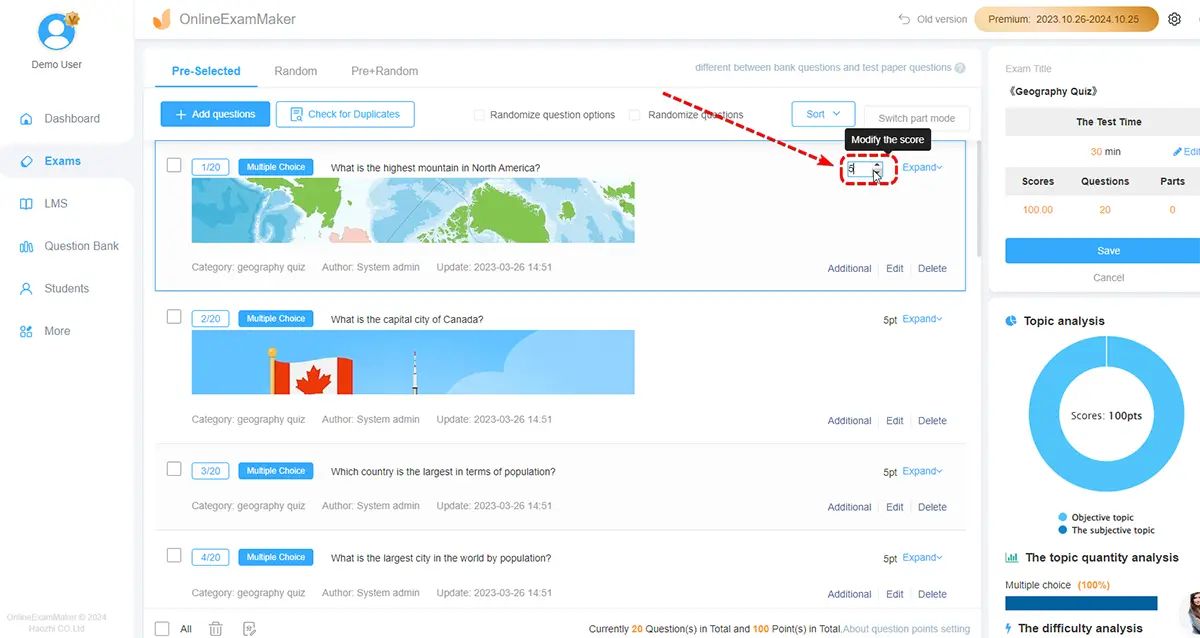
Here’s where OnlineExamMaker shines – it asks the right questions upfront:
- Grade level: Elementary, middle school, high school, or college
- Geographic focus: World geography, regional studies, physical geography, human geography
- Learning objectives: Knowledge recall, concept application, critical analysis
- Exam duration: 15 minutes to 2 hours
- Question count: 10 to 100 questions
Pro tip: Start with 20-25 questions for a 45-minute exam. OnlineExamMaker’s AI will suggest optimal question distribution based on your parameters.
Step 3: Unleash the AI Question Generator
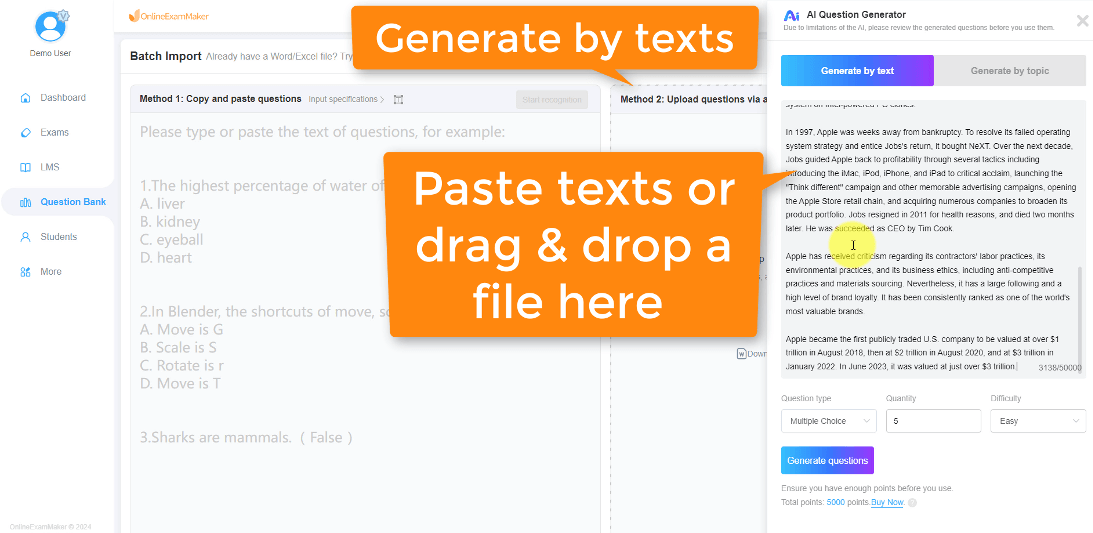
Now comes the exciting part. In OnlineExamMaker’s AI Question Generator section, input your specific topics. Let’s say you want to test knowledge about “European Physical Geography.”
Simply type: “Create questions about European mountain ranges, rivers, and climate zones” and watch the magic happen.
OnlineExamMaker’s AI will generate a variety of questions like:
- Multiple Choice: “Which river flows through the most European countries? A) Danube B) Rhine C) Volga D) Thames”
- True/False: “The Pyrenees form a natural border between Spain and Italy.”
- Short Answer: “Explain how the Gulf Stream affects Western Europe’s climate.”
- Essay Questions: “Compare the economic impact of the Alps versus the Carpathians on their respective regions.”
Step 4: Customize and Refine with OnlineExamMaker’s Smart Editor
Here’s what sets OnlineExamMaker apart – you’re not stuck with what the AI generates. The platform’s Smart Editor lets you:
- Adjust difficulty levels: Too easy? Click “Make Harder” and watch questions evolve
- Add multimedia elements: Insert maps, satellite images, or climate charts
- Modify question types: Convert a multiple choice into a drag-and-drop map exercise
- Set point values: Weight complex analysis questions higher than factual recall
The AI learns from your edits, so future question generations become increasingly aligned with your teaching style.
Step 5: Configure OnlineExamMaker’s Intelligent Grading System
This is where OnlineExamMaker truly becomes your teaching assistant. In the grading configuration panel:
- Automatic scoring: Set up instant grading for objective questions
- Rubric integration: Upload your geography assessment rubrics for essay questions
- Partial credit rules: Define how to handle partially correct answers
- Feedback templates: Create encouraging, constructive feedback messages
OnlineExamMaker’s AI can even generate personalized feedback based on specific wrong answers. Miss a question about tectonic plates? Students get targeted explanations about continental drift theory.
Step 6: Preview and Test Your Geography Exam
Before unleashing your creation on students, OnlineExamMaker offers a comprehensive preview mode. Take the exam yourself and watch for:
- Question flow and logical progression
- Appropriate difficulty distribution
- Clear, unambiguous wording
- Proper multimedia integration
The platform even provides an “AI Review” feature that checks for potential issues like unclear questions or incorrect answers.
Step 7: Deploy and Monitor with Real-Time Analytics
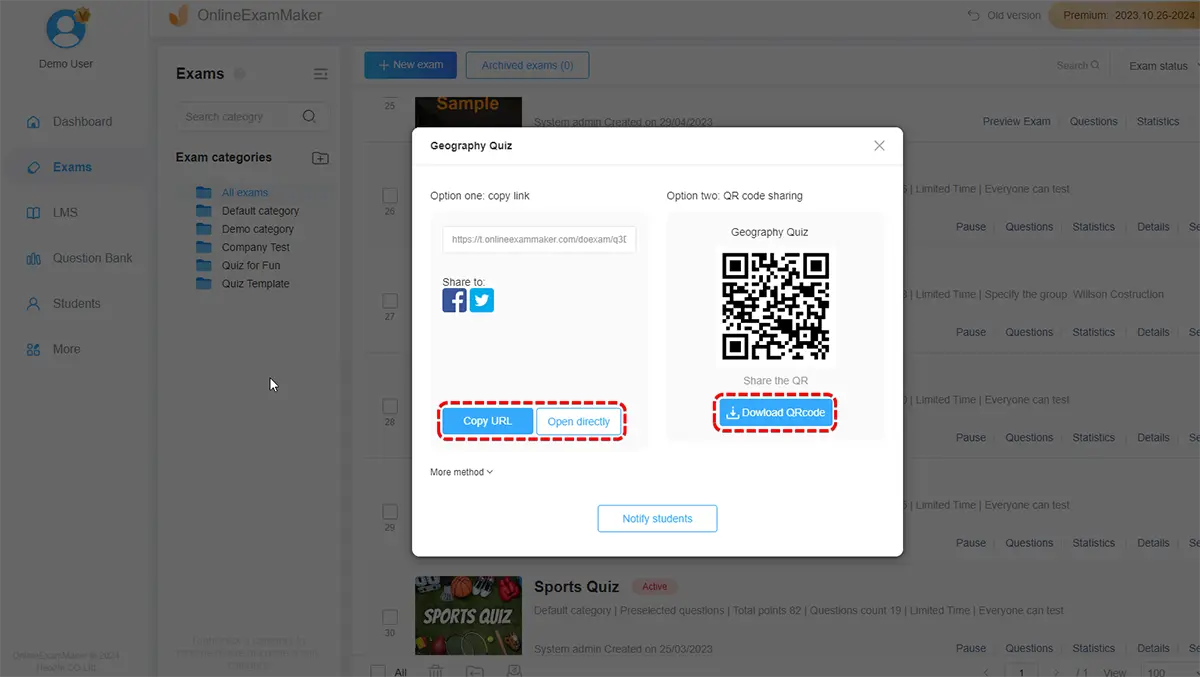
Once you’re satisfied, OnlineExamMaker makes distribution effortless. Generate unique exam links for each student or integrate directly with your learning management system.
As students take the exam, OnlineExamMaker’s dashboard provides real-time insights:
- Current completion rates
- Question-by-question difficulty analysis
- Common wrong answers (highlighting knowledge gaps)
- Time spent on each section
OnlineExamMaker Pro Tip: Use the “Question Bank” feature to save your best AI-generated geography questions. Over time, you’ll build a personalized library of high-quality assessments that perfectly match your teaching style.
Advanced Features That Make the Difference
AI-Driven Hints and Explanations
Gone are the days of students staring blankly at a question with no guidance. Modern AI geography exam tools can provide progressive hints that guide students toward the answer without giving it away completely.
For example, if a student struggles with “What causes the monsoon season in South Asia?”, the AI might offer hints like:
- “Think about temperature differences between land and ocean”
- “Consider how air pressure changes with temperature”
- “Remember the direction winds blow from high to low pressure areas”
Adaptive Question Difficulty
Smart AI systems track student performance in real-time and adjust question difficulty accordingly. Ace the basic river identification? Here come some complex watershed management scenarios.
Knowledge Gap Identification
Perhaps most valuable for educators, AI can analyze student responses across your entire class and identify common knowledge gaps. Seeing that 80% of students struggle with plate tectonics? Time to revisit that unit with a fresh approach.
Overcoming Common Challenges
Let’s address the elephant in the room – AI isn’t perfect, and neither are AI-generated geography exams.
Accuracy Concerns
AI can occasionally generate factually incorrect questions or answers. Always review AI-generated content before using it with students. Think of yourself as the final quality control checkpoint.
Cultural Sensitivity
Geography often involves cultural and political topics that require nuanced understanding. AI might not always get these subtleties right, so human oversight remains crucial.
Over-Reliance Risk
AI is a powerful tool, not a replacement for thoughtful curriculum design. Use it to enhance your teaching, not replace your professional judgment.
Ready to Get Started? Choose one geography topic for your next exam and try an AI quiz generator. Start small, experiment freely, and prepare to be amazed at what’s possible when human creativity meets artificial intelligence.
The world of geography education is evolving rapidly, and AI-powered assessment tools are leading the charge. By embracing these technologies thoughtfully and strategically, we can create more effective, engaging, and efficient learning experiences for our students while reclaiming precious time for the aspects of teaching that truly require the human touch.
