Paper-based first aid systems are still surprisingly common, and they quietly let risks pile up. The good news is that the right first aid assessment software can completely change this picture — turning reactive scrambles into proactive, documented, audit-ready programs.
Whether you’re a trainer, HR manager, or health and safety officer, here’s exactly what to look for when evaluating your options.
- 1. Risk and Hazard Assessment Tools
- 2. Customizable Checklists and Templates
- 3. Incident History and Trend Tracking
- 4. Compliance-Ready Reporting
- 5. Action Tracking and Reminders
- 6. Mobile Access and Field Usability
- 7. Training and Knowledge Assessment Support
- How to Choose the Right Platform
1. Risk and Hazard Assessment Tools
Every solid first aid program starts with one question: what could go wrong here? Good software should make answering that question easy — and repeatable.
Look for a platform that lets you:
- Identify and classify workplace hazards by type and risk level
- Document site-specific first aid needs based on workforce size and tasks
- Account for shift patterns, remote workers, and multi-location teams
According to OSHA’s workplace first aid guidance, a proper needs assessment should always start with hazard identification — not kit counts. The software you choose should reflect that priority.
Pro tip: If the tool only lets you tick “kit present / not present” boxes, keep looking.
2. Customizable Checklists and Templates
No two workplaces are identical. A construction site has very different first aid requirements than a call center. Your software needs to flex accordingly.
The best platforms offer editable templates that you can tailor to:
- Your specific industry risks and compliance requirements
- Internal policies and audit standards
- Recurring kit inspections, assessments, and reviews
SafetyCulture’s first aid inspection app, for example, is built around customizable form logic — so teams can replicate a real inspection workflow rather than a generic one.
Think of custom templates as your organization’s institutional memory. They ensure every assessor asks the same questions, every time, across every site.
3. Incident History and Trend Tracking
Here’s a question worth asking: do you know how many first aid incidents happened in your workplace last quarter? Or which department had the most near misses?
If you can’t answer that quickly, your current system isn’t working hard enough for you.
Strong first aid assessment software should store:
- Past incidents and near misses in a searchable log
- First-aid cases with timestamps, responders, and outcomes
- Patterns that reveal recurring risks or systemic gaps
This kind of trend analysis is exactly what experienced trainers and safety coaches recommend. In ProTrainings’ first aid needs assessment guidance, reviewing incident history is highlighted as a core step in any meaningful reassessment — not an optional extra.
Data doesn’t lie. Patterns in your incident log tell you where your next investment should go.
4. Compliance-Ready Reporting
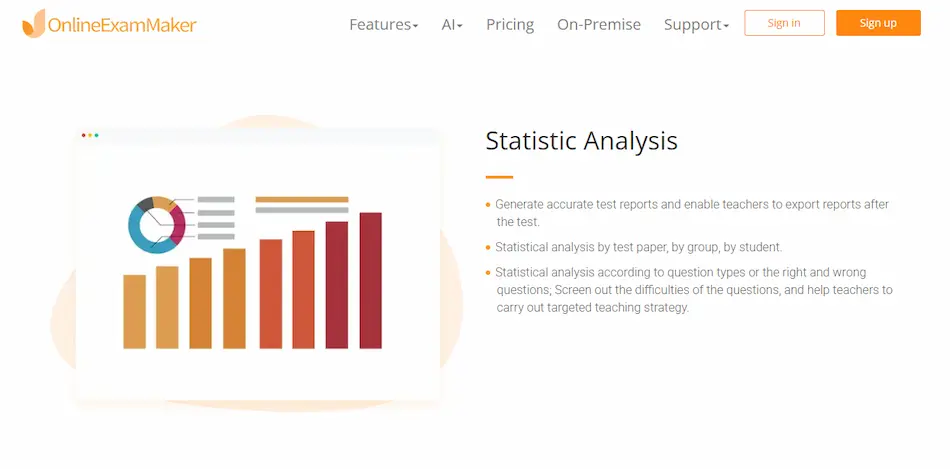
Audits are a fact of life in most regulated industries. The last thing you want during one is to be hunting through folders, spreadsheets, and email chains for documentation that should have been one click away.
When evaluating software, check for:
| Feature | Why It Matters |
|---|---|
| Time-stamped logs | Proves when assessments and actions were completed |
| Version history | Shows how policies and records have evolved |
| Exportable reports | Simplifies sharing with auditors, insurers, and management |
| Formal record storage | Supports legal and regulatory compliance requirements |
iProtectU’s first aid management software is one example of a platform that prioritizes audit-friendly documentation out of the box — because compliance isn’t a feature, it’s a necessity.
5. Action Tracking and Reminders
An assessment without follow-through is just a list of problems. The best software doesn’t just identify gaps — it makes sure someone actually closes them.
Look for platforms that let you:
- Assign corrective actions to specific team members
- Set deadlines for restocking, training, and signage fixes
- Send automated reminders so nothing falls through the cracks
This is the difference between a tool that documents problems and one that actually solves them. In busy organizations, even well-intentioned action items disappear without a system to track them.
Ask yourself: after your last kit inspection, how many follow-up actions were completed on time? Good software will turn that answer from “I’m not sure” to “all of them.”
6. Mobile Access and Field Usability
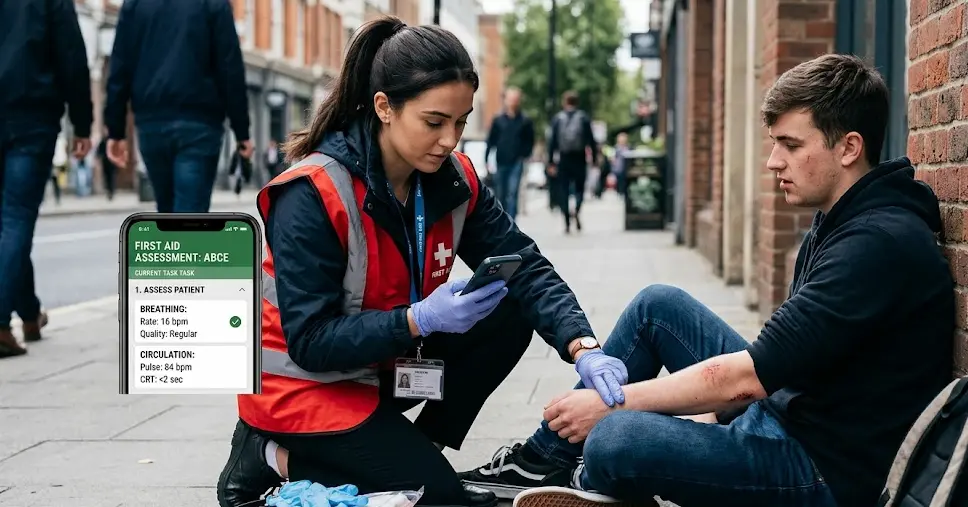
First aid assessments rarely happen at a desk. They happen on factory floors, at construction sites, in warehouses, and in remote locations with patchy Wi-Fi. Your software needs to work where the work actually happens.
Prioritize platforms that offer:
- Full functionality on phones and tablets
- Offline or low-connectivity support for field teams
- Fast, intuitive interfaces that don’t require a manual to operate
Mobile-friendly workflows make it realistic for frontline staff to complete assessments and inspections without needing to return to a desk to log everything. As shown in real-world inspection app demos, the difference in adoption rates between mobile-first and desktop-only tools is significant.
If it’s clunky on a phone, it won’t get used in the field. Simple as that.
7. Training and Knowledge Assessment Support
Even the best first aid kit is useless if no one knows how to use it — or where it is. Software that integrates training support brings your entire first aid program together in one place.
This feature is particularly valuable for HR managers and trainers responsible for onboarding new staff or managing changing procedures. Look for tools that help you:
- Track who has completed first aid training and when it expires
- Communicate updates to first-aid procedures and kit locations
- Embed guidance or training materials directly into assessments
For teams looking to go further, platforms like OnlineExamMaker offer a powerful complement to first aid assessment workflows. You can create custom quizzes and knowledge assessments to test staff understanding of first aid procedures, verify training completion, and generate detailed reports on learner performance — all in one place. It’s especially useful for HR managers who need to document that employees genuinely understand the procedures, not just that they attended a session.
Create Your Next Quiz/Exam Using AI in OnlineExamMaker
As first aid trainers consistently note, a trained team that understands what to do — and why — responds far more effectively in a real emergency. Software that reinforces this knowledge closes the loop between assessment and action.
How to Choose the Right Platform
With so many options available, narrowing down your shortlist doesn’t have to be overwhelming. Start by asking these questions:
- What’s your risk environment? High-hazard sites need more robust hazard mapping and incident tracking than low-risk office settings.
- How many sites or teams do you manage? Multi-site organizations need strong reporting aggregation and mobile usability.
- What are your compliance obligations? Industry-specific regulations may demand specific reporting formats or audit trails.
- Who will actually use it? A tool that frontline workers find confusing won’t get used consistently — ease of use matters.
Once you have a shortlist, run a pilot. Take one real assessment form, one real kit inspection workflow, and put each platform through its paces. The winner will be obvious.
Remember: the goal isn’t just better recordkeeping. It’s a first aid program that genuinely prevents incidents, responds faster when they happen, and gets stronger over time. The right software makes all three possible — without the Post-it notes.
