Picture this: a forklift operator finishes an online safety certification from their warehouse break room. No test center. No printed ID. Just a webcam, a locked browser, and an AI monitoring for anything suspicious. That scenario is no longer futuristic — it’s happening right now across manufacturing floors, construction sites, and corporate training departments worldwide.
Remote testing has exploded in the past few years, and safety certification programs are no exception. The convenience is undeniable. But convenience without integrity isn’t a credential — it’s a participation trophy with a liability attached. That’s where AI proctoring steps in.
But how do you actually set it up correctly? Which tools work best for high-stakes safety contexts? And how do you keep candidates from panicking the moment they see a blinking webcam light? This guide walks you through everything — from understanding the basics to running your first live AI-proctored exam — with practical steps your team can act on immediately.
- What Is AI Proctoring (and Why Safety Exams Need It)?
- Planning Your AI-Proctored Safety Certification Program
- Key Features to Look for in an AI Proctoring Platform
- Introducing OnlineExamMaker for Safety Certifications
- How to Set Up AI Proctoring with OnlineExamMaker
- Best Practices for Fairness and Compliance
- Final Thoughts
What Is AI Proctoring (and Why Safety Exams Need It)?
AI proctoring uses webcam feeds, audio, and screen recording to monitor candidates in real time — flagging suspicious behavior for human review rather than making final judgments automatically. Think of it as a very attentive assistant who never blinks, never gets bored, and remembers every detail. Unlike a live proctor watching a single screen, AI can monitor hundreds of exam sessions simultaneously, applying consistent rules across every candidate.
For safety certification exams — think OSHA compliance, electrical safety, first aid, confined space entry, or hazardous materials handling — the stakes are genuinely high. A fraudulent pass isn’t just embarrassing for your organization; it can cost lives on the job. A worker who cheated through a fire safety exam and doesn’t actually understand evacuation procedures is a liability nobody wants to discover after an incident.
Beyond security, AI proctoring creates a defensible audit trail: timestamped video recordings, behavioral logs, and incident reports. If a candidate ever challenges their result — or a regulator audits your certification records — you have evidence. That kind of documentation is nearly impossible to produce with traditional supervision methods.
It’s also worth understanding the three main models of AI proctoring — because they’re not interchangeable:
- Fully automated AI proctoring — The system monitors, flags, and generates a report with no human involvement during the exam. Efficient at scale, but should always include a post-exam human review stage for safety certifications.
- Human-in-the-loop (hybrid) — AI handles real-time monitoring and flags incidents; trained reviewers assess those flags and make final determinations. This is the gold standard for high-stakes safety exams and the model most certification bodies are gravitating toward.
- Live proctoring with AI assistance — A human proctor actively watches the session with AI flagging support. Most resource-intensive, typically reserved for the very highest-risk certifications or candidates with specific accommodation needs.
For the majority of safety certification programs, the hybrid approach offers the best balance: consistent AI monitoring at scale, plus human judgment where it counts most. It’s also the most defensible if your decisions are ever scrutinized externally.
Planning Your AI-Proctored Safety Certification Program
Before you configure a single setting, step back and think through what you’re actually certifying — and what level of security is appropriate. Not every safety exam carries the same risk profile.
A refresher course on hand-washing hygiene in a food service setting is very different from certifying a crane operator or an electrician working on live panels. Your proctoring approach should reflect that gap. Here’s a useful framework for matching security levels to exam types:
- High-risk, life-safety roles (heavy machinery, electrical, confined space, chemical handling) — maximum security: identity verification, facial recognition, full-session recording, lockdown browser, and human review of all flags.
- Mid-risk compliance roles (OSHA general industry awareness, fire safety, workplace ergonomics) — standard AI monitoring with spot-check human review and sensible flag thresholds.
- Low-risk refresher courses (annual policy reminders, awareness updates) — lighter AI monitoring focused primarily on identity confirmation and preventing obvious candidate substitution.
You should also map out your regulatory environment early. Many industries have specific accreditation or data protection requirements that affect how proctoring footage can be stored and who can access it. Getting legal or compliance input at the planning stage saves significant headaches later. Finally, draft your exam policies before launch: what materials are allowed, what room setup is required, how violations are handled, and what the appeals process looks like. Candidates who know the rules upfront are calmer, more cooperative, and far less likely to trigger false flags through nervous behavior.
Key Features to Look for in an AI Proctoring Platform
Not all proctoring tools are built equal — especially for high-stakes safety contexts. Here’s a breakdown of what actually matters when evaluating platforms:
| Feature | Why It Matters for Safety Exams |
|---|---|
| Identity verification & facial recognition | Prevents impersonation — critical when credentials directly affect workplace safety |
| Gaze & head-movement tracking | Detects off-screen reference use, phone consultation, or external coaching |
| Secure / lockdown browser | Blocks unauthorized tabs, apps, copy-paste behavior, and screen sharing |
| Multi-camera or 360° room view | Adds extra scrutiny for the highest-risk certifications |
| Human-in-the-loop review | AI flags, humans decide — reduces false accusations and protects fairness |
| Accessibility & bias controls | Accommodates candidates with disabilities, tics, or assistive technology needs |
| Data compliance (ISO 27001, SOC 2, GDPR) | Required for enterprise environments and regulated industries |
| LMS / platform integration | Ensures smooth workflows without forcing candidates onto unfamiliar systems |
One principle worth repeating: tiered security profiles beat one-size-fits-all configurations every time. Applying maximum scrutiny to a 10-minute awareness refresher frustrates candidates and generates noise. Applying minimal controls to a crane operator certification is genuinely dangerous. Match the tool to the risk, not the other way around.
Introducing OnlineExamMaker for Safety Certifications
OnlineExamMaker is an all-in-one exam software platform designed for exactly this challenge — and it does considerably more than watch candidates through a webcam. It’s built for HR managers, safety trainers, teachers, and manufacturing enterprises who need a reliable, scalable solution without a steep learning curve or an IT team on standby.
Create Your Next Quiz/Exam Using AI in OnlineExamMaker
Here’s what makes it a particularly strong fit for safety certification programs:
- AI Webcam Proctoring — Real-time monitoring with face detection, multiple-person alerts, gaze tracking, and suspicious behavior flagging. All footage is recorded and reviewable, making appeals and audits straightforward. Security sensitivity is fully configurable by exam type.
- AI Question Generator — Building a solid question bank for safety scenarios used to take days. Describe the topic, set the difficulty and question format, and the AI generates a full draft in minutes. Safety coordinators with no instructional design background can produce professional, scenario-based questions that genuinely test practical knowledge.
- Automatic Grading — Instant results with zero manual marking. Candidates receive their pass/fail outcome immediately after submission. Administrators get clean analytics — score distributions, question-level performance, pass rate trends — without touching a spreadsheet.
OnlineExamMaker is cloud-based and scales smoothly from small team certifications to enterprise-wide compliance rollouts across multiple sites and departments. It integrates with existing LMS platforms, supports custom branding, and manages candidate scheduling. Simple enough for a single safety trainer to run solo; robust enough for a large HR operation with thousands of employees to certify annually.
How to Set Up AI Proctoring with OnlineExamMaker
Ready to run your first AI-proctored safety certification? Here’s a practical, step-by-step playbook:
Step 1 — Build Your Exam
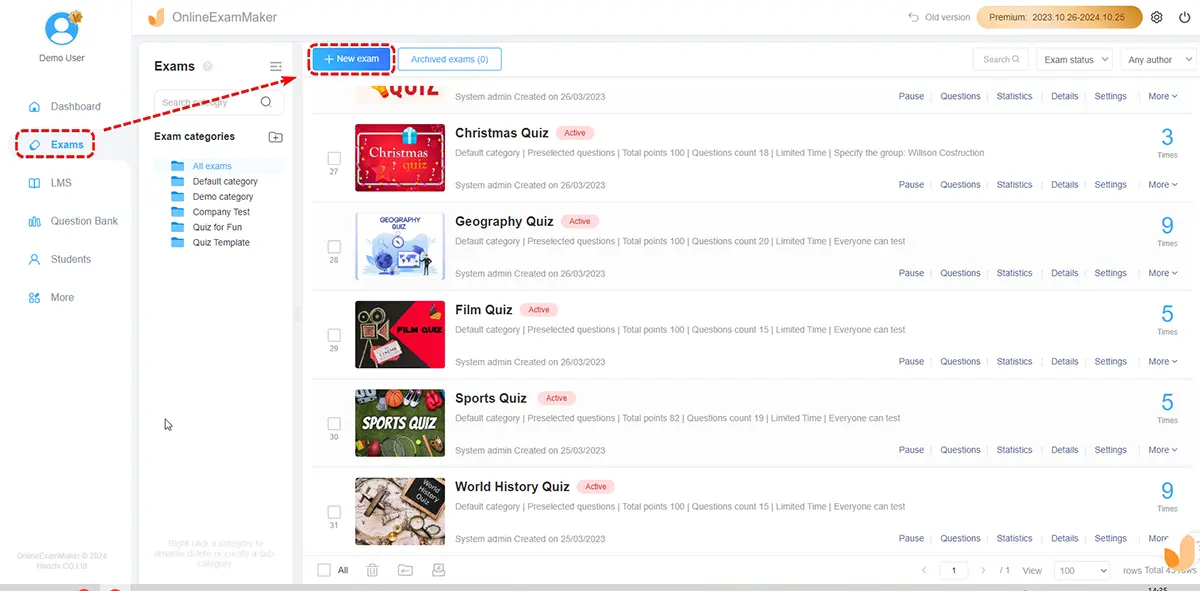
Start with the AI Question Generator to create scenario-based safety questions tailored to your industry. Set time limits, passing score thresholds, and enable question randomization to reduce answer-sharing between candidates. Specify whether reference materials are permitted — for most safety certifications, they shouldn’t be.
Step 2 — Configure Proctoring Settings
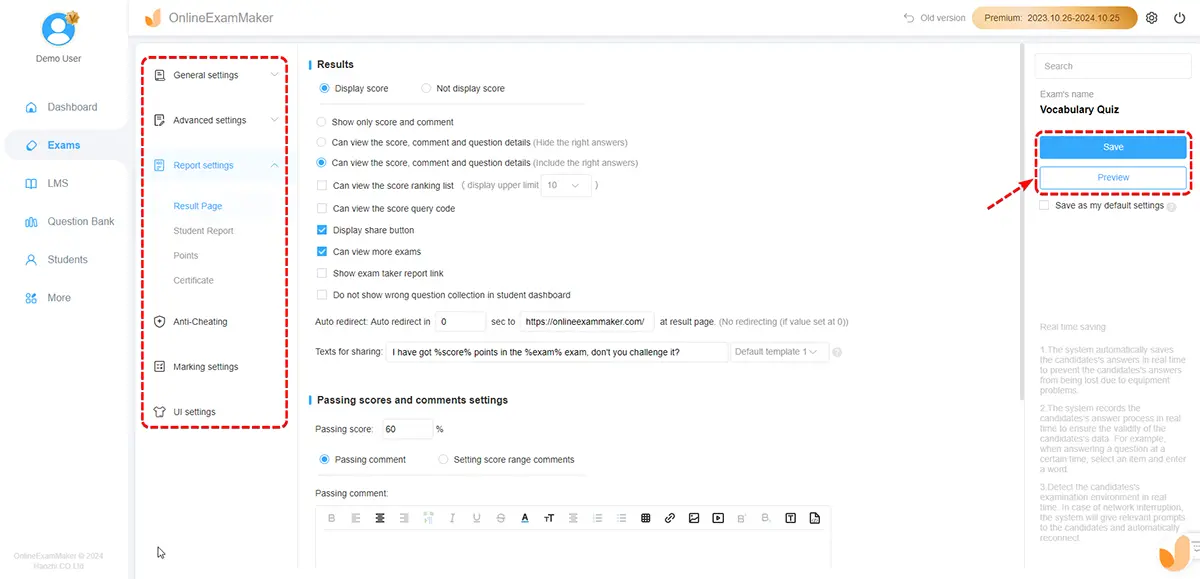
In the exam settings panel, enable AI Webcam Proctoring and select the appropriate security tier for your exam type. Activate facial recognition for identity verification at session start. Set the flag threshold — how many behavioral alerts trigger a human review — based on your risk profile. For life-safety certifications, err toward stricter settings and expand tolerance gradually as you gather data.
Step 3 — Run an Internal Pilot
Before going live with real candidates, run a dry-run session with a small internal group — colleagues, team leads, or volunteers. Verify that webcam permissions work across different device types, the lockdown browser deploys correctly on various operating systems, and flag sensitivity isn’t so aggressive that every yawn or sideways glance generates an incident report. Adjust, test again, then launch with confidence.
Step 4 — Prepare and Communicate With Candidates
Send pre-exam preparation materials at least a week in advance: hardware and internet requirements, a system check link, a clear FAQ covering what the AI monitors, and — critically — a plain-language explanation of how flags are reviewed by a human before any consequence is applied. Transparency here dramatically reduces candidate anxiety and, by extension, the nervous behaviors that sometimes trigger false positives.
Consider adding a short demo video or practice session where candidates can experience the webcam setup before the real exam. Workers who’ve never taken a proctored online exam before — and in manufacturing environments, that’s often the majority — benefit enormously from knowing what to expect. Familiarity breeds calm. Calm produces cleaner exam data.
Step 5 — Review Flags and Issue Results
After each session, designated reviewers check AI-flagged clips rather than full recordings — a significant time-saver at scale. Human reviewers apply context: is that head movement a suspicious glance at notes, or a candidate with a neck condition? Once review is complete, use Automatic Grading to finalize results and trigger certificate delivery for candidates who passed. The whole post-exam process can be completed in a fraction of the time traditional proctoring required.
Best Practices for Fairness and Compliance
AI proctoring is a powerful tool — but it needs guardrails to work ethically and legally. A few principles worth building into your program from day one:
- Always use human-in-the-loop review for safety certifications. AI flags suspicious moments; trained humans make the final call. This protects candidates from unjust outcomes and gives your organization legal defensibility if decisions are challenged.
- Build a documented appeals process. Candidates who believe they were wrongly flagged need a clear, fair path to challenge the result. Outline the process in your exam policies and communicate it before the exam, not after a dispute arises.
- Configure accessibility accommodations proactively. Extended time, movement allowances, and assistive technology support need to be set up before exam day — not scrambled together after a complaint. Work with your vendor to understand which accommodations their AI can handle without generating false positives.
- Track false-flag rates by demographic group. Bias in AI proctoring is a documented industry-wide issue. Monitor your incident data for patterns, and hold your vendor accountable for model improvements if disparities emerge across groups.
- Maintain your audit trail. Keep timestamped video, behavioral logs, and incident reports for a retention period aligned with your regulatory requirements. You’ll want this documentation if a certification result is ever challenged in a legal or regulatory context.
- Review your analytics after every exam cycle. AI proctoring platforms generate rich data — incident patterns, session durations, flag types, and pass rate trends. Use that data actively. If one exam consistently generates twice the flags of similar assessments, something is misconfigured — or your question bank needs work. The data tells a story worth reading.
Organizations that treat AI proctoring as a “set and forget” system tend to run into problems. Those that review incident data regularly, refine thresholds, and maintain open communication with candidates build programs that genuinely hold up — both to scrutiny and to scale.
Final Thoughts
Safety certifications exist for a reason — and the integrity of those exams has direct, real-world consequences. An operator who genuinely understands electrical lockout/tagout procedures is measurably less likely to cause a serious incident than one who bluffed through an unmonitored online quiz. The credential should mean something. AI proctoring is one of the most practical ways to ensure it does.
Done thoughtfully, AI proctoring makes it harder to cheat, easier to scale across large workforces, and more defensible if results are questioned — all without turning your candidates into suspects or your exam administrators into full-time video reviewers.
OnlineExamMaker brings all the pieces together: AI-powered question creation, intelligent webcam proctoring, and instant automated grading in one cohesive platform. Whether you’re running a 15-person first-aid refresher for a small team or rolling out mandatory compliance certifications across hundreds of manufacturing workers at multiple locations, it’s built for the job — and it’s built for people who have better things to do than manually manage every step of the exam process.
The question isn’t really whether to adopt AI proctoring for your safety certifications. It’s how soon you want to stop worrying about whether your credentials actually mean something.