You post a job opening on Monday. By Wednesday, 300 resumes are sitting in your inbox. By Friday, you still haven’t called anyone. Sound familiar? Hiring is broken for a lot of teams — not because they don’t care, but because the old process simply can’t keep up with today’s volume and speed.

That’s where online assessments come in. They’ve quietly become one of the most powerful weapons in a modern recruiter’s toolkit — helping HR managers filter smarter, move faster, and hire people who actually stick around. This guide walks you through exactly how to use them, step by step.
- What Are Online Hiring Assessments?
- Why Assessments Help You Hire Faster
- Choosing the Right Assessment for Each Role
- Introducing OnlineExamMaker: Your Assessment Command Center
- How to Use OnlineExamMaker for Online Hiring Assessments
- Integrating Assessments Into Your Hiring Workflow
- Ensuring a Great Candidate Experience
- KPIs to Measure Your Success
- Common Mistakes to Avoid
- Final Thoughts: Hire Smarter, Not Slower
What Are Online Hiring Assessments?
Online hiring assessments are structured tests or exercises that help employers evaluate candidates before they ever sit down for a face-to-face interview. They come in many flavors:
| Assessment Type | Best For | What It Measures |
|---|---|---|
| Skills Tests | Technical, admin, writing roles | Job-specific abilities |
| Cognitive Ability Tests | Any role requiring problem-solving | Reasoning, logic, learning speed |
| Personality Assessments | Customer-facing, leadership roles | Work style, culture fit |
| Situational Judgement Tests | Service, HR, management roles | Decision-making in real scenarios |
| Coding Challenges | Engineering, tech roles | Programming knowledge and style |
| Video Assessments | Sales, communications, teaching | Presence, communication, clarity |
They fit neatly into different stages of your funnel — from early screening right through to final validation before an offer goes out. Think of them as your first interview, without the scheduling headache.
Why Assessments Help You Hire Faster
Here’s the honest truth: most resumes don’t tell you much. A polished CV might hide someone who can’t do the actual job. And a plain-looking resume might belong to your best-ever hire. Assessments cut through the noise.
According to a SHRM report, companies that use structured pre-employment assessments reduce their time-to-hire by up to 50% while improving quality of hire. That’s not a small gain — that’s a competitive advantage.
Here’s what makes them so effective:
- They automate early screening — no more reading through hundreds of resumes just to find five worth calling.
- They standardize evaluation — every candidate faces the same questions, reducing gut-feel bias.
- They provide instant results — ranked dashboards mean your recruiter can act on data the same day.
- They reduce unnecessary interviews — your hiring manager only meets candidates who already proved themselves.
Less back-and-forth. Faster decisions. Better hires. It really is that simple — when you do it right.
Choosing the Right Assessment for Each Role
Not every test fits every role. A coding challenge for a customer service rep? Pointless. A personality profile for a junior developer? Debatable. The key is matching your assessment to what the job actually demands.
Start by mapping out three things:
- Core competencies — what skills are truly required to succeed?
- Must-haves vs. nice-to-haves — don’t test for things that don’t matter.
- Success behaviors — what does your top performer actually do day-to-day?
From there, the match becomes clearer. Technical roles call for work samples and coding tests. Customer-facing roles thrive with situational judgement and video responses. Leadership positions benefit from scenario-based case studies and values alignment tasks.
Also check your tool against these criteria: Is it valid and reliable? Is it easy for candidates to use on mobile? Does it integrate with your ATS? And critically — does it keep your process legally compliant and free from discriminatory bias?
Introducing OnlineExamMaker: Your Assessment Command Center
OnlineExamMaker is a powerful, all-in-one online assessment platform built for teams that need to move fast without cutting corners. Whether you’re a small HR team at a growing startup or a training department at a large manufacturing enterprise, it gives you everything you need to build, deploy, and analyze hiring assessments — all in one place.
What makes it stand out? A few things worth knowing:
- 🧠 AI Question Generator — Build job-relevant assessments in minutes. Just enter the role, skills, or topic, and the AI generates a bank of ready-to-use questions. No staring at a blank screen wondering where to start.
- ✅ Automatic Grading — Results are scored instantly. No waiting, no manual marking. Candidates get ranked in real time so your team can act without delay.
- 🔒 AI Webcam Proctoring — Ensure assessment integrity with AI-powered monitoring that flags suspicious behavior. Your results mean something because candidates can’t game the system.
- 📊 Smart Dashboards — See candidate scores, completion rates, and rankings at a glance. Share results with hiring managers instantly.
- 📱 Mobile-Friendly — Candidates can complete assessments on any device, reducing drop-off rates significantly.
Create Your Next Quiz/Exam Using AI in OnlineExamMaker
How to Use OnlineExamMaker for Online Hiring Assessments
Getting started is easier than you’d expect. Here’s a practical walkthrough:
Step 1: Create Your Account
Sign up for free at OnlineExamMaker — no credit card needed for the SAAS version. If your company requires full data ownership, the on-premise version is available for download.
Step 2: Build Your Assessment Using AI
Use the AI Question Generator to instantly create questions based on the job role. Enter something like “customer service skills for a retail support rep” and watch it generate a relevant, ready-to-use question bank. You can edit, add, or remove questions to match your exact needs.
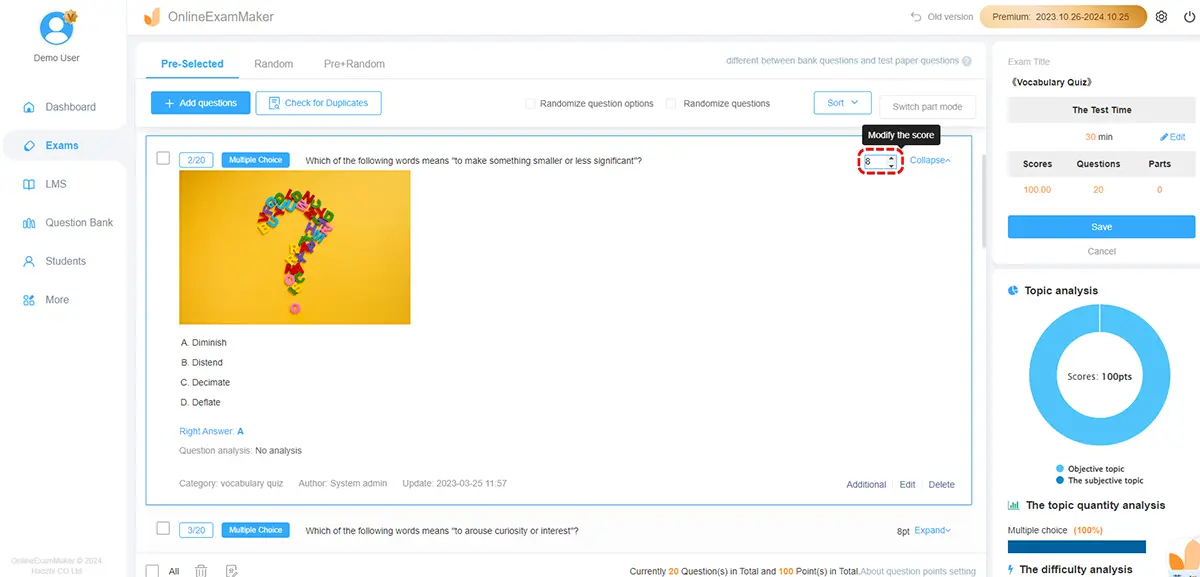
Step 3: Set Time Limits and Scoring Rules
Keep it focused — aim for 20 to 40 minutes to reduce candidate drop-off. Set your pass mark or score threshold. OnlineExamMaker’s Automatic Grading does the rest, instantly ranking every submission once submitted.
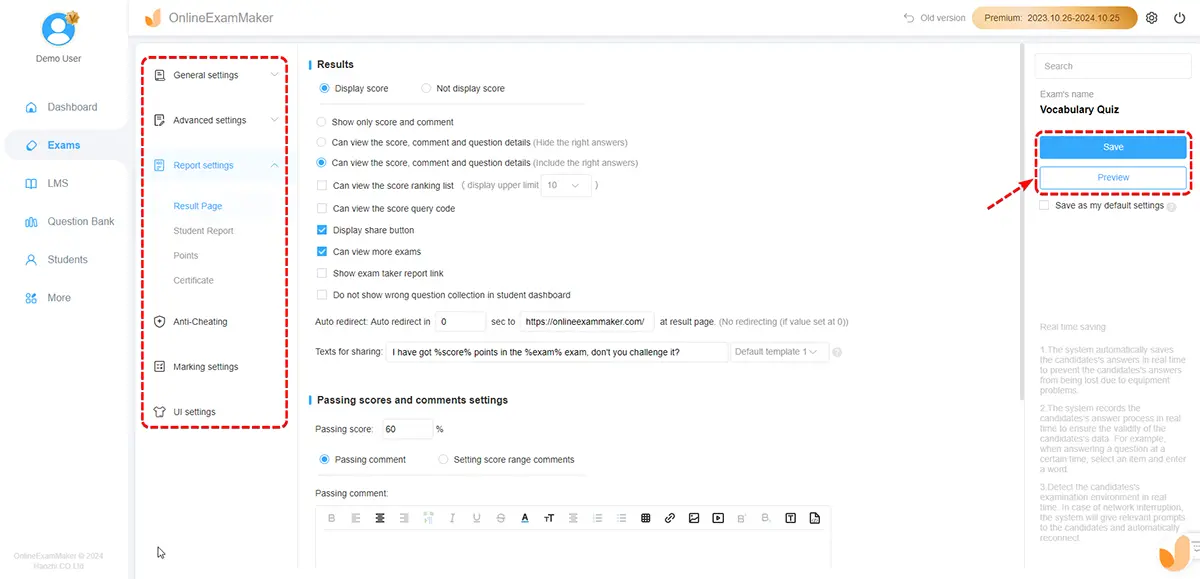
Step 4: Enable Proctoring
Turn on AI Webcam Proctoring to maintain integrity — especially important for remote or high-volume hiring. The AI monitors for unusual behavior and flags anything suspicious, so your scores actually mean what they say.
Step 5: Send Invitations Automatically
Once a candidate applies, set up automatic assessment invites. OnlineExamMaker handles reminders and tracks completion status — you don’t need to chase anyone manually.
Step 6: Review Results and Shortlist
Log into your dashboard and see the ranked list. Filter by score, review individual responses, and share results directly with your hiring manager. You’ve gone from 300 applicants to a focused shortlist — without a single phone screen.
Integrating Assessments Into Your Hiring Workflow
Where you place the assessment in your funnel matters. Here’s a proven sequence that works for most teams:
- Candidate submits application.
- Automatic invite sent to complete online assessment.
- Platform scores and ranks candidates in real time.
- Recruiter reviews top-scoring candidates only.
- Hiring manager interviews a focused shortlist.
- Offer made faster, with confidence backed by data.
For high-volume roles (think frontline staff, support agents, interns) — place the assessment right after the application. For specialized roles, run it after a brief recruiter screen. For senior or critical positions, use it as a final validation layer before the offer.
Ensuring a Great Candidate Experience
Here’s something a lot of HR teams overlook: a bad assessment experience can cost you great candidates. If the test is confusing, too long, or doesn’t work on their phone — they’ll just drop out.
Keep it clean and respectful:
- Provide clear instructions and time expectations upfront.
- Make sure the interface works on mobile — many candidates apply from their phones.
- Offer a short demo question so they know what to expect.
- Send timely follow-ups — even to rejected candidates. It protects your employer brand.
Tell candidates why you use assessments and how you use the results. Transparency builds trust. And candidates who trust your process are more likely to show up, engage, and give their honest best.
KPIs to Measure Your Success
You can’t improve what you don’t measure. Once assessments are live, track these:
| Metric | Why It Matters |
|---|---|
| Time-to-hire (before vs. after) | Proves the efficiency gain |
| Cost-per-hire | Shows ROI on your assessment tool |
| Funnel conversion rates | Identifies drop-off points |
| New hire performance at 3–6 months | Validates predictive value of tests |
| Early turnover rate | Signals whether fit is improving |
| Hiring manager satisfaction | Checks if shortlists are getting better |
Compare test scores against on-the-job performance over time. If high scorers are consistently your best hires, you’ve built something real. If not — refine your questions, adjust your cut-off scores, and iterate.
Common Mistakes to Avoid

Even well-intentioned teams make these missteps. Learn from them before they bite you:
- One-size-fits-all testing — what works for a sales role won’t work for a warehouse supervisor. Customize every time.
- Over-testing — a 3-hour assessment for an entry-level role? Candidates will vanish. Keep it proportionate.
- Ignoring the data — if your team still hires on gut feel after seeing assessment results, the whole thing is pointless. Trust the process.
- Skipping validation — always check whether high scorers actually perform better. If they don’t, something in your test design needs fixing.
- Going silent on candidates — no updates, no rejection notes, no follow-up. That’s a fast track to a bad employer reputation.
Final Thoughts: Hire Smarter, Not Slower
The best hiring teams today don’t work harder than everyone else — they work with better systems. Online assessments are one of the clearest wins available: they save time, surface better candidates, reduce bias, and give you data you can actually learn from.
Start small. Pick one role with high volume or recurring pain. Build a simple assessment using OnlineExamMaker’s AI generator. Run it for 60 to 90 days. Measure your time-to-hire, your shortlist quality, your early performance reviews. Then expand.
You don’t need to overhaul your entire process overnight. You just need to take the first step — and let the data guide the rest. The right candidate is out there. Now you have a faster way to find them.