If you’ve ever watched a student’s eyes dart between their phone and a suspiciously helpful browser tab during a Kahoot game, you’re not alone. Cheating in online quizzes has become as common as forgotten homework excuses. But here’s the thing—preventing it doesn’t require you to become a detective or abandon fun quiz platforms altogether.
- Understanding Why Students Cheat in Kahoot
- Use Kahoot’s Built-In Anti-Cheat Features
- Block Common Cheating Methods
- Adjust How You Run the Quiz Game
- Change the Game Format to Reduce Temptation
- OnlineExamMaker: A Better Tool to Conduct Anti-Cheating Quizzes
- How to Use OnlineExamMaker to Create Cheat-Proof Exams?
Understanding Why Students Cheat in Kahoot
Before we dive into solutions, let’s get real for a second. Students don’t cheat because they’re evil masterminds. They do it because Kahoot makes it ridiculously easy—and sometimes, way too tempting.
The competitive nature of the game turns a simple quiz into a high-stakes race. Add in public leaderboards, the pressure to perform, and the fact that answers are displayed on the teacher’s screen? Well, you’ve basically created the perfect storm for academic shortcuts.
Some students will search for your exact quiz beforehand and memorize answers. Others use answer-revealing websites that crack Kahoot’s code in real time. And the really tech-savvy ones? They’ll deploy bots to flood your game or use AI chatbots to get instant answers.
The good news is that once you understand the “how,” you can address the “how to stop it.”
Use Kahoot’s Built-In Anti-Cheat Features
Here’s something most teachers miss: Kahoot actually has several features designed to combat cheating. You just need to know where to find them and actually turn them on.
Turn On Player Authentication
This is your first line of defense. By requiring students to log in with an identifier or email, you ensure that each student can only join once. No more mystery players. No more duplicate accounts.
According to discussions on Kahoot’s support forums, player authentication helps you track exactly who is who—which means accountability from the get-go.
Enable Two-Step Join and Rotating PINs
Want to keep bots and answer-site users out? Enable two-step authentication or use rotating PINs for each game session. This simple step makes it exponentially harder for external cheating tools to infiltrate your quiz.
As noted by IMIT’s research on Kahoot bot attacks, rotating PINs significantly reduce unauthorized access because the game code changes each time you host.
Use the Nickname Generator and Lock Players
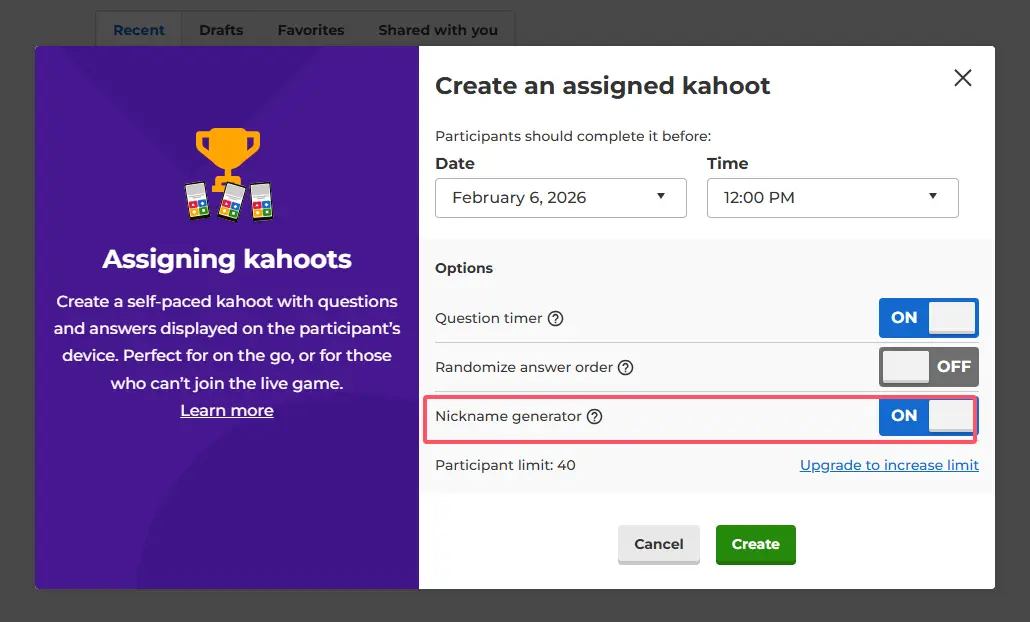
Tired of inappropriate nicknames? Use Kahoot’s nickname generator to assign random names, then lock the player list before starting. This prevents late joiners and lobby spam—two common disruption tactics.
Keep Quizzes Private
Set your quizzes to private mode and don’t let students download or share full reports afterward. The less accessible your quiz is to the public, the harder it is for students to prep with memorized answers from previous sessions.
Block Common Cheating Methods
Let’s face it—students are resourceful. If there’s a hack, they’ll find it. Your job isn’t to outsmart them (though you probably could); it’s to make cheating more trouble than it’s worth.
Block Known Cheat Sites
Work with your IT department to block known Kahoot hack and answer-revealing websites on school devices. Sites that promise to reveal answers in real-time can be filtered out at the network level.
Prevent Quiz Duplication and Advance Searches
Students love to search for and duplicate your Kahoot in advance, memorizing answers like they’re studying for a spelling bee. Combat this by varying your questions regularly or switching to Assigned (homework) mode instead of live public games.
When students can’t predict what’s coming, they can’t prepare the wrong way.
Monitor for AI-Assisted Cheating
Welcome to 2024, where students don’t just Google answers—they ask ChatGPT. Monitor for AI-assisted cheating by walking around the classroom and checking screens, or use classroom-monitoring software if available.
Yes, it requires vigilance. But the presence of a watchful teacher is often enough to deter most would-be cheaters.
Adjust How You Run the Quiz Game
Sometimes preventing cheating isn’t about technology—it’s about logistics. Small tweaks to how you run Kahoot can make a world of difference.
Require Real Names or Class-Specific Formats
Lock down nicknames and require students to use their real names or a specific format (like “FirstnameLastinitial”). This makes it immediately obvious when a suspicious account pops up.
Community discussions on Kahoot’s support page emphasize that real-name requirements drastically improve accountability.
Keep the PIN Private
Never, ever post your Kahoot PIN on public boards or social media. Share it only in class or via your learning management system. Public PINs are an open invitation for bot attacks and unauthorized participants.
Shorten Time Limits Per Question
Give students less time to look up answers by shortening the timer on each question. This isn’t about making the quiz harder—it’s about making cheating impractical.
Also, consider rotating between different quiz platforms like Quizizz or Blooket. When students can’t predict which tool you’ll use, they can’t prepare cheat sheets in advance.
Change the Game Format to Reduce Temptation
Here’s a radical idea: What if you made cheating pointless by changing what success looks like?
Use Team-Based Kahoots
Switch to team-based mode where students work in pairs or small groups. One device can have notes while another runs the game. This shifts the focus from cutthroat competition to collaboration.
When everyone’s working together, the incentive to cheat alone disappears. Plus, you get the added benefit of peer learning.
Treat Kahoot as Formative Practice, Not High-Stakes Grading
When students know the Kahoot is just for practice, the temptation to cheat drops significantly.
Have Paper Quizzes Ready as a Backup
Here’s a strategy that works like magic: Announce at the start that anyone caught cheating will immediately switch to a paper version of the quiz. Suddenly, the “fun” of digital cheating evaporates.
It’s simple psychology—students want the interactive experience. Threaten to take it away, and most will think twice before gaming the system.
OnlineExamMaker: A Better Tool to Conduct Anti-Cheating Quizzes
Now, let’s talk about what happens when Kahoot’s limitations become too much to manage. What if you need something more robust—a platform designed from the ground up to prevent cheating?
While Kahoot is fantastic for engagement and quick formative assessments, OnlineExamMaker takes security seriously. It’s built for educators who need ironclad anti-cheating measures without sacrificing the ease of online testing.
[Insert Screenshot 6 (Video 1) at 2:10 – showing OnlineExamMaker dashboard]
Why OnlineExamMaker Outperforms Kahoot for Secure Testing
Here’s the honest truth: Kahoot wasn’t designed to be a high-security exam platform. It was designed to be fun. OnlineExamMaker, on the other hand, offers features that teachers, trainers, and HR managers actually need when integrity matters:
- Advanced proctoring options including webcam monitoring, screen recording, and AI-based behavior analysis
- Randomized question pools so no two students see the same quiz in the same order
- Browser lockdown that prevents tab-switching, copy-paste, and access to external tools
- Time-bound access controls that ensure students can only take the exam during designated windows
- Detailed analytics that flag suspicious patterns like rapid answer changes or unusual response times
According to PointerPro’s guide on preventing quiz cheating, combining multiple layers of security is far more effective than relying on a single method. OnlineExamMaker does exactly that.
Create Your Next Quiz/Exam Using AI in OnlineExamMaker
How to Use OnlineExamMaker to Create Cheat-Proof Exams?
So how do you actually set up an anti-cheating exam with OnlineExamMaker? It’s simpler than you might think.
Step 1: Create Your Exam with Question Randomization
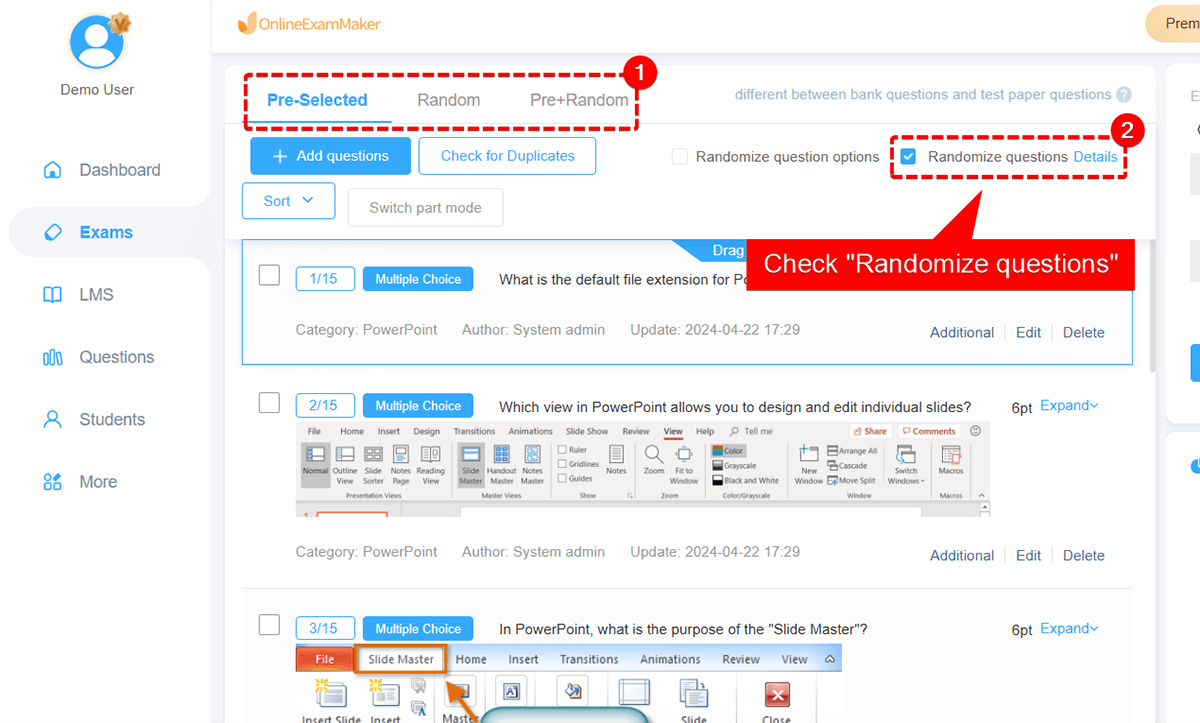
Start by building your exam in OnlineExamMaker’s intuitive question editor. The key here is to enable question randomization. This shuffles both the order of questions and the order of answer choices for each student.
Why does this matter? Because even if two students sit next to each other, they won’t be able to simply copy answers. Question three for Student A might be question seven for Student B.
Step 2: Enable Browser Lockdown and Disable Copy-Paste
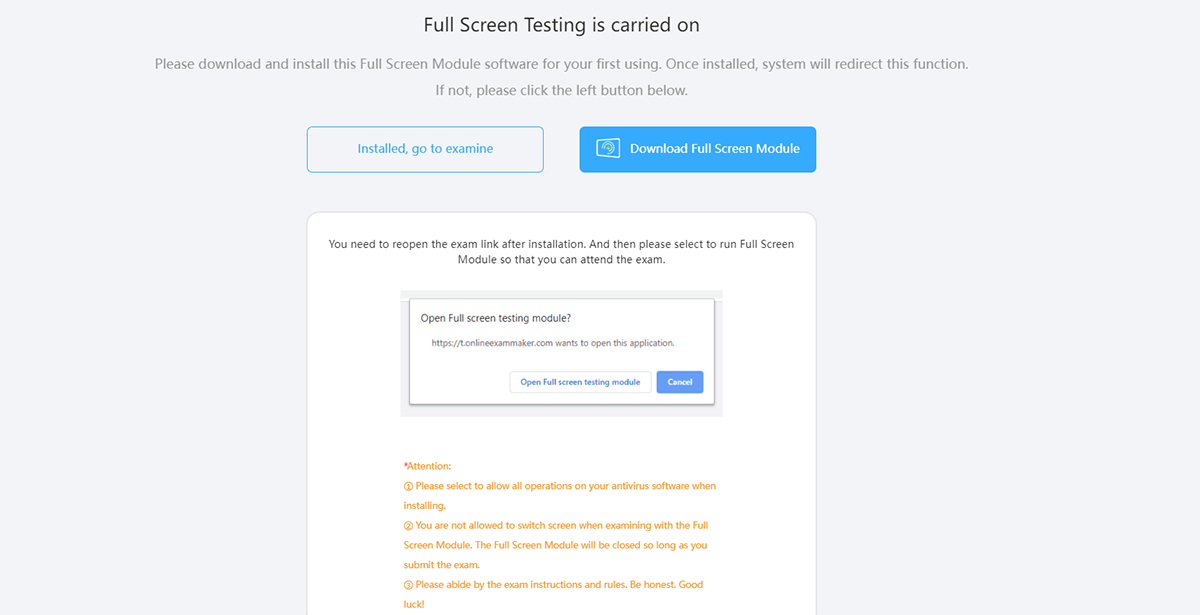
In the exam settings, activate browser lockdown mode. This prevents students from opening new tabs, accessing other applications, or using keyboard shortcuts to copy text.
Disable right-click and copy-paste functions as well. It sounds strict, but when academic integrity is on the line, these measures are non-negotiable.
Step 3: Turn On Webcam Proctoring
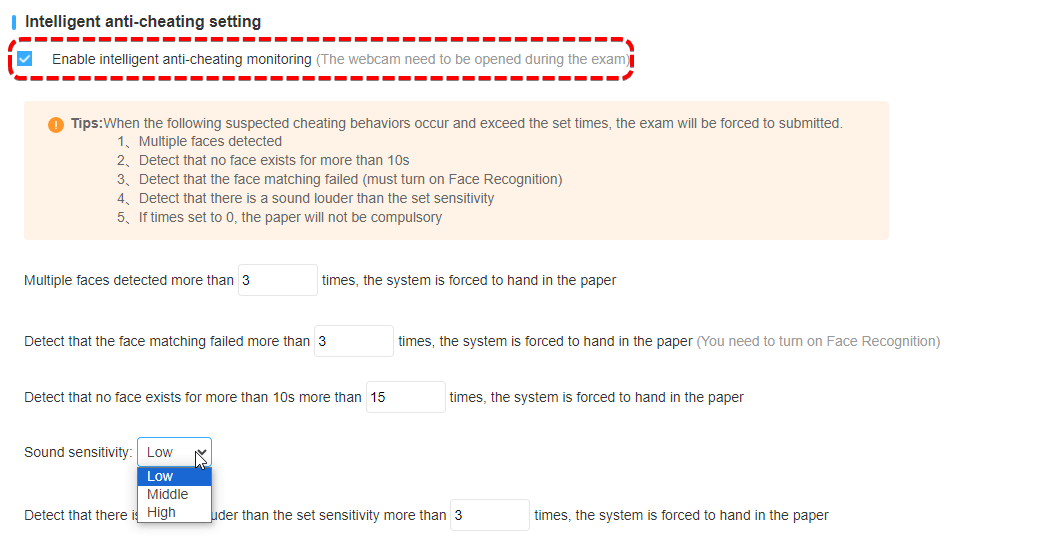
For high-stakes assessments, enable webcam proctoring. OnlineExamMaker can record video throughout the exam and even use AI to detect suspicious behaviors like looking off-screen, multiple people in the frame, or sudden movements.
This isn’t about Big Brother surveillance—it’s about creating a level playing field where honest students aren’t disadvantaged by dishonest ones.
Step 4: Set Time Limits and Access Windows
Configure time limits for the entire exam and individual questions if needed. Also, set specific access windows so students can only take the exam during your designated timeframe.
This prevents students from collaborating across different time zones or sharing answers with classmates who haven’t tested yet.
Step 5: Review Analytics and Flag Suspicious Activity
After the exam, dive into OnlineExamMaker’s analytics dashboard. Look for red flags like:
- Students who answered every question in suspiciously uniform time intervals
- Patterns of rapid answer changes right before submission
- IP addresses that don’t match expected locations
- Unusual response times compared to class averages
These insights help you identify potential cheating without relying solely on gut feelings.
Final Thoughts
Preventing student cheating in Kahoot—or any online quiz platform—isn’t about turning yourself into a surveillance expert. It’s about being intentional with your tools, strategic with your approach, and realistic about what different platforms can and can’t do.
Kahoot is brilliant for engagement, quick checks for understanding, and making learning fun. But when you need serious security, platforms like OnlineExamMaker give you the control and oversight that educational integrity demands.
At the end of the day, the goal isn’t to catch students in the act. It’s to create an environment where cheating is so difficult, so impractical, and so obviously not worth it that students choose to engage honestly instead.
Because that’s what we really want, isn’t it? Students who learn, grow, and succeed on their own merit—not because they found a clever workaround.
So go ahead. Lock down those nicknames, randomize those questions, and maybe—just maybe—give OnlineExamMaker a try for your next important assessment. Your honest students will thank you for it.
