Here’s a hard truth nobody wants to say out loud in the Monday morning leadership meeting: 70% of executives admit their companies are suffering financially because their workforce lacks the right competencies, according to Springboard’s State of the Workforce Skills Gap 2024 report. That’s not a small problem. That’s a slow leak in the hull of the ship.
For HR managers, L&D leaders, trainers, and manufacturing team leads, the answer isn’t hiring your way out — it’s assessing your way in. Knowing where your people stand, what skills they actually have, and where the gaps are hiding is the only way to build a training strategy that sticks. But doing that across hundreds or thousands of employees? That’s where most organizations trip up.
This guide walks you through exactly how to conduct large-scale assessments for enterprise teams — step by step, without the headaches.
- Why Enterprise-Scale Assessment Is Non-Negotiable Right Now
- Step 1: Define Your Purpose and Scope
- Step 2: Choose the Right Assessment Methods
- Step 3: Build a Scalable Assessment Framework
- Step 4: Choose the Right Platform — Enter OnlineExamMaker
- Step 5: How to Use OnlineExamMaker to Run Large-Scale Assessments
- Step 6: Communicate Transparently with Participants
- Step 7: Analyze Results and Turn Data into Action
- Common Pitfalls to Avoid
- Conclusion
Why Enterprise-Scale Assessment Is Non-Negotiable Right Now
Skills are going stale faster than ever. Research from Springboard found that 37% of leaders believe hard skills have a shelf life of under two years. By 2030, 61% of business leaders expect employee skill sets will need to change completely or almost completely.
Meanwhile, 87% of companies already know they have a skills gap — or will have one soon. The scary part? Many don’t know which skills are missing, or where the gaps are worst. That’s like knowing your car is leaking oil but not knowing which part to fix.
Large-scale assessments solve this. They give organizations a full, honest picture of workforce capability — by team, region, role, and level — so training budgets go where they’re actually needed. No more guessing. No more generic programs that miss the mark for 60% of the room.
Step 1: Define Your Purpose and Scope
Before you build a single question, get crystal clear on why you’re running this assessment. The answer shapes everything — the method, the platform, the communication strategy, and what you do with the results.
Common enterprise use cases include:
- Skills mapping for digital transformation programs
- Performance benchmarking across business units or regions
- Compliance certification for regulated industries (manufacturing, healthcare, finance)
- Leadership readiness before a succession planning cycle
- Change readiness before a restructure or new system rollout
Once you’ve nailed the “why,” define the population. Which roles, departments, geographies, and employment types are in scope? Are contractors included? Will results be visible to managers, or only to HR? Answer these questions before anything else — they’re the guardrails for every decision that follows.
Then identify your stakeholders: HR, L&D, IT, legal, communications, and business unit leaders. Getting alignment early prevents the painful mid-project pivots that derail timelines and erode employee trust.
Step 2: Choose the Right Assessment Methods
Not all assessments are created equal. The right method depends on what you’re trying to measure.
| Assessment Type | Best Used For | Examples |
|---|---|---|
| Knowledge tests / quizzes | Compliance, technical skills, certifications | Safety protocols, product knowledge, software skills |
| Competency assessments | Skills gap analysis across roles | Leadership behaviors, communication, problem-solving |
| Engagement / culture surveys | Organizational health, change readiness | Pulse checks, post-restructure sentiment surveys |
| 360-degree feedback | Leadership development, senior roles | Manager effectiveness, executive coaching input |
| Simulations / case studies | Role-specific behavioral assessment | Sales scenarios, customer service role-plays |
For most enterprise teams, a mixed-method approach works best — combining objective knowledge tests with behavioral self-assessments, for instance. This gives you both the “what they know” and the “how they work” picture simultaneously.
Step 3: Build a Scalable Assessment Framework
A good framework translates your business objectives into measurable behaviors and outcomes. Think of it as the architecture of your assessment — without it, you’re just piling questions into a room and hoping something useful falls out.
Your framework should include:
- Domains and competencies — What broad skill areas are you measuring? (e.g., Technical Skills, Leadership, Compliance, Customer Focus)
- Weightings — Which areas matter most for this role or program?
- Item types — Multiple choice, scenario-based, true/false, short answer, rating scales
- Difficulty calibration — Are questions pitched at the right level for the audience?
Always pilot your assessment with a small group first. Item analysis catches questions that are confusing, too easy, or inadvertently biased before they reach your full population. Standardize across regions, but allow localized items (language, regional regulations, local product knowledge) where necessary.
Step 4: Choose the Right Platform — Enter OnlineExamMaker
Running a large-scale assessment manually — spreadsheets, emailed PDFs, printed test booklets — is the organizational equivalent of trying to fill a swimming pool with a watering can. It works, technically. But not well, and not at scale.
This is where OnlineExamMaker changes the game entirely.
OnlineExamMaker is a powerful, enterprise-ready online assessment platform designed to help HR managers, trainers, teachers, and L&D professionals build, deliver, and analyze assessments at any scale. Whether you’re testing 50 employees in one office or 5,000 across multiple countries, the platform handles the heavy lifting.
What makes it genuinely useful for large enterprises is its combination of smart automation and strong security. Let’s break down the features that matter most:
AI-Powered Question Creation
Building a large question bank from scratch is time-consuming work. OnlineExamMaker’s AI Question Generator accelerates this dramatically — you can generate high-quality, relevant questions in seconds by entering a topic or uploading source material. For enterprise teams running assessments across multiple competency areas, this cuts development time significantly while maintaining content quality.
Automatic Grading
When you’re scoring assessments for hundreds of people, manual grading is a logistical nightmare. OnlineExamMaker’s Automatic Grading system scores objective questions instantly and delivers results in real time. Participants get immediate feedback; administrators get clean, organized data without the bottleneck of manual review.
AI Webcam Proctoring
Assessment integrity matters — especially for compliance certifications or high-stakes skills validation. OnlineExamMaker’s AI Webcam Proctoring uses intelligent monitoring to detect suspicious behaviors during online exams, giving organizations confidence that results reflect actual knowledge rather than collaborative shortcuts.
Create Your Next Quiz/Exam Using AI in OnlineExamMaker
Step 6: How to Use OnlineExamMaker to Run Large-Scale Assessments
Here’s a practical walkthrough of how enterprise teams can use OnlineExamMaker from setup to results.
1. Build Your Question Bank
Log in to OnlineExamMaker and navigate to the Question Bank. Use the AI Question Generator to create questions by topic, upload existing content, or build questions manually. Organize questions into categories that match your competency framework — this makes it easy to mix and match for different roles or departments.
2. Create and Configure Your Assessment
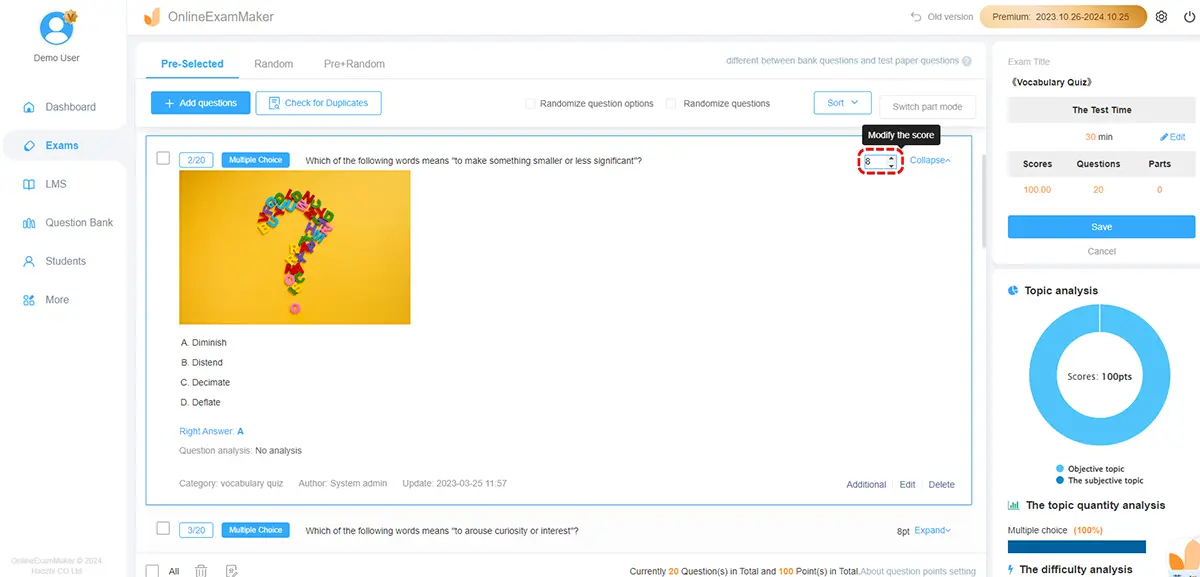
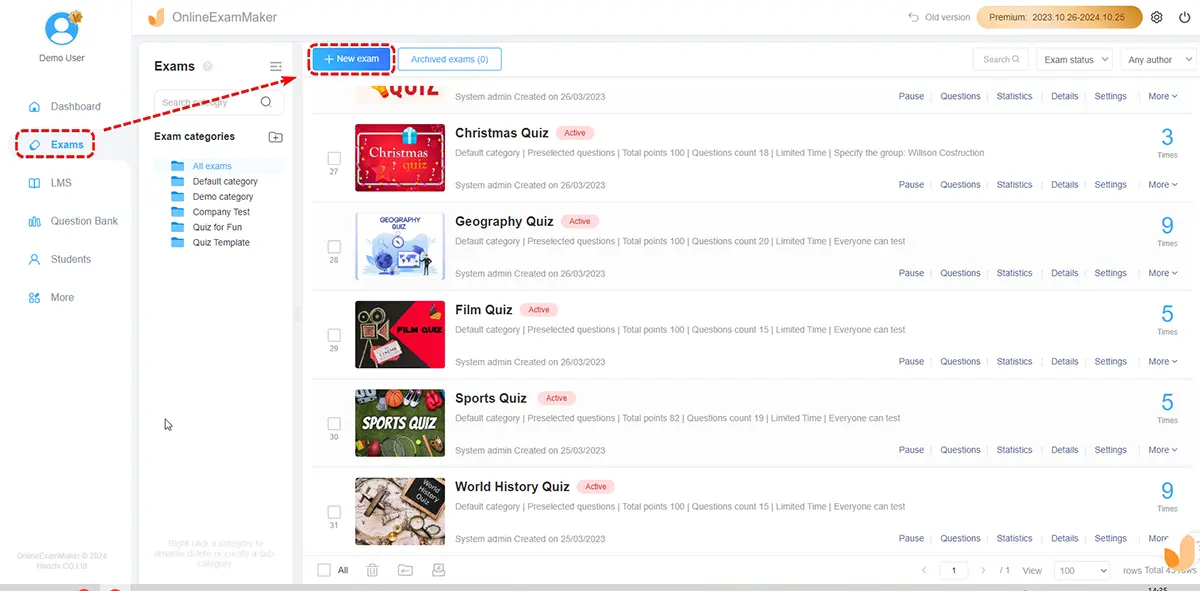
Create a new exam and configure the core settings: time limits, pass scores, question randomization (important for large groups to prevent answer sharing), and whether participants can review their results immediately. You can create multiple versions of the same assessment for different populations with minimal extra effort.
3. Set Up Participant Management
Upload your participant list in bulk using a CSV file. OnlineExamMaker allows you to segment participants by department, location, or role — making it easy to report results by group later. Automated invitation emails and reminder notifications are built in, so you don’t need to manually chase completions.
4. Enable Proctoring for High-Stakes Assessments
For assessments where integrity matters — compliance certifications, technical skills validation, or regulated training — activate AI Webcam Proctoring. Set the sensitivity level and configure alerts for flagged behaviors. This is especially useful for distributed teams where an in-person proctor isn’t practical.
5. Monitor Live Participation
During the assessment window, monitor completion rates in real time via the admin dashboard. Identify departments with low participation early so managers can follow up before the deadline, rather than scrambling for stragglers afterward.
6. Analyze Results by Group
Once the assessment closes, pull reports filtered by department, role, score range, or location. OnlineExamMaker’s analytics give you individual results, team averages, and question-level data — showing which specific items were most commonly missed. This is where the real insight lives.
Step 7: Communicate Transparently with Participants
The single fastest way to kill participation rates and employee trust is to launch an assessment without explaining why it’s happening. Nobody wants to feel like they’re being evaluated for reasons they don’t understand.
Before the assessment goes live, send clear communications covering:
- Why the assessment is being conducted (skills development, not performance review)
- Who will see the results — and at what level of detail
- How data will be used (to inform training, not to determine layoffs)
- How long the assessment takes
- A leadership endorsement — a brief message from a senior leader adds credibility
Transparency isn’t just a nice-to-have. It’s the difference between 40% completion and 90% completion.
Step 8: Analyze Results and Turn Data into Action
All those responses mean nothing if they just sit in a dashboard. The real value of large-scale assessment comes from what happens next.
Here’s a framework for turning results into action:
- Identify priority gaps — Which competency areas show the lowest scores across the organization? Which teams or roles are furthest behind?
- Segment insights — Don’t just report the overall average. Break results down by department, level, and region. A company-wide average of 72% can hide the fact that one entire business unit is scoring 45%.
- Link gaps to learning — Match identified gaps to specific training programs, coaching interventions, or stretch assignments. Avoid the trap of building generic training for everyone when the need is concentrated.
- Share results with managers — Give team leaders ready-made summaries with talking points so they can have meaningful conversations with their people about the results.
- Track over time — Re-assess at regular intervals to measure whether interventions are closing the gaps. Less than 5% of skills initiatives make it to the measurement stage — don’t be in that 95%.
Common Pitfalls to Avoid
| Pitfall | What Goes Wrong | How to Avoid It |
|---|---|---|
| Launching without clear purpose | Results don’t answer any useful question | Define success criteria before building anything |
| Poor communication | Low participation, employee anxiety | Pre-launch communications with leadership endorsement |
| No pilot phase | Confusing questions reach 3,000 people | Always test with a representative sample group first |
| Results never acted on | Employees lose trust in future assessments | Commit to a post-assessment action plan before launch |
| Over-assessing | Survey fatigue, disengagement | Design shorter, targeted assessments and space them appropriately |
Conclusion
Running large-scale assessments for enterprise teams isn’t just an HR exercise — it’s a strategic investment in your organization’s ability to compete, adapt, and grow. The companies that know what their people can do — and where the gaps are — are the ones best positioned to close those gaps before they become crises.
The good news is that you don’t need a custom-built system or a dedicated assessment team of twenty people to do this well. With the right approach and a platform like OnlineExamMaker, HR managers, trainers, and L&D leaders can design, deliver, and analyze large-scale assessments that actually produce insight — not just data.
Start small if you need to. Run a pilot. Build your question bank. But start. Because the cost of not knowing what your workforce can do is quietly compounding every single quarter.