- What Are Open-Ended Questions in Online Assessments?
- Why Use Open-Ended Questions Online?
- Key Benefits of Open-Ended Questions
- The Real Challenges (and How to Handle Them)
- How to Design Effective Open-Ended Items
- How to Use OnlineExamMaker for Online Assessments
- Best Practices for Grading and Feedback
- Balancing Open-Ended and Closed-Format Questions
- Practical Tips for Educators, Trainers, and HR Managers
- Conclusion
What Are Open-Ended Questions in Online Assessments?
Not every question deserves a checkbox. Some ideas are too big, too layered, or too human to fit neatly into option A, B, C, or D. That’s exactly where open-ended questions come in.
In online assessments, open-ended questions are prompts that require learners to compose their own responses — think short-answer replies, essay-style explanations, or scenario-based problems. Unlike multiple-choice formats, there’s no single “right” answer hiding behind a radio button. Learners must think, organize, and express.
Educators, L&D professionals, HR managers, and corporate trainers are increasingly turning to open-ended items in digital exams, knowledge checks, and employee surveys. The reason is simple: they reveal what learners actually understand — not just what they can recognize.
Why Use Open-Ended Questions Online?
You’ve probably sat through a quiz where you guessed your way to 80% without knowing a thing. Open-ended questions make that a lot harder — and a lot more useful. Here’s why they’re gaining ground:
- They promote critical thinking. Rather than prompting rote recall, open-ended prompts ask learners to apply, analyze, and synthesize knowledge. Research confirms that this style of questioning leads to deeper cognitive engagement than traditional closed-format items.
- They reveal nuance. A correct multiple-choice answer tells you a learner picked right. An open-ended response tells you why they think they’re right — and whether they actually are.
- They mirror real work. Whether it’s writing a performance review, drafting a safety report, or explaining a process to a new hire, real-world tasks are open-ended. Your assessments should be too.
For manufacturing enterprises, this might mean asking line supervisors to describe how they’d handle a safety deviation. For HR teams, it could be a scenario asking candidates to explain how they’d resolve a workplace conflict. The format fits practically every professional context.
Key Benefits of Open-Ended Questions
Let’s break down what makes these question types genuinely worth the extra effort:
| Benefit | What It Means in Practice |
|---|---|
| Deeper Learning | Learners who construct explanations retain information more effectively than those who simply recognize answers. Studies in medical education show constructive retrieval strengthens long-term memory. |
| Personalized Expression | Every learner brings different language, examples, and frameworks. Open responses honor that diversity and surface individual understanding. |
| Instructor Insight | Patterns in open responses reveal common misconceptions, knowledge gaps, or emotional friction — data that a scantron sheet will never give you. |
| Assessment Flexibility | From case studies to reflective prompts, open-ended items adapt across disciplines — compliance training, onboarding, academic courses, and beyond. |
The Real Challenges (and How to Handle Them)
Let’s be honest: open-ended questions aren’t a plug-and-play solution. They come with genuine friction. Knowing what those friction points are — before you hit them — makes all the difference.
1. They take longer to answer.
Learners spend more time reading, thinking, and writing. In long assessments, this can lead to fatigue or drop-off. Keep open-ended items targeted and brief where possible.
2. Grading is time-consuming.
Manual review of text responses is slow. For a class of 30 it’s manageable; for a corporate cohort of 300, it becomes a bottleneck. This is where smart tooling — like Automatic Grading features — changes the equation entirely.
3. Consistency is tricky.
Two graders reading the same essay can score it differently. Without clear criteria, subjectivity creeps in and undermines fairness. Analytic rubrics are the fix here.
4. Not every learner types well.
Technical barriers — unfamiliar interfaces, small screens, poor keyboard access — can disadvantage learners who know the material but struggle with the format.
5. Vague answers happen.
Without clear scaffolding, some learners give responses that are technically on-topic but say almost nothing. Good prompt design prevents this.
How to Design Effective Open-Ended Items
A good open-ended question isn’t just an open question. It’s a crafted invitation to think. Here’s what separates a strong prompt from a confusing one:
- Be specific in your ask. “Explain the difference between X and Y, using one example from your work experience” is infinitely better than “Tell us about X.” Precision produces better responses.
- Set length expectations. Tell learners how much to write: “In 3–5 sentences” or “In approximately 150 words.” This reduces anxiety and sets a quality baseline.
- Map to learning outcomes. Every open-ended item should connect to a specific skill — analysis, evaluation, synthesis, reflection. If you can’t name the outcome it measures, rethink the prompt.
- Scaffold for lower-stakes contexts. For new learners or formative checks, use sub-questions or sentence starters. “One thing I learned was… and I would apply it by…” is a gentle structure that still prompts real thinking.
Think of good prompt writing as the difference between asking someone “How was your day?” versus “What’s one thing that surprised you today and why?” The second question actually gets you an answer.
How to Use OnlineExamMaker for Online Assessments
OnlineExamMaker is a comprehensive online assessment platform designed for educators, corporate trainers, HR managers, and enterprise teams. It combines a powerful exam creation interface with AI-driven features that reduce the manual burden of grading, question writing, and test security — all in one place.
Here’s how to get started with building your first open-ended assessment in OnlineExamMaker:
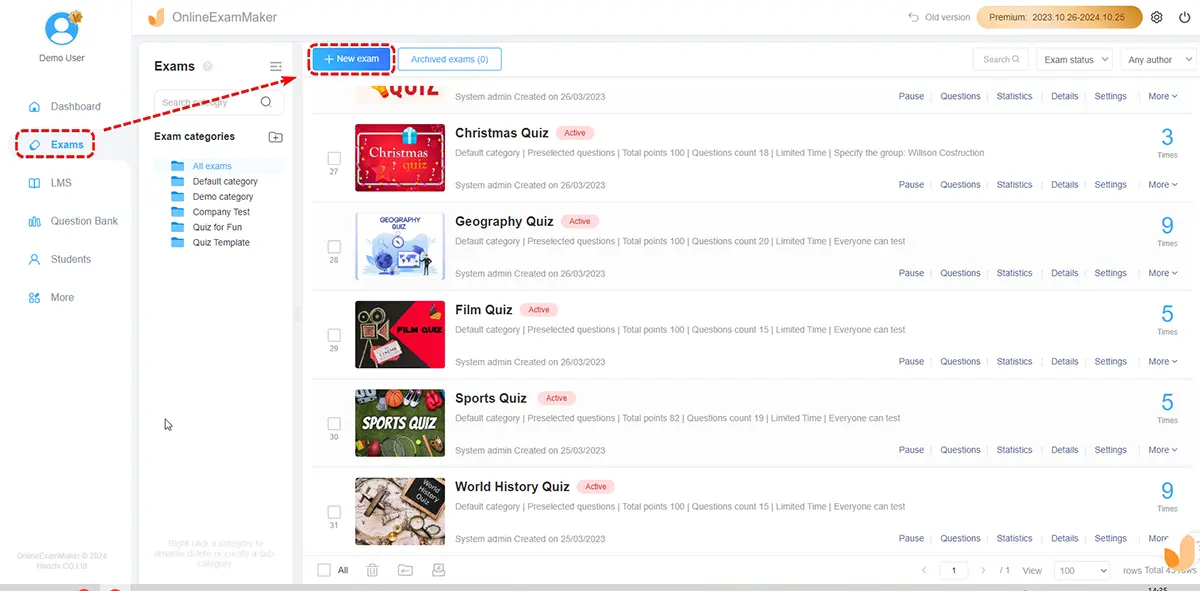
Step 1: Create Your Exam
Log into your OnlineExamMaker account and click Create Exam. Enter the exam title, set a time limit, and define the target audience. You can build from scratch or use one of the pre-built templates for different industries.
Step 2: Add Open-Ended Questions
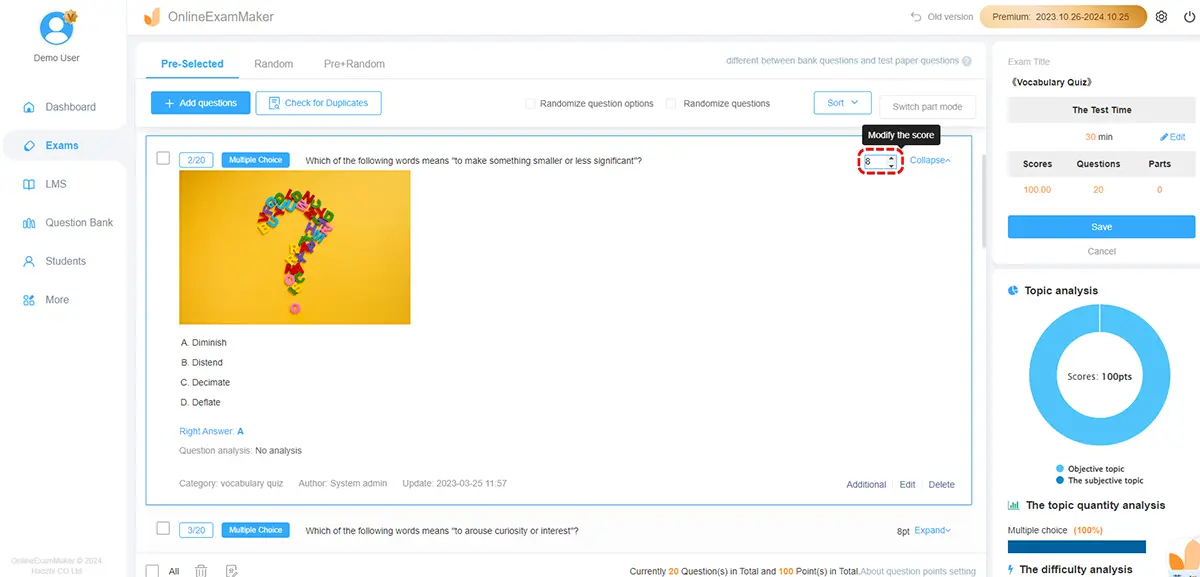
In the question editor, select Short Answer or Essay as your question type. Write your prompt clearly — specifying expected length and any required elements (e.g., “Include two real-world examples”). You can also use the AI Question Generator to instantly create a bank of open-ended prompts based on your topic, saving significant preparation time.
Step 3: Set Grading Criteria
For each open-ended item, define rubric criteria directly in the platform. OnlineExamMaker supports analytic rubric scoring — assign points to dimensions like clarity, use of evidence, and depth of reasoning. The platform’s Automatic Grading tool can also assist by pre-scoring responses based on your rubric, flagging responses for human review where needed.
Step 4: Enable Proctoring (Optional)
For high-stakes assessments, activate AI Webcam Proctoring to monitor test-takers in real time. The system detects unusual behavior and logs it automatically — keeping your assessment integrity intact without needing an in-person proctor.
Step 5: Distribute and Collect Results
Share the exam link with learners via email, LMS, or embedded on your website. Once responses are submitted, the platform aggregates results in a dashboard — showing completion rates, response lengths, and score distributions at a glance.
Create Your Next Quiz/Exam Using AI in OnlineExamMaker
Best Practices for Grading and Feedback
The quality of an open-ended assessment isn’t just in the questions — it’s in what happens after submission. Grading and feedback close the loop, and how you do it matters.
- Use analytic rubrics. Define explicit criteria upfront: What does a “strong” response look like? What’s “adequate”? Breaking scoring into dimensions (depth, clarity, evidence) makes grading faster and more consistent across raters.
- Automate what you can. Platforms with rubric-based auto-scoring, annotation tools, and comment libraries speed up review dramatically — especially for large cohorts.
- Sample strategically. For very large groups, you don’t always need to read every response in full depth. Spot-check a percentage, review outliers, and focus detailed attention on key items.
- Give feedback that’s actionable. “Good effort” helps no one. Link comments to rubric dimensions: “Your explanation was clear, but the second example didn’t connect to the scenario — here’s how to strengthen it.”
Research in educational assessment consistently shows that timely, specific feedback improves learner performance more than any other single factor. Make it count.
Balancing Open-Ended and Closed-Format Questions
Here’s a truth most assessment designers eventually learn: neither format alone is best. The magic is in the mix.
Closed-format questions (multiple choice, true/false, matching) are fast to complete, easy to score, and excellent for breadth coverage. Open-ended questions give you depth, nuance, and authenticity. Use both — intentionally.
A practical approach:
- Start with a few closed items to warm learners up and establish baseline knowledge.
- Follow with one or two open-ended prompts that ask learners to explain or apply what they just demonstrated.
- Limit open-ended items to two or three per assessment to control cognitive load.
- For high-stakes exams (certifications, final evaluations), lean on closed items for efficiency. Reserve open-ended prompts for competency-based or formative assessments.
Think of it like a meal: multiple-choice is the carbs — reliable, filling, efficient. Open-ended questions are the protein — they take longer to digest, but that’s where the growth happens.
Practical Tips for Educators, Trainers, and HR Managers
Whether you’re running a compliance training course, a management assessment, or a university module, these strategies will make open-ended questions work harder for you:
- Train learners before the test. If open-ended questions are new to your audience, give them a low-stakes practice prompt. Familiarity with the format reduces anxiety and improves response quality.
- Pilot your questions. Test new prompts with a small group first. If most responses miss the point, the question is probably the problem — not the learners.
- Build in accessibility. Offer audio-response options or simplified prompts for learners with different needs. Ensure the platform you use displays properly on mobile devices. Fairness isn’t optional.
- Track item-level data. Monitor average completion times and response lengths for each open-ended item. Unusually short responses often signal a confusing or overly broad prompt.
For HR managers specifically: open-ended questions in pre-hire or onboarding assessments can reveal communication skills, cultural alignment, and reasoning ability that no structured test will capture. Used well, they’re one of the most powerful tools in your talent toolkit.
Conclusion
Open-ended questions won’t replace every quiz format — and they shouldn’t. But when designed with intention, supported by clear rubrics, and delivered through a capable platform, they transform assessments from checkbox exercises into genuine learning moments.
The challenges are real: grading takes time, consistency requires structure, and learners need preparation. But those are solvable problems. The deeper risk is designing assessments that never ask learners to actually think.
If you’re ready to build smarter online assessments — ones that go beyond recognition and into real understanding — OnlineExamMaker gives you the tools to do it efficiently. Start with one open-ended question in your next quiz. Write a simple rubric. See what your learners actually know.
You might be surprised at what they have to say.