Kahoot isn’t just one price. It’s like walking into an ice cream shop with fifty flavors—except instead of sprinkles and hot fudge, you’re choosing between player limits and AI tools. Whether you’re a teacher trying to jazz up your classroom, a trainer running corporate sessions, or just someone who really, really loves trivia night, there’s a plan for you.
- Understanding Kahoot’s Pricing Structure
- Personal and Home Use Plans (Kahoot!+)
- School and Education Pricing
- Business and Professional Plans (Kahoot! 360)
- Free Alternative: OnlineExamMaker
- Is Kahoot Worth the Cost?
- Frequently Asked Questions about Kahoot Pricing
Understanding Kahoot’s Pricing Structure
First things first. Kahoot doesn’t do simple. They’ve got plans for every possible use case, which means you need to figure out who you are before you figure out what you’ll pay.
Are you using it at home? In a classroom? For business presentations? Each category has its own pricing ladder, and mixing them up is like ordering off the kids menu when you’re clearly an adult—it just doesn’t work.
The good news? There is a free version. The catch? It’s bare bones. Think of it as the demo car with no air conditioning and manual windows. It runs, but you’ll probably want the upgrades.
Personal and Home Use Plans (Kahoot!+)
Let’s start with casual users. Maybe you’re hosting a family game night, or you’re that friend who brings trivia to every party. Here’s what you’re looking at:
Free (Classic) Plan
Zero dollars. Zilch. Nada. But you’re capped at 10 players, and you only get basic quiz formats—true/false questions and simple multiple choice. It’s perfect for small gatherings, but try hosting a bigger event and you’ll hit that wall fast.
You do get access to ready-made content and online support, which honestly isn’t bad for free. Just don’t expect any fancy features.
Most Popular Plan (Gold/Standard)
Now we’re talking. $25 per month or $144 annually (that’s $12/month if you commit to the year). And right now, there’s a promotional deal running until February 8, 2026, that brings that effective monthly rate down to around $12.
What do you get for your money?
- Up to 200 players – Perfect for larger parties or community events
- AI tools – Let the robots help you create content faster
- Customizable backgrounds and logos – Make it yours
- All game modes – Not just the basic stuff
- 5 kids profiles – Great for families
- 50+ languages – Because the world is big
- AccessPass content – Premium quizzes and materials
For most people, this is the sweet spot. It’s enough features to feel professional without breaking the bank.
Best Value Plan (Premium)
The heavyweight champion. $34.99 monthly or $228 annually (effective $19/month with annual billing). With the current promo, you’re looking at $19/month when billed yearly.
This one’s for power users:
- Up to 800 players – Host a small concert, basically
- Ultimate AI tools – All the AI bells and whistles
- All question types – Every format you can imagine
- Creation from trusted sources – Import from quality materials
- Vocabulary and grammar in 50+ languages – Educational depth
Unless you’re running massive events regularly, this might be overkill. But if you need it, it’s there.
School and Education Pricing
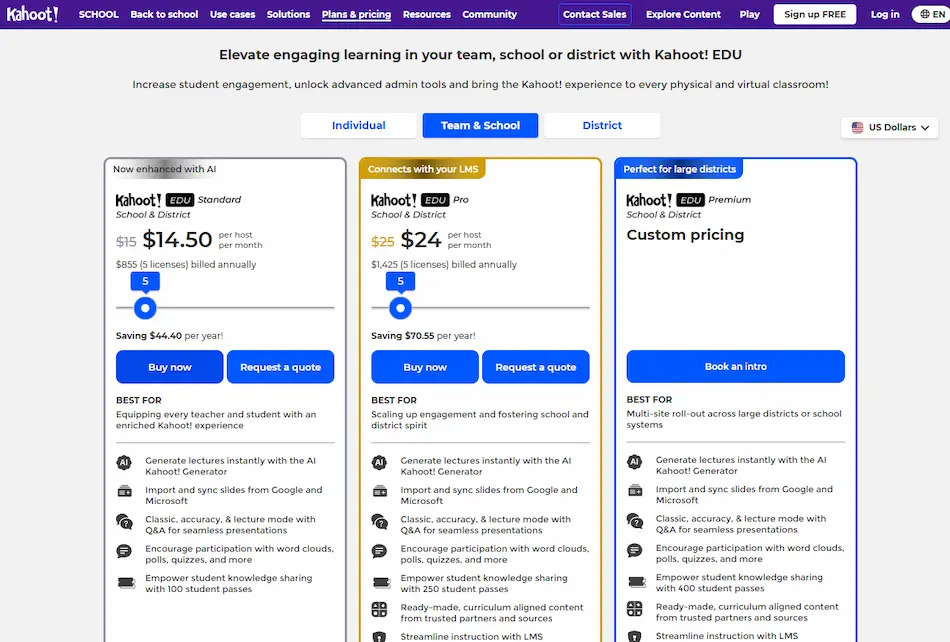
Teachers, this is your section. The pricing structure shifts when you move into educational territory, and it’s priced per teacher, not per school.
Basic Plan
$10.50 per month or $121 annually (about $10.10/month). Here’s what you’re working with:
- Up to 100 students
- AI content creation from topics or URLs
- Review and feedback questions
- Game modes
- Progress reports
- 50+ languages
For a single teacher working with smaller classes, this covers the essentials. You can create content quickly, track student progress, and keep things engaging without spending a fortune.
Standard Plan (Most Popular)
$17.50 monthly or $208 annually (roughly $17.30/month). This is where most educators land:
- Up to 200 students
- Unlimited AI from files and slides
- Precision questions (like slider questions)
- Advanced reports
- AccessPass content
- Exclusive rewards
The jump from Basic to Standard gives you more flexibility and better analytics. If you’re serious about using Kahoot as a teaching tool, this is probably your best bet.
Premium Plan (Best Value)
$27.50 per month or $328 annually ($27.35/month effective). The full package:
- Up to 800 students
- Ultimate AI tools
- All question types
- Creation from any sources
- Full modes
- Vocabulary and grammar learning tools
This is for teachers managing multiple large classes or departments coordinating across several educators. It’s comprehensive but pricey.
All education prices include tax and have been converted from EUR to USD at the 2026 average exchange rate.
Business and Professional Plans (Kahoot! 360)
Corporate trainers and business presenters, your world is different. Kahoot! 360 is built for presentations, training sessions, and team meetings. One license per presenter—participants don’t need their own accounts, which is nice.
There’s a free demo available (up to 3 participants, no credit card required), so you can test-drive before committing. Nonprofits get 50% off, which is genuinely helpful. And if you need 25+ licenses, custom Spirit plans kick in.
Pro Plan (Most Popular)
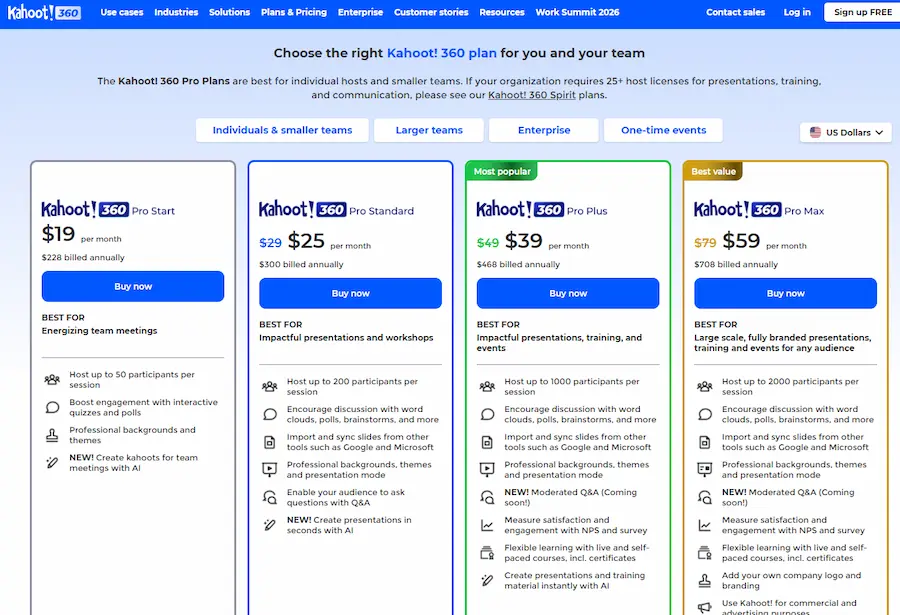
$39 per month or $468 annually. Yes, annual billing is required. Here’s what $39 gets you:
- Up to 1,000 participants
- Polls, word clouds, and brainstorms
- Slide imports
- Professional themes
- Moderated Q&A (coming soon)
- NPS surveys
- AI content creation
- Certificates
For most business users running training sessions or team meetings, Pro covers everything you need. A thousand participants is plenty for most corporate environments.
Pro Plus Plan (Best Value)
$59 monthly or $708 annually. All the Pro features, plus:
- Up to 2,000 participants
- Custom branding and logo
- Commercial use rights
- Full AI generation tools
The branding options alone might justify the upgrade if you’re client-facing or representing a brand. Custom logos and themes make presentations look more polished and professional.
Business plan prices exclude VAT, so factor that into your budget.
Free Alternative: OnlineExamMaker Online Quiz Making Software
Not everyone needs to pay for Kahoot. In fact, if you’re a teacher or trainer on a tight budget, there’s a compelling alternative that won’t cost you a dime.
Enter OnlineExamMaker.
This AI exam making software is designed specifically for educators who need to create interactive quizzes without the price tag. And here’s the kicker: it’s actually free to use. Not “free for 10 days then we charge you” free. Actually free.
Create Your Next Quiz/Exam Using AI in OnlineExamMaker
Why Teachers Love OnlineExamMaker?
OnlineExamMaker provides an affordable solution—well, free is pretty affordable—for teachers who want to create engaging, interactive quizzes without subscription fees eating into their already tight budgets.
The platform uses AI to help you generate questions, format assessments, and even grade responses automatically. It’s like having a teaching assistant who never sleeps and doesn’t require coffee breaks.
You can create multiple question types, track student progress, and share quizzes easily. For educators who need solid quiz functionality without the bells and whistles of game-show-style presentations, it’s a practical choice.
The interface is straightforward. No need for extensive training or tutorial videos—you can jump in and start creating. And because it’s free to use, you can test it out, implement it in your classroom, and see if it fits your teaching style without any financial risk.
Kahoot vs. OnlineExamMaker: What’s the Difference?
Kahoot excels at engagement and game-based learning. It’s flashy, fun, and gets students excited. OnlineExamMaker focuses on assessment and flexibility without the entertainment factor.
Think of it this way: Kahoot is the party. OnlineExamMaker is the reliable study session. Both have their place. Your choice depends on what you need more—excitement or practicality.
Is Kahoot Worth the Cost?
The million-dollar question. Or, more accurately, the $144-to-$708 question.
Here’s my take: It depends entirely on your use case.
For teachers using it weekly to engage students? Absolutely. The time saved on lesson planning and the boost in student participation often justify the $17.50/month Standard plan. Research shows that game-based learning increases student engagement, and Kahoot delivers on that front.
For businesses running regular training sessions? The Pro plan at $39/month is competitive with other presentation and training tools. If you’re already paying for multiple software subscriptions, consolidating some of that functionality into Kahoot might actually save money.
For casual home use? The free version works fine for small groups. If you’re hosting bigger events regularly, the $12/month (with annual billing) Gold plan is reasonable. But if you only use it occasionally, those one-time event options might serve you better.
The AI features are genuinely helpful for content creation. Instead of spending an hour writing questions, you can generate a solid quiz in minutes. That time savings adds up, especially for busy teachers and trainers.
When Kahoot Isn’t Worth It
If you’re barely using it, don’t pay for it. Subscriptions you forget about are just money down the drain. And if you’re primarily focused on assessment rather than engagement, free tools like OnlineExamMaker might serve you better.
Also, if you’re working with very small groups consistently, the free version might genuinely be all you need. Don’t upgrade just because the marketing makes premium plans look shiny.
Frequently Asked Questions
Can I use Kahoot for free?
Yes. The Classic free plan supports up to 10 players with basic question types. It’s limited, but functional for small groups and casual use.
What’s the cheapest Kahoot plan for teachers?
The Basic education plan costs $10.50/month (or $121 annually), supporting up to 100 students with AI content creation and basic game modes.
Do participants need to pay for Kahoot?
No. Only the host needs a Kahoot account and subscription. Participants join for free using a game code—no account or payment required.
Is there a discount for nonprofits?
Yes. Nonprofit organizations get 50% off Kahoot! 360 business plans.
Can I cancel my Kahoot subscription anytime?
Yes, you can cancel anytime. However, if you paid annually, you won’t get a refund for unused months. Monthly plans give you more flexibility.
What’s AccessPass content?
AccessPass is a separate subscription starting at $3/month that gives you access to premium quizzes and educational content created by experts. Some Kahoot plans include it; others require a separate purchase.
How does OnlineExamMaker compare to Kahoot?
OnlineExamMaker is free and focuses on quiz creation and assessment without the game-show format. Kahoot emphasizes engagement and interactive gameplay. Choose based on whether you prioritize entertainment or pure functionality.
Can I try Kahoot! 360 before buying?
Yes. There’s a free demo available for up to 3 participants with no credit card required. Test it out before committing to a subscription.
What happens if I exceed my player limit?
If you try to host a game with more players than your plan allows, additional players won’t be able to join. You’ll need to upgrade to accommodate more participants.
Are there any hidden fees?
VAT is included in personal and education plans but excluded from business plans. Annual billing is required for business subscriptions. Otherwise, what you see is what you pay.
