Here’s something that’ll make any educator’s coffee go cold: AI-powered cheating in remote exams has skyrocketed by more than 300% since 2024. Students aren’t just sneaking glances at their phones anymore—they’re deploying sophisticated AI tools that can solve complex problems in seconds, write entire essays, and even generate code that passes muster.
But here’s the twist. The same technology enabling this academic arms race is also fighting back. AI detection systems have evolved from simple webcam monitors into intelligent guardians that can spot everything from subtle eye movements to suspicious typing patterns that scream “ChatGPT did this.”
Whether you’re a teacher trying to maintain exam integrity, an HR manager screening technical candidates, or a trainer certifying professionals, you need to know what’s actually working in 2026. So let’s cut through the noise and explore the four most effective AI cheating detection technologies—and more importantly, how to use them without turning your exams into a dystopian surveillance state.
- Why Traditional Anti-Cheating Methods Don’t Work Anymore?
- Technology #1: AI-Powered Proctoring Systems
- Technology #2: Secure Browser Environments with Behavioral Analytics
- Technology #3: AI Plagiarism and Code Detection Tools
- Technology #4: Advanced AI Watermarking and Signal Detection
- OnlineExamMaker: Your Complete AI Proctoring Solution
- Comparison Table: Which Technology Fits Your Needs?
- Best Practices for Creating Anti Cheating Exams
- The Future: What’s Coming Next in AI Detection
Why Traditional Anti-Cheating Methods Don’t Work Anymore?
Remember when locking down a browser and enabling a webcam felt like Fort Knox-level security? Those days are gone.
Today’s students have access to AI assistants that can solve calculus problems while discussing philosophy, generate production-ready code in multiple languages, and compose essays that fool even experienced educators. The cheating has gotten smarter, so the detection needs to be smarter too.

Reality Check: A 2025 study found that over 60% of students admitted to using AI tools in ways that violated academic integrity policies. Most didn’t even consider it “real” cheating.
The problem isn’t just about catching cheaters anymore. It’s about building systems that can distinguish between legitimate AI-assisted learning (which many institutions now encourage) and outright fraud. That’s where these four technologies come in.
Technology #1: AI-Powered Proctoring Systems
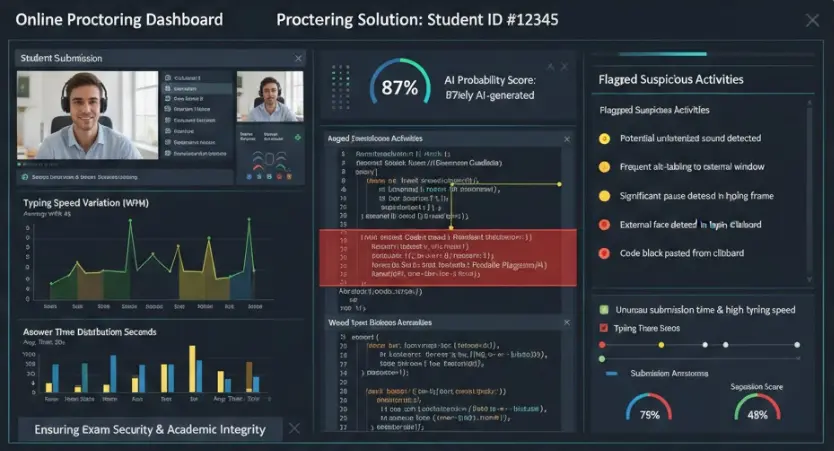
Think of AI proctoring as having a tireless teaching assistant who never blinks, never gets bored, and can monitor hundreds of students simultaneously. Systems like Honorlock, Proctorio, TestInvite, OnlineExamMaker, and Inspera have moved far beyond simple video recording.
How It Actually Works
Modern AI proctoring analyzes multiple data streams in real-time:
- Facial recognition and eye tracking: The system maps your face and monitors where you’re looking. Constantly glancing to the right where your phone sits? The AI notices.
- Audio analysis: Voice detection catches you whispering questions to someone off-camera or using voice-to-text features.
- Environmental scanning: Machine learning models identify suspicious objects—phones, notebooks, second monitors, or even another person entering the frame.
- Behavioral pattern recognition: The AI learns what “normal” test-taking behavior looks like and flags deviations.
Implementation Guide: Getting Started with AI Proctoring
Here’s the step-by-step process that actually works:
- Choose your integration: Most platforms connect directly with learning management systems like Canvas, Moodle, or Blackboard. The setup typically takes 15-30 minutes.
- Configure your security settings: Decide your tolerance levels. Will you flag every glance away from the screen, or only sustained diversions? Too strict creates false positives; too lenient defeats the purpose.
- Run test sessions: Before the real exam, have students complete practice quizzes. This helps them understand what’s expected and reduces anxiety.
- Set up human review protocols: AI flags suspicious behavior, but humans should make final decisions.
- Communicate clearly: Students need to know they’re being monitored and why. Transparency builds trust and reduces the urge to test the system.
Pro Tip: Enable “facial movement detection” but be careful with “multiple faces” alerts if students have family members or roommates nearby. Context matters.
Technology #2: Secure Browser Environments with Behavioral Analytics
Imagine a browser that’s basically exam-only mode for the internet. That’s what secure exam browsers do, but the 2026 versions have gotten wickedly smart about detecting AI cheating through behavioral analysis.
What Makes Modern Secure Browsers Different
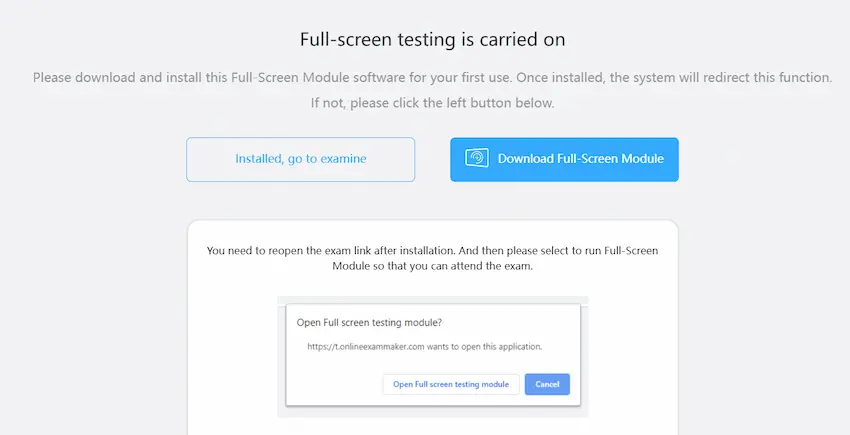
Platforms like HackerRank Secure Mode and SmarTest Invigilate don’t just lock down your computer—they analyze how you’re taking the exam:
- Typing pattern analysis: The system learns your natural typing rhythm. When you suddenly copy-paste perfectly formatted code or text appears at inhuman speeds, that’s a red flag.
- Tab switching prevention: You physically cannot open another browser window or application. Even alt-tabbing is blocked.
- Clipboard monitoring: Any attempt to paste content from outside sources gets logged.
- Answer timing anomalies: Did you spend 30 seconds on a complex algorithm that should take 20 minutes? The AI knows something’s fishy.
Step-by-Step Setup for Secure Browser Environments
- Download and install: Most secure browsers require a one-time installation. Students download the software before the exam window opens.
- Configure exam parameters: Set time limits, question randomization, and enable specific security features (screen recording, keystroke logging, etc.).
- Test the user experience: Have a few students do a trial run. You’ll quickly discover if there are compatibility issues with certain operating systems or if your instructions need clarification.
- Enable violation reporting: Configure what types of activities trigger immediate alerts versus post-exam review. For example, a single tab-switch attempt might just get logged, while five attempts pause the exam.
- Review behavioral data post-exam: The real magic happens in analysis. Look for patterns across multiple students—if five people all answered question 12 with identical unusual approaches, that’s worth investigating.
The Behavioral Analytics Advantage
Here’s what makes this approach clever: it’s not looking for cheating per se—it’s looking for inhuman patterns. When a student who’s been averaging 40 words per minute suddenly produces 300 characters of flawless code in 10 seconds, that’s not skill improvement. That’s copy-paste from ChatGPT.
Technology #3: AI Plagiarism and Code Detection Tools
This is where things get interesting. We’re not talking about your old-school plagiarism checker that just compares submissions to a database. Modern AI detection tools like HackerRank AI Plagiarism Detection and CoderPad use machine learning to spot the telltale fingerprints of AI-generated content.
How AI Detects AI (The Meta Battle)
These systems analyze several sophisticated signals:
- Writing style consistency: Does this essay use vocabulary and sentence structures that match the student’s previous work? If someone who usually writes at a 10th-grade level suddenly produces graduate-level prose, the AI notices.
- Code pattern analysis: ChatGPT and similar tools have distinctive coding styles—specific variable naming conventions, comment patterns, and problem-solving approaches. Detection algorithms are trained to recognize these signatures.
- Solution speed vs. complexity: An algorithm that should take an experienced programmer 45 minutes to solve got completed in 6 minutes? That’s mathematically suspicious.
- Submission pattern matching: When multiple students submit nearly identical solutions with the same unusual approach, they likely used the same AI source.
Technical Insight: Modern code detectors analyze abstract syntax trees (AST) rather than just comparing text. This catches students who try to obfuscate AI-generated code by renaming variables or reformatting.
Implementing AI Plagiarism Detection
Here’s how to integrate these tools effectively:
- Establish a baseline: Have students complete a simple, proctored task early in the course. This gives the AI a sample of their authentic work for comparison.
- Configure detection sensitivity: Most platforms let you adjust thresholds. For technical hiring, you might set stricter parameters than for student homework where AI assistance is partially allowed.
- Upload and analyze submissions: Batch process all submissions through the detection tool. Most platforms return results within minutes.
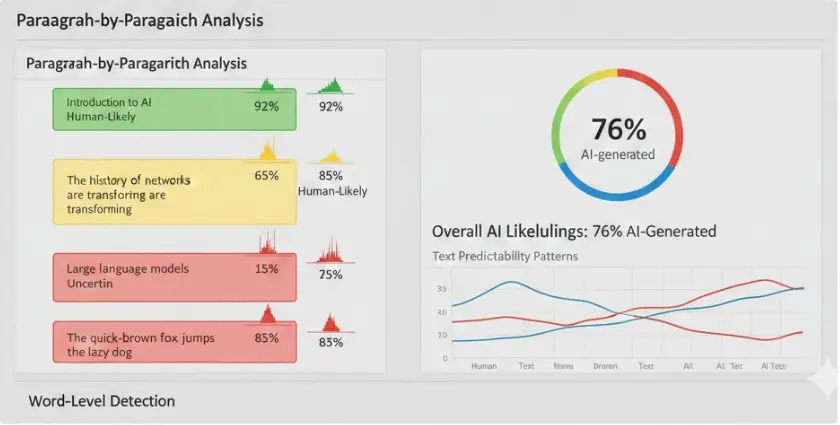
- Review flagged content manually: The AI provides probability scores (e.g., “87% likely AI-generated”). Use these as investigation starting points, not final verdicts.
- Enable session replays: Some platforms like CoderPad record the entire coding session. You can literally watch how the solution developed, including deleted code and debugging steps.
Technology #4: Advanced AI Watermarking and Signal Detection
Now we’re entering the cutting edge—and frankly, the slightly sci-fi territory. This technology fights AI-generated content by either embedding invisible watermarks in AI outputs or detecting statistical patterns that humans simply cannot replicate.
How AI Watermarking Works
Here’s the elegant concept: when AI models like ChatGPT generate text, they could theoretically embed imperceptible patterns in word choice and sentence structure. Think of it as a microscopic signature that screams “an AI wrote this.”
OpenAI revealed in 2024 that they developed a text watermarking system with 99.9% effectiveness—meaning it could detect AI-generated content with near-perfect accuracy. The catch? They haven’t released it publicly yet.
Why? According to discussions in the AI research community, there are concerns about false positives for non-native English speakers and the potential for bad actors to develop workarounds.
Open-Source Alternatives: DetectGPT and Beyond
While we wait for commercial watermarking, open-source tools have emerged:
- DetectGPT: Analyzes text probability distributions. AI-generated content tends to choose more “predictable” words compared to human writing, which has more variance and personality.
- GLTR (Giant Language Model Test Room): Visualizes how likely each word is based on language model predictions. Text that consistently uses highly probable words is suspicious.
- Custom evaluation scripts: Some institutions are building their own detection algorithms trained on specific AI models their students might access.
How to Implement Detection Signal Analysis
- Choose your tool: For most educational contexts, start with something like GPTZero or Turnitin’s AI detector, which have user-friendly interfaces.
- Run parallel testing: Don’t rely solely on detection scores. Use these tools alongside other methods (proctoring, behavioral analysis).
- Understand the limitations: A high AI-detection score doesn’t necessarily mean cheating—it might mean the student writes very formally or used AI for brainstorming and outlining (which might be allowed).
- Create clear policies: Define what level of AI assistance is acceptable. Is using AI for research allowed but not for writing? For ideation but not for final code? Students need clarity.
- Consider local implementations: For technically sophisticated institutions, experimenting with open-source detection tools through platforms like GitHub can provide customized solutions.
The Future Is Closer Than You Think
Watermarking technology will eventually become standard. When it does, detecting AI-generated content will become as straightforward as running a spell-checker. Until then, signal detection tools provide a valuable—if imperfect—supplement to your anti-cheating arsenal.
OnlineExamMaker: Your Complete Onlinw AI Proctoring Solution
If you’re feeling overwhelmed by the options, there’s good news: comprehensive platforms exist that bundle these technologies into one coherent system. OnlineExamMaker stands out as a particularly elegant solution for educators and training organizations who want powerful AI detection without the complexity.
What Makes OnlineExamMaker Different
Rather than cobbling together separate proctoring, secure browser, and detection tools, OnlineExamMaker provides an integrated platform that handles the entire exam lifecycle:
- Intelligent question creation: The AI Question Generator helps you build comprehensive tests quickly, with built-in variety to prevent answer sharing.
- Automated assessment: The Automatic Grading system handles everything from multiple choice to complex short-answer questions, saving hours of manual review time.
- Comprehensive proctoring: The AI Webcam Proctoring feature combines facial recognition, environmental scanning, and behavioral analytics in one package.
Create Your Next Quiz/Exam Using AI in OnlineExamMaker
How to Create an AI-Proctored Exam with OnlineExamMaker
The setup process is remarkably straightforward:
- Sign up and create your exam: Log into the platform and choose “Create New Exam.” You can build questions manually or use the AI generator to create a question bank based on your topic and difficulty level.
- Configure security settings: Navigate to the “Anti-Cheating” section. Enable webcam monitoring, face detection, and tab-switching prevention. You can adjust sensitivity levels based on your comfort with false positives.
- Set exam parameters: Define time limits, question randomization, and whether students can review answers before submitting. The platform supports various question types including multiple choice, essay, coding challenges, and file uploads.
- Test the exam environment: Use the “Preview” mode to experience the exam exactly as students will. This helps you catch any configuration issues before go-time.
- Distribute access: Generate unique links for each student or integrate with your existing LMS. Students receive clear instructions on technical requirements and what to expect during proctoring.
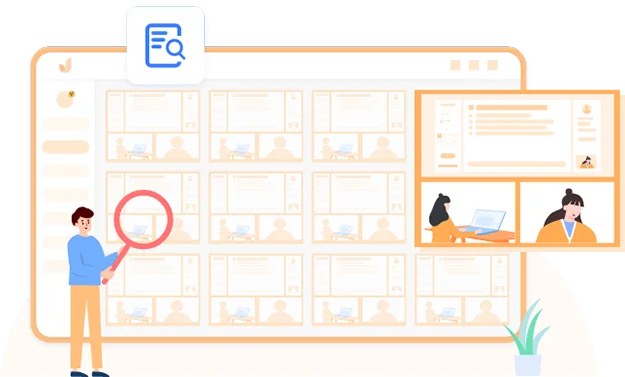
- Monitor in real-time: During the exam, view a dashboard showing all active test-takers. The AI flags suspicious behavior, but you can also watch live feeds if needed.
- Review and grade: After submission, the automatic grading handles objective questions instantly. For subjective answers, the AI provides preliminary scores that you can adjust, along with flagged integrity concerns.
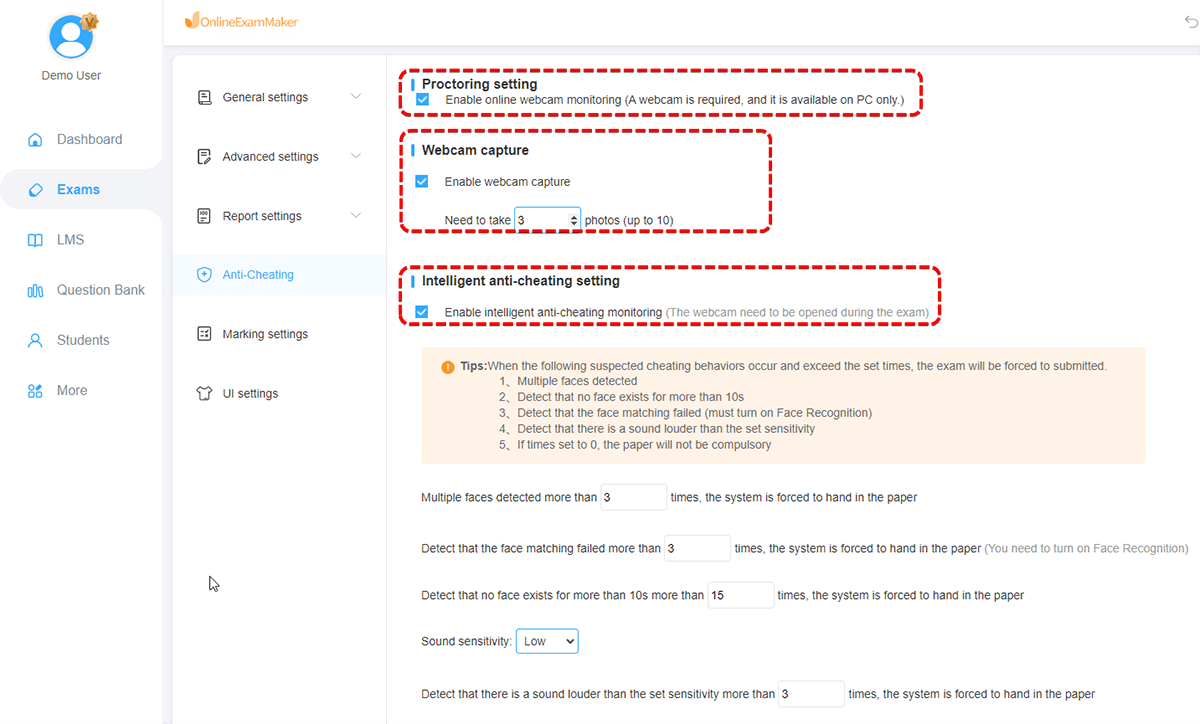
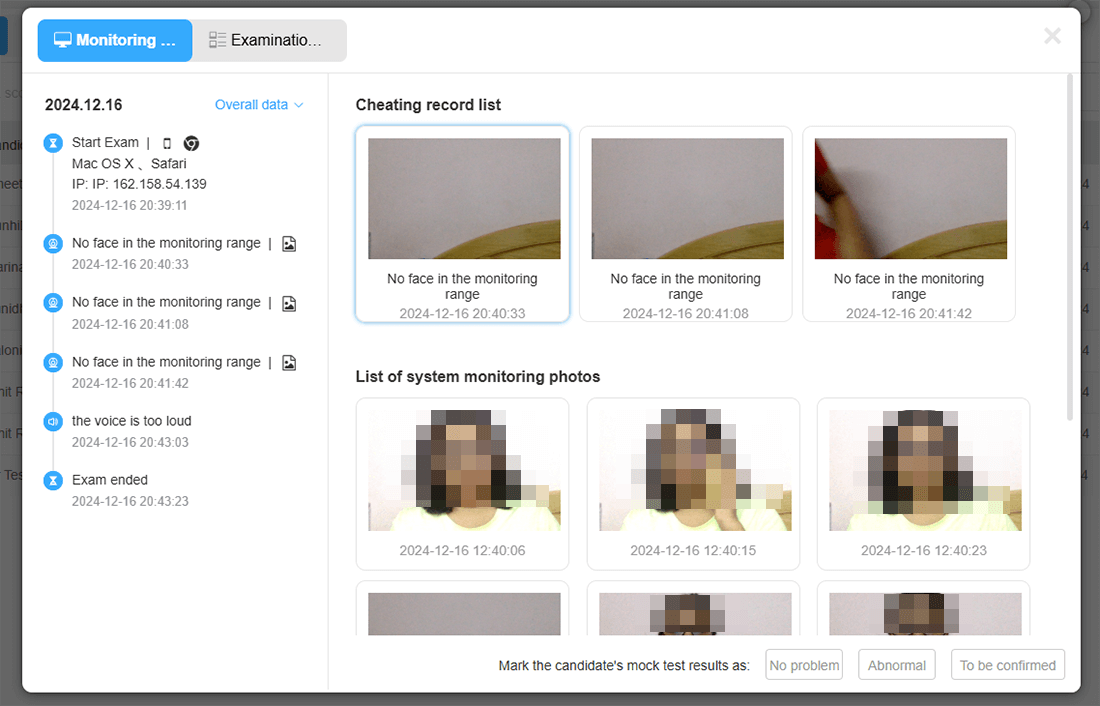
- Exam creation wizard with step-by-step navigation
- Left panel: Question bank with AI-generated questions preview
- Center panel: Security settings configuration (webcam monitoring, face detection, tab-switching prevention)
- Right panel: Proctoring options with toggle switches for different security levels
- Bottom toolbar: Save, preview, and publish buttons
Visit OnlineExamMaker’s AI Proctoring page for reference to create an accurate representation of their actual interface and features.
Why Teachers and HR Managers Love It
The platform solves a real problem: you don’t need to be a tech expert to deploy sophisticated AI proctoring. Teachers report setup times of under 30 minutes for their first exam, and subsequent tests take even less time as you reuse question banks and settings.
For HR managers conducting technical assessments, the combination of secure environment and behavioral analytics provides confidence that hiring decisions are based on genuine candidate abilities, not AI-assisted performances.
Comparison Table: Which Technology Fits Your Needs?
Let’s cut through the marketing speak and compare these technologies based on what actually matters:
| Technology | Best For | Accuracy Rate | False Positive Risk | Setup Complexity | Cost Range |
|---|---|---|---|---|---|
| AI Proctoring (Honorlock, Inspera) |
High-stakes exams, live monitoring needs | 85-92% | Moderate (10-15%) | Medium | $$-$$$ |
| Secure Browsers (HackerRank, SmarTest) |
Technical assessments, coding exams | 93% | Low (5-8%) | Low | $$ |
| AI Detection (Plagiarism Tools) |
Essay exams, code submissions | 80-88% | Moderate (12-18%) | Very Low | $-$$ |
| Watermarking (Emerging) |
Future-proofing, research contexts | 99%+ (theoretical) | Unknown | High (DIY only) | Free-$ |
| OnlineExamMaker (Integrated Platform) |
Educators wanting all-in-one solution | 87-91% | Low-Moderate (8-12%) | Very Low | $$ |
Budget Tip: If you’re working with limited resources, start with secure browser technology and AI plagiarism detection—they provide the best bang for your buck. Add live proctoring only for truly high-stakes exams where the investment justifies the cost.
Best Practices for Creating Anti Cheating Exams
Technology alone won’t solve exam integrity issues. Here’s what actually works based on real-world implementation across hundreds of institutions:
1. Transparency Beats Surveillance
Students who understand why you’re using AI detection and how it works are significantly less likely to attempt cheating. Create a simple explainer document that covers:
- What data is collected and how it’s used
- How AI flags suspicious activity (without giving away exploits)
- Your human review process for flagged content
- Privacy protections and data retention policies
2. Layer Your Defenses
No single technology is foolproof. The most effective approach combines:
- Secure browser environment (blocks the easy stuff)
- AI proctoring or webcam monitoring (catches environment-based cheating)
- Plagiarism/code detection (identifies AI-generated content)
- Question design that’s resistant to AI (more on this below)
3. Design AI-Resistant Assessments
Here’s a secret: the best defense against AI cheating is asking questions that AI struggles with:
- Require personal examples: “Describe a time you debugged a difficult error in your own code” can’t be answered by ChatGPT.
- Ask for process, not just answers: “Show your work” and “Explain your reasoning” force students to demonstrate understanding.
- Use novel scenarios: Create case studies or problems that don’t exist in AI training data.
- Time-box appropriately: Give enough time for thoughtful work but not enough for extensive AI consultation.
4. Establish Clear Policies on AI Use
This is crucial: in 2026, blanket “no AI ever” policies are increasingly impractical. Many professional contexts encourage AI as a productivity tool. Instead, define:
- When AI assistance is allowed (research, outlining, brainstorming)
- When it’s prohibited (final submissions, problem-solving, original analysis)
- How to properly cite AI tools when used
- Consequences for violations at different severity levels
5. Train Before You Deploy
Run practice exams with AI detection enabled. Let students get comfortable with the technology and understand what behaviors trigger flags. This dramatically reduces both anxiety and false positives.
6. Have Human Oversight
AI detection should inform decisions, not make them. Always have a human review flagged content before accusing students of academic dishonesty. The psychological and legal consequences of false accusations are severe.
The Future: What’s Coming Next in AI Detection
The cat-and-mouse game between AI cheating and AI detection is accelerating. Here’s what’s on the horizon:
Biometric Behavioral Analysis
Next-generation systems will build comprehensive behavioral profiles based on how students think and work—typing patterns, mouse movements, even cognitive load indicators derived from webcam analysis of facial micro-expressions. This sounds invasive, and it is. The ethical debates around this technology are fierce and necessary.
Real-Time AI Watermarking
When OpenAI and other companies finally release their watermarking technology, detection will become nearly instantaneous. Copy-paste from ChatGPT, and the system will know before you even submit. The challenge will be preventing AI tools from removing their own watermarks.
Blockchain-Verified Credentials
Some institutions are experimenting with blockchain-based exam verification—creating immutable records of proctored assessments that can’t be faked or disputed. This matters especially for professional certifications and high-stakes testing.
Adaptive Testing That Outsmarts AI
Imagine exams that dynamically adjust based on your responses, asking follow-up questions that probe whether you truly understand the concepts or just memorized AI-generated answers. This kind of adaptive assessment is already being piloted in medical and legal education.
