- What Is Rich Media in Exams?
- Why Rich Media Improves Assessment Quality
- Real-World Use Cases Across Industries
- How to Build a Rich Media Question Bank with OnlineExamMaker
- Overcoming Common Challenges
- Quick Comparison: Text-Only vs. Rich Media Exams
- Start Building Better Exams Today
Let’s be honest about something: the average multiple-choice question is about as exciting as watching paint dry. Four answer choices, a wall of text, and — if you’re lucky — maybe a bar chart. Students click through, trainers hope for the best, and nobody really knows if the knowledge stuck.
Now flip the script. What if that same question opened with a 30-second video clip of a factory safety incident, and the learner had to identify what went wrong? Or a nurse-training exam played an audio recording of abnormal heart sounds, asking students to diagnose the condition? Suddenly, you’re not just testing recall — you’re testing real-world judgment.
That’s the promise of rich media in exam questions. And in 2025, it’s never been easier to deliver on it.
What Is Rich Media in Exams?
Rich media refers to any dynamic, non-text content embedded within an assessment — think videos, audio clips, annotated images, animations, or interactive visuals. Rather than describing a scenario through words alone, rich media shows it.
According to Lenovo’s glossary, rich media includes animations, video ads, 360-degree images, and clickable elements that create interactive experiences. In an exam context, this translates to:
- Embedded videos — play a clip, then answer questions about it
- Audio prompts — language comprehension, tone analysis, or technical sound recognition
- Images and diagrams — label parts, identify errors, or interpret data visually
- Interactive hotspots — click regions of an image to demonstrate understanding
It’s the difference between asking “What should you do during a chemical spill?” and actually showing someone a lab video and asking them to spot the safety violation.
Why Rich Media Improves Assessment Quality
There’s solid science behind this shift. Research consistently shows that incorporating visuals dramatically improves memory retention compared to text alone. When learners encounter information through multiple sensory channels — seeing and hearing — it forms stronger cognitive connections.
But the benefits go deeper than memory. Rich media assessments:
- Test higher-order thinking — analysis, evaluation, and application rather than rote recall
- Improve fairness — visual and audio formats reduce disadvantages for learners who struggle with dense text
- Mirror real-world conditions — a manufacturing technician’s job involves reading gauges and watching equipment, not parsing paragraphs
- Boost engagement — according to Proctortrack, interactive formats consistently produce higher completion rates and more attentive responses
For HR managers running compliance training, this matters enormously. A certification test that uses realistic audio scenarios or video simulations doesn’t just check a box — it actually verifies that employees can handle the situation.
Real-World Use Cases Across Industries
Rich media assessments aren’t a niche novelty. They’re already transforming how organizations across sectors evaluate competence:
| Industry | Media Type | Example Use Case |
|---|---|---|
| Healthcare / Nursing | Audio clips | Identify abnormal heart or lung sounds |
| Manufacturing | Video | Spot safety protocol violations in a workflow video |
| Language Education | Audio + images | Listen to a conversation, answer comprehension questions |
| HR / Corporate Training | Video scenarios | Evaluate how a candidate handles a conflict scenario |
| K–12 / Higher Education | Images | Analyze a historical photograph or scientific diagram |
Educators have also explored photo-based micro-research assignments, where students analyze images connected to course concepts before engaging in discussion — a method that ThinkExam notes increases both engagement and depth of response.
How to Build a Rich Media Question Bank with OnlineExamMaker
Here’s where things get practical. Knowing that you should use rich media is one thing — knowing how to actually build those exams without a full media production team is another.
OnlineExamMaker is an all-in-one exam platform built for exactly this challenge. Whether you’re a corporate trainer creating onboarding assessments or a teacher designing unit tests, it gives you the tools to create, manage, and deliver multimedia-rich exams — without needing a software engineering degree.
Here’s a step-by-step look at building a rich media question bank inside OnlineExamMaker:
Step 1: Set Up Your Question Bank
Log into your OnlineExamMaker account and navigate to the Question Bank module. You can organize questions by subject, topic, difficulty, or department — making it easy to reuse and remix content across different assessments.
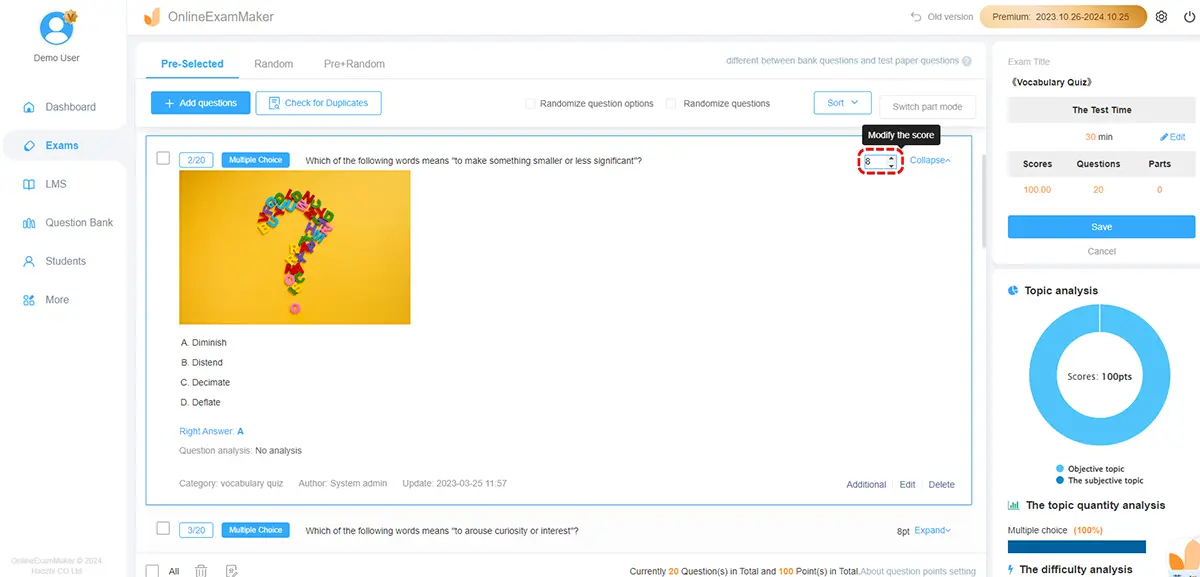
Step 2: Choose Your Question Type
OnlineExamMaker supports a wide range of formats: multiple choice, true/false, fill-in-the-blank, matching, and more. For each question, you’ll find an option to attach media directly in the question editor.
Step 3: Embed Your Rich Media
Click the media insert button within the question editor and upload or link your content:
- Images — PNG, JPG, or GIF files for diagrams, charts, or visual prompts
- Audio — MP3 files for language tests, scenario recordings, or technical sounds
- Video — MP4 files or YouTube/Vimeo embeds for scenario-based questions
Pro tip: stick to standard file formats (MP4 for video, MP3 for audio) and keep file sizes reasonable to avoid loading delays — especially important for learners on slower connections.
Step 4: Use the AI Question Generator
One of the platform’s standout features is its AI Question Generator. Feed it a topic, a document, or even a video transcript, and it will automatically produce a set of draft questions you can refine. This slashes question creation time dramatically — a blessing for any trainer building a 100-question compliance bank from scratch.
Step 5: Configure Grading and Proctoring
Once your questions are ready, OnlineExamMaker’s Automatic Grading handles scoring instantly, giving learners immediate feedback — no manual marking required. For high-stakes assessments, the platform’s AI Webcam Proctoring monitors sessions in real time, flagging unusual behavior without requiring a human invigilator in the room.
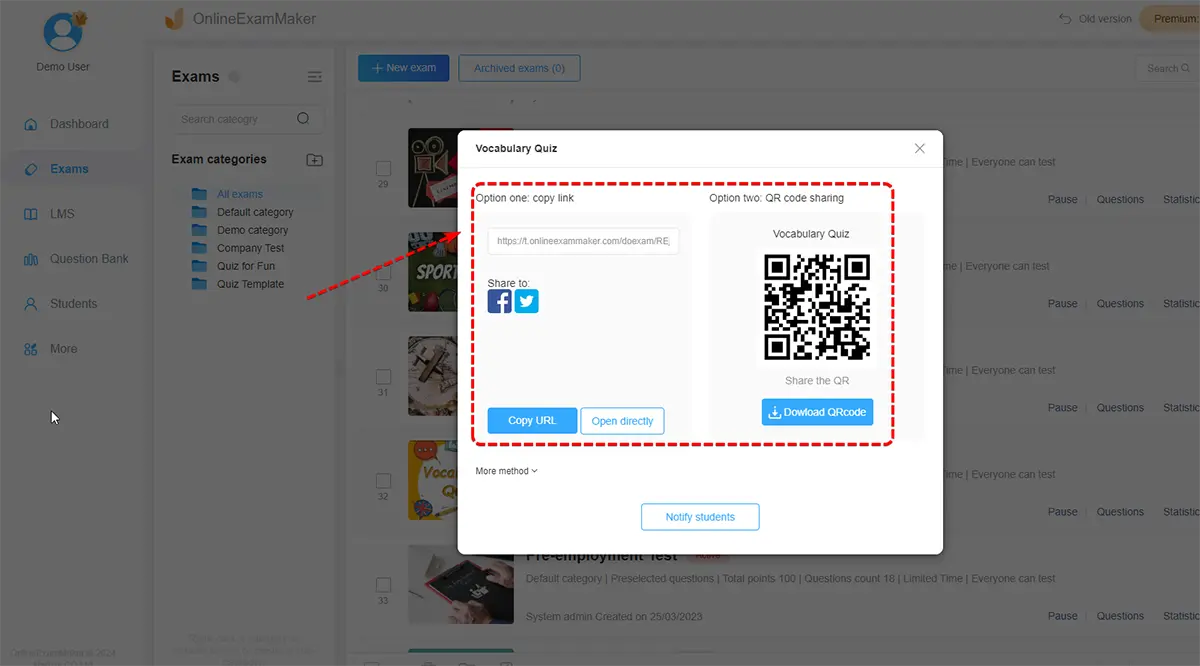
Step 6: Publish and Share
Generate a shareable link or embed the exam directly into your LMS or company portal. OnlineExamMaker handles everything from access controls to completion tracking — so you can focus on the content, not the logistics.
 Overcoming Common Challenges
No approach is without its bumps. Here are the most common objections to rich media exams — and how to handle them sensibly:
“We don’t have the budget for video production.”
You don’t need a film crew. A smartphone recording of a trainer demonstrating a process, or a stock image from a free library, is enough to add meaningful context to most questions. Start small. One well-chosen image per question already changes the experience.
“What about students with slow internet?”
Use compressed file formats and test load times before going live. Platforms like Otus and OnlineExamMaker optimize media delivery, but doing a test run with your target audience’s typical connection speed is always smart practice.
“Won’t it make cheating easier?”
Actually, the opposite tends to be true. Scenario-based video and audio questions are far harder to look up in a textbook or share via screenshot. Combined with AI proctoring, rich media assessments can be more secure than traditional text-only formats, as Proctortrack’s research on online exam integrity confirms.
“Our learners aren’t tech-savvy.”
A short orientation video or practice quiz before the real assessment works wonders. Most people figure out “press play” pretty quickly.
Quick Comparison: Text-Only vs. Rich Media Exams
| Factor | Text-Only Exams | Rich Media Exams |
|---|---|---|
| Learner engagement | Low to moderate | High |
| Skills tested | Recall, comprehension | Analysis, application, judgment |
| Real-world relevance | Limited | Strong |
| Accessibility | Good for strong readers | Broader — visual/auditory learners included |
| Creation effort | Low | Moderate (lower with AI tools) |
| Cheat resistance | Low | Higher (scenario-specific content) |
Start Building Better Exams Today
The research is clear, the tools are accessible, and the bar to entry has never been lower. Rich media doesn’t just make exams more interesting — it makes them more accurate. An assessment that reflects how work actually looks and sounds gives you far more confidence that someone is truly ready for the job.
For teachers, trainers, HR managers, and enterprise learning teams, the practical path forward is straightforward: start with one or two questions that include an image or short video, see how your learners respond, and build from there. You don’t have to overhaul everything overnight.
And if you want a platform that makes the whole process smooth — from AI-assisted question creation to automated grading and proctored delivery — OnlineExamMaker is worth a serious look. It’s built for exactly the kind of assessment work that actually moves the needle.
As research published in Taylor & Francis confirms, multimedia-enhanced assessments show superior recall outcomes and stronger academic integrity compared to traditional formats. The future of testing is already here — it just needs someone willing to press play.