WooCommerce Variations is a powerful feature that enables online stores to offer customizable product options, such as different sizes, colors, materials, or any other attributes, all within a single product listing. This functionality helps streamline inventory management and enhances the customer shopping experience by allowing precise selections.
Key Concepts:
– Attributes: These are the characteristics of a product that can vary, like “Size” or “Color”. Attributes are created in the WooCommerce settings and serve as the foundation for variations.
– Terms: Specific values within an attribute, such as “Small, Medium, Large” for Size, or “Red, Blue, Green” for Color.
– Variations: Combinations of attributes and terms that create unique product versions. For example, a T-shirt product might have variations like “Size: Small, Color: Red”.
How to Set Up Variations:
1. Create Attributes: Go to Products > Attributes in your WordPress dashboard. Add and define attributes with their terms.
2. Add to Product: Edit a variable product, then in the “Attributes” tab, assign attributes and select which ones will generate variations.
3. Generate Variations: In the “Variations” tab, use the “Add variation” button to create options based on the attributes. Customize each variation with:
– Unique price, sale price, and currency.
– Stock levels, SKU, and weight/dimensions.
– Individual images, descriptions, or downloadable files.
4. Save and Test: Ensure all variations are configured correctly, then preview the product on the front end to verify customer options.
Benefits:
– Flexibility: Offer a wider range of choices without creating separate products, reducing clutter in your catalog.
– Inventory Control: Track stock for each variation individually, preventing overselling.
– Sales Boost: Customers are more likely to purchase when they can select exact preferences, potentially increasing conversion rates.
– SEO and Organization: Variations keep your product pages clean and optimized, as search engines treat them as part of one product.
Best Practices:
– Use clear, consistent naming for attributes and terms to avoid customer confusion.
– Regularly update stock levels to reflect real-time availability.
– Optimize images for each variation to improve load times and user experience.
– Test variations on different devices to ensure seamless functionality.
– Consider using plugins for advanced features, like variation swatches or conditional logic, if needed.
By leveraging WooCommerce Variations, businesses can create dynamic, user-friendly product pages that cater to diverse customer needs while maintaining efficient backend operations.
Table of Contents
- Part 1: Create An Amazing WooCommerce Variations Quiz Using AI Instantly in OnlineExamMaker
- Part 2: 20 WooCommerce Variations Quiz Questions & Answers
- Part 3: Automatically Generate Quiz Questions Using AI Question Generator
Part 1: Create An Amazing WooCommerce Variations Quiz Using AI Instantly in OnlineExamMaker
The quickest way to assess the WooCommerce Variations knowledge of candidates is using an AI assessment platform like OnlineExamMaker. With OnlineExamMaker AI Question Generator, you are able to input content—like text, documents, or topics—and then automatically generate questions in various formats (multiple-choice, true/false, short answer). Its AI Exam Grader can automatically grade the exam and generate insightful reports after your candidate submit the assessment.
Overview of its key assessment-related features:
● Create up to 10 question types, including multiple-choice, true/false, fill-in-the-blank, matching, short answer, and essay questions.
● Automatically generates detailed reports—individual scores, question report, and group performance.
● Instantly scores objective questions and subjective answers use rubric-based scoring for consistency.
● API and SSO help trainers integrate OnlineExamMaker with Google Classroom, Microsoft Teams, CRM and more.
Automatically generate questions using AI
Part 2: 20 WooCommerce Variations Quiz Questions & Answers
or
1. Question: What is a WooCommerce variation?
A) A separate product listing
B) A specific version of a product with different attributes like size or color
C) A payment gateway option
D) A category for grouping products
Answer: B
Explanation: Variations enable you to manage different options of a single product, such as varying sizes or colors, which helps in organizing inventory efficiently without creating multiple products.
2. Question: How do you create variations for a product in WooCommerce?
A) By adding a new product category
B) By enabling the “Variable Product” type and adding attributes
C) By setting up a new shipping zone
D) By configuring global settings in WordPress
Answer: B
Explanation: To create variations, you first define product attributes and then select the “Variable Product” type, allowing you to generate combinations for attributes like size or material.
3. Question: What is the difference between attributes and variations in WooCommerce?
A) Attributes are global, while variations are product-specific
B) Attributes define options, while variations are the specific combinations of those options
C) Variations are for images only, and attributes handle pricing
D) There is no difference; they are the same
Answer: B
Explanation: Attributes are the base options (e.g., color: red, blue), and variations are the resulting combinations (e.g., a red large t-shirt), which can have unique prices and stock levels.
4. Question: Can you set individual prices for each variation in WooCommerce?
A) No, prices must be the same for all variations
B) Yes, each variation can have its own price
C) Only for digital products
D) Only if using a premium plugin
Answer: B
Explanation: WooCommerce allows you to customize prices for each variation, enabling dynamic pricing based on attributes like size or custom features.
5. Question: What happens if you enable “Manage Stock” for variations?
A) Stock is managed globally for all products
B) Each variation can have its own stock quantity
C) Stock management is disabled
D) It only affects shipping
Answer: B
Explanation: Enabling stock management for variations lets you track inventory for each specific option separately, preventing overselling of out-of-stock items.
6. Question: How do variations affect the product gallery in WooCommerce?
A) Variations do not impact the gallery
B) Each variation can have its own images
C) Only the main product image is shown
D) Variations share a single gallery
Answer: B
Explanation: You can upload unique images for each variation, which helps customers visualize differences, such as color variations, improving the shopping experience.
7. Question: What is the purpose of the “Default Variation” setting in WooCommerce?
A) To set the most expensive variation
B) To define the variation that loads first on the product page
C) To hide certain variations
D) To apply discounts automatically
Answer: B
Explanation: The default variation is the one that appears selected by default on the product page, making it easier for customers to see a pre-selected option.
8. Question: Can you use variations for downloadable products in WooCommerce?
A) No, variations are only for physical products
B) Yes, for files with different versions or licenses
C) Only with external plugins
D) Variations are not supported for downloads
Answer: B
Explanation: Variations can be applied to downloadable products, such as different file formats or access levels, allowing for more flexible digital sales.
9. Question: How do you add custom fields to variations in WooCommerce?
A) Through the product description
B) Using plugins like Advanced Custom Fields
C) Directly in the variation settings
D) Variations do not support custom fields
Answer: B
Explanation: While basic fields are available, adding custom fields to variations often requires plugins to extend functionality, such as for additional product details.
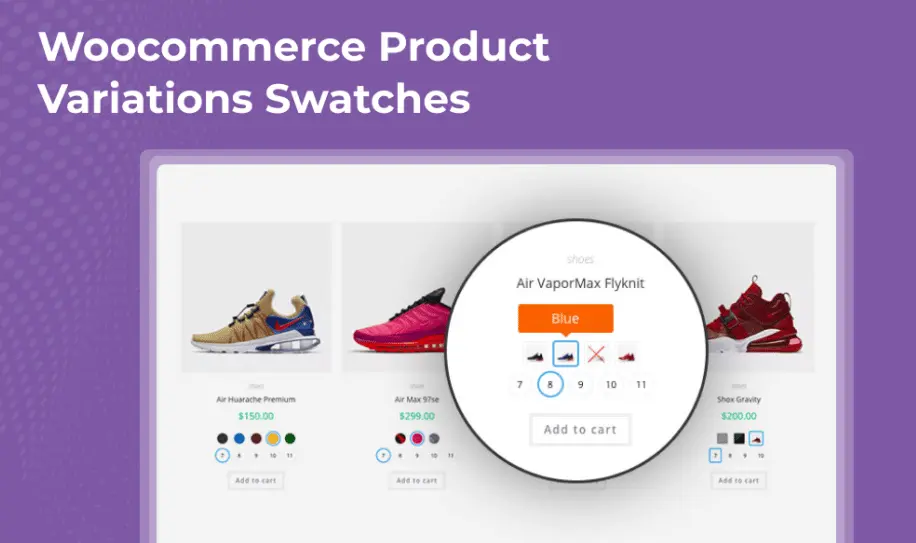
10. Question: What does the “Variation Swatches” feature do in WooCommerce?
A) It changes product colors on the page
B) It displays variations as buttons or images instead of dropdowns
C) It manages stock levels automatically
D) It applies variations to categories
Answer: B
Explanation: Variation swatches enhance user experience by showing options like colors or sizes as visual elements, rather than traditional dropdown menus.
11. Question: Is it possible to limit the number of variations per product in WooCommerce?
A) No, there is no limit
B) Yes, through attribute settings or plugins
C) Only for free versions of WooCommerce
D) Variations are unlimited by default
Answer: B
Explanation: While WooCommerce doesn’t enforce a hard limit, you can manage and limit variations via attribute configurations or by using extensions to optimize performance.
12. Question: How do variations impact SEO in WooCommerce?
A) Variations do not affect SEO
B) Each variation can have its own URL and meta data
C) Only the main product is indexed
D) Variations hurt SEO rankings
Answer: B
Explanation: Variations can be SEO-optimized with unique slugs and descriptions, allowing search engines to index them separately for better visibility.
13. Question: What is the role of attributes in generating variations?
A) Attributes are not related to variations
B) Attributes provide the options that variations are based on
C) Attributes handle only pricing
D) Attributes are for customer reviews
Answer: B
Explanation: Attributes define the available choices (e.g., sizes), and WooCommerce uses them to generate all possible variation combinations automatically.
14. Question: Can you set different shipping classes for variations?
A) No, shipping is the same for all
B) Yes, each variation can have a unique shipping class
C) Only for international shipping
D) Shipping classes are global
Answer: B
Explanation: Variations allow for customized shipping classes, which can adjust costs based on factors like weight or size differences.
15. Question: How do you handle out-of-stock variations in WooCommerce?
A) They are automatically hidden
B) You can set them to be visible but not purchasable
C) Out-of-stock is not manageable
D) They must be deleted
Answer: B
Explanation: WooCommerce lets you control visibility of out-of-stock variations, keeping them listed to inform customers while preventing purchases.
16. Question: What plugin is commonly used to enhance WooCommerce variations?
A) Yoast SEO
B) WooCommerce Variation Swatches
C) Contact Form 7
D) WordPress Importer
Answer: B
Explanation: Plugins like WooCommerce Variation Swatches add features such as visual selectors, making variations more user-friendly and customizable.
17. Question: Can variations have different tax rates in WooCommerce?
A) No, taxes are uniform
B) Yes, based on the variation’s attributes
C) Only for certain countries
D) Taxes are not applicable to variations
Answer: B
Explanation: Each variation can be assigned different tax settings if they fall under varying tax rules, such as for different product types or regions.
18. Question: How do you update variation details in bulk in WooCommerce?
A) Manually one by one
B) Using the WooCommerce product exporter/importer
C) It is not possible
D) Only through code
Answer: B
Explanation: The built-in exporter and importer tools allow for bulk updates of variation details like price or stock, saving time for large inventories.
19. Question: What is the maximum number of attributes you can use for variations?
A) There is no limit
B) Up to 5 per product
C) Up to 10 globally
D) It depends on server resources
Answer: D
Explanation: While WooCommerce itself doesn’t impose a strict limit, excessive attributes can strain performance, so it’s managed based on your site’s capabilities.
20. Question: How do variations improve customer experience in WooCommerce?
A) By complicating the purchase process
B) By offering personalized options and accurate product details
C) By reducing product variety
D) By limiting payment methods
Answer: B
Explanation: Variations provide customers with tailored choices, clear pricing, and specific details, leading to higher satisfaction and reduced returns.
or
Part 3: Automatically generate quiz questions using OnlineExamMaker AI Question Generator
Automatically generate questions using AI