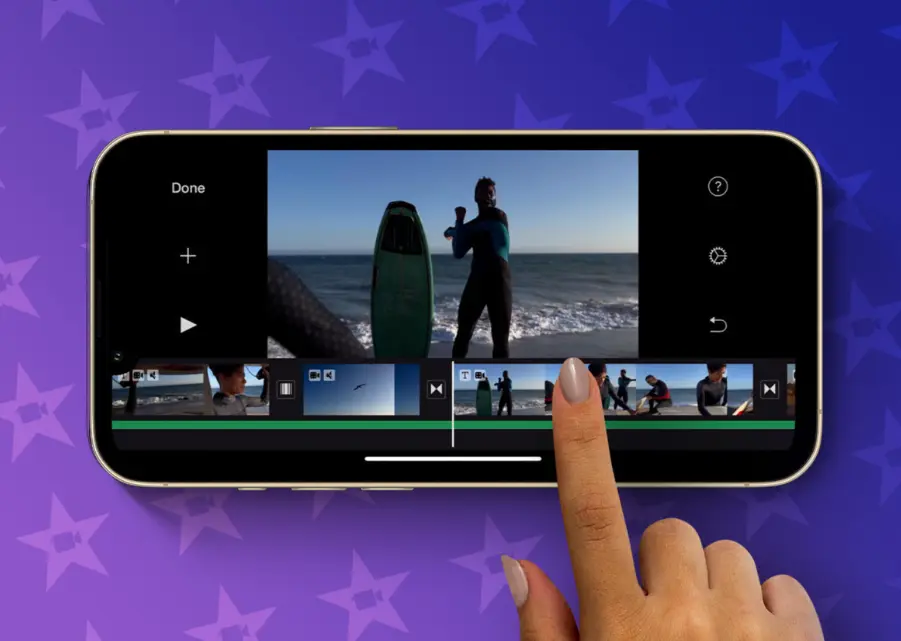
iMovie is a free video editing software developed by Apple, designed for macOS and iOS devices. It offers an intuitive interface that makes it easy for beginners and intermediate users to create professional-looking videos, trailers, and slideshows.
Key features include:
– Timeline Editing: Drag and drop clips, photos, and audio to build your project with precision.
– Themes and Templates: Pre-built themes for quick customization, ideal for creating Hollywood-style trailers.
– Effects and Transitions: A wide range of filters, effects, titles, and transitions to enhance your footage.
– Audio Tools: Adjust volume, add music, sound effects, or record voiceovers directly in the app.
– 4K Support: Edit high-resolution videos up to 4K, with options for color correction and stabilization.
– Sharing Options: Export directly to social media, YouTube, or save to your device for further use.
Perfect for hobbyists, students, or small creators, iMovie integrates seamlessly with other Apple apps like Photos and iCloud, streamlining your workflow. While it’s powerful for basic editing, advanced users might need more complex tools like Final Cut Pro.
Table of Contents
- Part 1: OnlineExamMaker AI Quiz Generator – Save Time and Efforts
- Part 2: 20 iMovie Quiz Questions & Answers
- Part 3: Save Time and Energy: Generate Quiz Questions with AI Technology
Part 1: OnlineExamMaker AI Quiz Generator – Save Time and Efforts
What’s the best way to create a iMovie quiz online? OnlineExamMaker is the best AI quiz making software for you. No coding, and no design skills required. If you don’t have the time to create your online quiz from scratch, you are able to use OnlineExamMaker AI Question Generator to create question automatically, then add them into your online assessment. What is more, the platform leverages AI proctoring and AI grading features to streamline the process while ensuring exam integrity.
Key features of OnlineExamMaker:
● Combines AI webcam monitoring to capture cheating activities during online exam.
● Allow the quiz taker to answer by uploading video or a Word document, adding an image, and recording an audio file.
● Automatically scores multiple-choice, true/false, and even open-ended/audio responses using AI, reducing manual work.
● OnlineExamMaker API offers private access for developers to extract your exam data back into your system automatically.
Automatically generate questions using AI
Part 2: 20 iMovie Quiz Questions & Answers
or
1. Question: What is the primary purpose of iMovie?
Options:
A. Photo editing
B. Video editing
C. Music composition
D. Document creation
Answer: B
Explanation: iMovie is designed by Apple specifically for video editing, allowing users to create and edit videos with ease.
2. Question: Which tab in iMovie is used to add effects to your video clips?
Options:
A. Timeline
B. Media
C. Adjustments
D. Share
Answer: C
Explanation: The Adjustments tab provides tools for adding effects, color corrections, and other enhancements to video clips.
3. Question: How do you import media files into iMovie?
Options:
A. Drag and drop from the desktop
B. Use the File > Import menu
C. Both A and B
D. Only through external drives
Answer: C
Explanation: iMovie allows importing media by dragging and dropping files or using the Import option in the File menu for flexibility.
4. Question: What does the Timeline in iMovie represent?
Options:
A. Audio tracks only
B. The sequence of video and audio clips
C. Project titles
D. Export settings
Answer: B
Explanation: The Timeline is where users arrange and edit the sequence of video, audio, and other elements in their project.
5. Question: Which feature in iMovie helps smooth transitions between clips?
Options:
A. Filters
B. Transitions
C. Speed effects
D. Titles
Answer: B
Explanation: The Transitions feature allows users to add fades, dissolves, or other effects to make the shift between clips seamless.
6. Question: What is the function of the Playhead in iMovie?
Options:
A. To trim clips
B. To indicate the current playback position
C. To add music
D. To export videos
Answer: B
Explanation: The Playhead shows the exact point in the timeline where playback or editing is occurring, helping with precise edits.
7. Question: How can you add text to your video in iMovie?
Options:
A. Using the Effects panel
B. Using the Titles browser
C. Directly in the Timeline
D. Through the Share menu
Answer: B
Explanation: The Titles browser provides pre-designed text overlays that can be customized and added to specific points in the video.
8. Question: What file format is commonly used when exporting from iMovie?
Options:
A. JPEG
B. MP3
C. MP4
D. DOCX
Answer: C
Explanation: iMovie typically exports videos in MP4 format, which is widely compatible for sharing and playback on various devices.
9. Question: Which tool in iMovie allows you to adjust the speed of a clip?
Options:
A. Color correction
B. Speed editor
C. Audio enhancer
D. Transition settings
Answer: B
Explanation: The Speed editor tool lets users slow down or speed up clips, creating effects like slow-motion or fast-forward.
10. Question: How do you access the audio editing tools in iMovie?
Options:
A. Through the Video tab
B. In the Inspector panel
C. Via the Timeline menu
D. Both B and C
Answer: D
Explanation: Audio editing tools are available in the Inspector panel and can also be adjusted directly from the Timeline for volume and effects.
11. Question: What happens when you use the “Split Clip” feature?
Options:
A. It merges two clips
B. It divides a single clip into two parts
C. It adds effects to the clip
D. It exports the clip
Answer: B
Explanation: The Split Clip feature cuts a selected clip at a specific point, allowing for more precise editing in the Timeline.
12. Question: Which iMovie feature is useful for stabilizing shaky footage?
Options:
A. Crop
B. Stabilization
C. Rotate
D. Filters
Answer: B
Explanation: The Stabilization feature automatically corrects shaky video, making it smoother and more professional-looking.
13. Question: How can you add background music to a project in iMovie?
Options:
A. Import from iTunes
B. Drag audio files into the Timeline
C. Both A and B
D. Only through external apps
Answer: C
Explanation: Users can add background music by importing from iTunes or dragging audio files directly into the Timeline.
14. Question: What is the role of the Preview window in iMovie?
Options:
A. To edit audio
B. To view the project as it plays
C. To manage imports
D. To set export options
Answer: B
Explanation: The Preview window allows users to watch their project in real-time, helping to review edits before finalizing.
15. Question: Which option in iMovie helps with color correction?
Options:
A. Transitions
B. Color adjustments
C. Titles
D. Speed effects
Answer: B
Explanation: Color adjustments tools enable users to tweak brightness, contrast, and saturation for better visual quality.
16. Question: How do you share a completed project from iMovie?
Options:
A. Using the File menu
B. Through the Share menu
C. Exporting to desktop
D. All of the above
Answer: D
Explanation: iMovie offers multiple sharing methods via the Share menu, File export, or saving to the desktop for distribution.
17. Question: What does the “Ken Burns” effect do in iMovie?
Options:
A. Adds panning and zooming to photos
B. Creates transitions
C. Edits audio
D. Stabilizes video
Answer: A
Explanation: The Ken Burns effect applies smooth panning and zooming animations to still images, making them more dynamic in videos.
18. Question: Which keyboard shortcut is used to play or pause a project in iMovie?
Options:
A. Spacebar
B. Command + S
C. Option + P
D. Shift + Enter
Answer: A
Explanation: Pressing the Spacebar is a quick way to start or stop playback, enhancing workflow efficiency.
19. Question: How can you undo an action in iMovie?
Options:
A. Press Command + Z
B. Use the Edit menu
C. Both A and B
D. There is no undo feature
Answer: C
Explanation: iMovie supports undoing actions via the Command + Z shortcut or through the Undo option in the Edit menu.
20. Question: What is the maximum resolution supported for projects in iMovie?
Options:
A. 720p
B. 1080p
C. 4K
D. 8K
Answer: C
Explanation: iMovie supports up to 4K resolution for projects, allowing high-quality editing for modern devices and displays.
or
Part 3: Save Time and Energy: Generate Quiz Questions with AI Technology
Automatically generate questions using AI