Excel Data Modeling is a powerful feature that allows users to organize, analyze, and visualize large datasets within Microsoft Excel. It transforms raw data into structured models for advanced reporting and decision-making.
Key Components:
– Data Model Tab: This is the central hub in Excel where you can manage tables, relationships, and calculations. Access it via the “Data” tab and select “Data Model.”
– Power Query: An ETL (Extract, Transform, Load) tool for importing and cleaning data from various sources like databases, CSV files, or web pages. It helps in shaping data before loading it into the model.
– Power Pivot: Enables handling of millions of rows of data by creating in-memory data models. It supports relationships between tables and advanced calculations using DAX (Data Analysis Expressions).
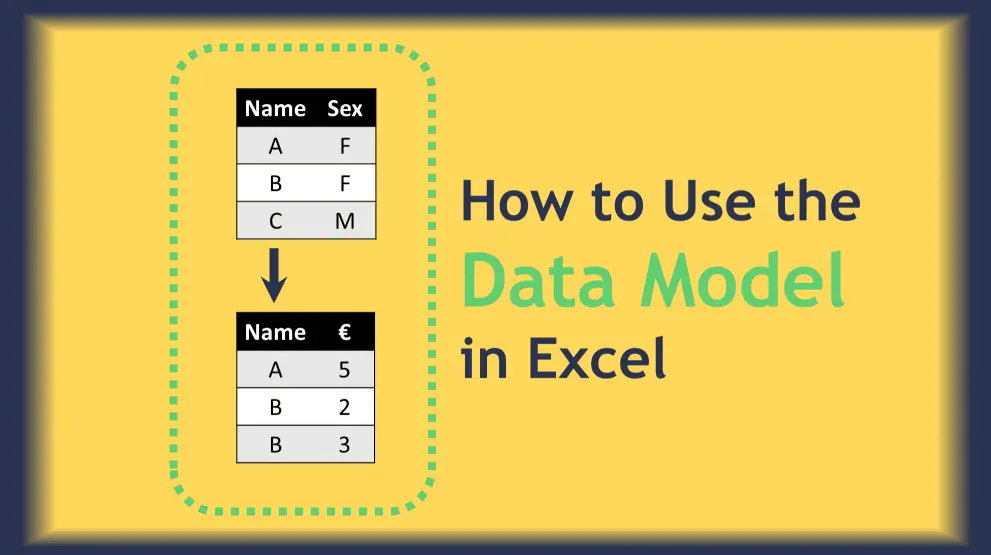
– Relationships: Define connections between tables based on common fields, allowing for complex queries and pivot tables that pull data from multiple sources.
– DAX Formulas: A formula language similar to Excel functions but designed for data modeling. It includes functions for aggregation, filtering, and time intelligence to create measures and calculated columns.
How It Works:
1. Import Data: Use Power Query to bring in data from external sources. Clean and transform it as needed.
2. Build the Model: Add tables to the Data Model and create relationships to link them logically.
3. Add Calculations: Use DAX to define measures (e.g., total sales) or calculated columns for deeper insights.
4. Visualize Results: Create PivotTables, PivotCharts, or dashboards that leverage the data model for interactive reports.
5. Refresh and Manage: Update the model with new data and optimize for performance.
Benefits:
– Efficiency: Handles large datasets without slowing down Excel, ideal for business intelligence.
– Advanced Analytics: Supports complex scenarios like what-if analysis, forecasting, and trend analysis.
– Integration: Seamlessly works with other Microsoft tools like Power BI for enhanced reporting.
– Accessibility: No need for separate software; it’s built into Excel, making it user-friendly for beginners and experts alike.
Best Practices:
– Start with clean data to avoid errors in relationships.
– Use descriptive names for tables and measures to maintain clarity.
– Regularly test your model with sample data before full deployment.
– Optimize by removing unnecessary columns and using efficient DAX formulas.
Excel Data Modeling empowers users to turn static spreadsheets into dynamic analytical tools, driving better data-driven decisions.
Table of Contents
- Part 1: OnlineExamMaker AI Quiz Maker – Make A Free Quiz in Minutes
- Part 2: 20 Excel Data Modeling Quiz Questions & Answers
- Part 3: OnlineExamMaker AI Question Generator: Generate Questions for Any Topic
Part 1: OnlineExamMaker AI Quiz Maker – Make A Free Quiz in Minutes
What’s the best way to create a Excel Data Modeling quiz online? OnlineExamMaker is the best AI quiz making software for you. No coding, and no design skills required. If you don’t have the time to create your online quiz from scratch, you are able to use OnlineExamMaker AI Question Generator to create question automatically, then add them into your online assessment. What is more, the platform leverages AI proctoring and AI grading features to streamline the process while ensuring exam integrity.
Key features of OnlineExamMaker:
● Create up to 10 question types, including multiple-choice, true/false, fill-in-the-blank, matching, short answer, and essay questions.
● Build and store questions in a centralized portal, tagged by categories and keywords for easy reuse and organization.
● Automatically scores multiple-choice, true/false, and even open-ended/audio responses using AI, reducing manual work.
● Create certificates with personalized company logo, certificate title, description, date, candidate’s name, marks and signature.
Automatically generate questions using AI
Part 2: 20 Excel Data Modeling Quiz Questions & Answers
or
1. Question: What is the primary purpose of a PivotTable in Excel data modeling?
Options:
A) To perform basic arithmetic operations
B) To summarize and analyze large datasets interactively
C) To create charts and graphs directly
D) To automate email sending
Answer: B
Explanation: A PivotTable allows users to reorganize and summarize selected columns and rows of data to extract meaningful insights, making it essential for dynamic data analysis.
2. Question: Which Excel feature is used to establish relationships between tables in a data model?
Options:
A) VLOOKUP function
B) Power Query
C) Relationships dialog box
D) Conditional formatting
Answer: C
Explanation: The Relationships dialog box in Excel enables users to link tables based on common fields, which is crucial for creating a cohesive data model across multiple tables.
3. Question: In Excel, what does the XLOOKUP function improve upon compared to VLOOKUP?
Options:
A) Speed of calculation
B) Ability to search in any direction and return values from any column
C) Integration with external databases
D) Automatic data formatting
Answer: B
Explanation: XLOOKUP enhances VLOOKUP by allowing searches in any direction (left, right, up, or down) and retrieving values from any column, making it more flexible for data modeling tasks.
4. Question: What is the main function of Power Query in Excel data modeling?
Options:
A) To create pivot charts
B) To transform and clean data from various sources
C) To apply conditional formatting
D) To run macros
Answer: B
Explanation: Power Query is a tool for importing, transforming, and merging data from different sources, which helps in preparing clean and structured data for modeling.
5. Question: How can you ensure data integrity in an Excel data model?
Options:
A) By using absolute cell references
B) By applying data validation rules
C) By hiding columns
D) By changing the font size
Answer: B
Explanation: Data validation rules restrict the type of data or the values that users can enter into a cell, helping maintain accuracy and consistency in the data model.
6. Question: What is a key benefit of using tables (structured references) in Excel data modeling?
Options:
A) They make formulas easier to read and maintain
B) They automatically adjust as data is added or removed
C) Both A and B
D) Neither A nor B
Answer: C
Explanation: Tables in Excel use structured references that make formulas intuitive and dynamic, automatically expanding or contracting as data changes, which enhances data modeling efficiency.
7. Question: In DAX (Data Analysis Expressions), what does the CALCULATE function primarily do?
Options:
A) Perform simple addition
B) Modify the filter context of a calculation
C) Create new tables
D) Format dates
Answer: B
Explanation: CALCULATE allows users to change the filter context in DAX formulas, enabling more complex and customized calculations in Power Pivot data models.
8. Question: Which tool in Excel is best for performing what-if analysis on a data model?
Options:
A) Solver
B) Goal Seek
C) Scenario Manager
D) All of the above
Answer: D
Explanation: Solver, Goal Seek, and Scenario Manager are all what-if analysis tools that allow users to test different variables and outcomes in a data model to evaluate potential scenarios.
9. Question: What happens when you create a relationship between two tables in Excel’s data model?
Options:
A) It merges the tables into one
B) It allows data from both tables to be used in a single PivotTable
C) It deletes duplicate records
D) It changes the data types
Answer: B
Explanation: Establishing a relationship enables seamless integration of data from multiple tables in reports like PivotTables, without physically combining the tables.
10. Question: How does Power Pivot enhance Excel data modeling?
Options:
A) By increasing the row limit for datasets
B) By providing advanced analytical functions like DAX
C) Both A and B
D) Neither A nor B
Answer: C
Explanation: Power Pivot allows handling of larger datasets beyond Excel’s standard limits and includes DAX for creating complex calculations, making it ideal for advanced data modeling.
11. Question: In Excel, what is the purpose of a slicer in a data model?
Options:
A) To filter data interactively in PivotTables or PivotCharts
B) To add borders to cells
C) To sort data alphabetically
D) To insert images
Answer: A
Explanation: Slicers provide an easy way to filter and segment data in PivotTables or PivotCharts, improving the interactivity and usability of data models.
12. Question: Which formula is commonly used to calculate the total sales in a data model?
Options:
A) SUMIF
B) AVERAGE
C) COUNT
D) PROPER
Answer: A
Explanation: SUMIF allows summing values based on a specific condition, such as totaling sales for a particular product, which is a fundamental operation in data modeling.
13. Question: What is the difference between a calculated column and a measure in Power Pivot?
Options:
A) Calculated columns are stored in the table; measures are dynamic calculations
B) Measures are stored in the table; calculated columns are dynamic
C) They are the same thing
D) Neither can be used in PivotTables
Answer: A
Explanation: Calculated columns add new data to the table and are computed row by row, while measures are dynamic aggregations that recalculate based on the context, like in PivotTables.
14. Question: How can you import data from an external database into an Excel data model?
Options:
A) Using the Data tab and Get Data feature
B) By copying and pasting
C) With the Format Painter
D) Via the Insert tab
Answer: A
Explanation: The Get Data feature under the Data tab allows users to connect to external databases, import data, and integrate it into the Excel data model for analysis.
15. Question: In Excel data modeling, what does the Goal Seek tool do?
Options:
A) Finds the input value needed to achieve a desired result
B) Creates charts automatically
C) Deletes errors in formulas
D) Sorts data
Answer: A
Explanation: Goal Seek is used to perform what-if analysis by determining the input value that will produce a specific output, helping in scenario planning within data models.
16. Question: Which Excel feature is useful for visualizing data trends in a model?
Options:
A) PivotCharts
B) Text to Columns
C) Freeze Panes
D) Page Layout
Answer: A
Explanation: PivotCharts provide graphical representations of data from PivotTables, allowing users to visualize trends and patterns in their data models effectively.
17. Question: What is the role of data types in Excel when building a data model?
Options:
A) They ensure compatibility and accurate calculations
B) They change the color of cells
C) They add watermarks
D) They lock the workbook
Answer: A
Explanation: Proper data types (e.g., text, number, date) prevent errors in calculations and ensure that the data model functions correctly during analysis.
18. Question: How can conditional formatting be applied in an Excel data model?
Options:
A) To highlight cells based on rules, like values above a threshold
B) To merge cells
C) To add hyperlinks
D) To change page orientation
Answer: A
Explanation: Conditional formatting visually emphasizes key data points in a model, such as high or low values, making it easier to identify trends and outliers.
19. Question: In Excel, what is the Scenario Manager used for?
Options:
A) To compare different sets of input values and their outcomes
B) To create backups of files
C) To print multiple sheets
D) To record macros
Answer: A
Explanation: Scenario Manager allows users to save and switch between different scenarios in a data model, facilitating what-if analysis and decision-making.
20. Question: What is a best practice for maintaining a large Excel data model?
Options:
A) Use named ranges for clarity
B) Avoid using tables
C) Disable auto-save
D) Use only absolute references
Answer: A
Explanation: Named ranges make formulas easier to understand and maintain in large data models, reducing errors and improving overall manageability.
or
Part 3: OnlineExamMaker AI Question Generator: Generate Questions for Any Topic
Automatically generate questions using AI