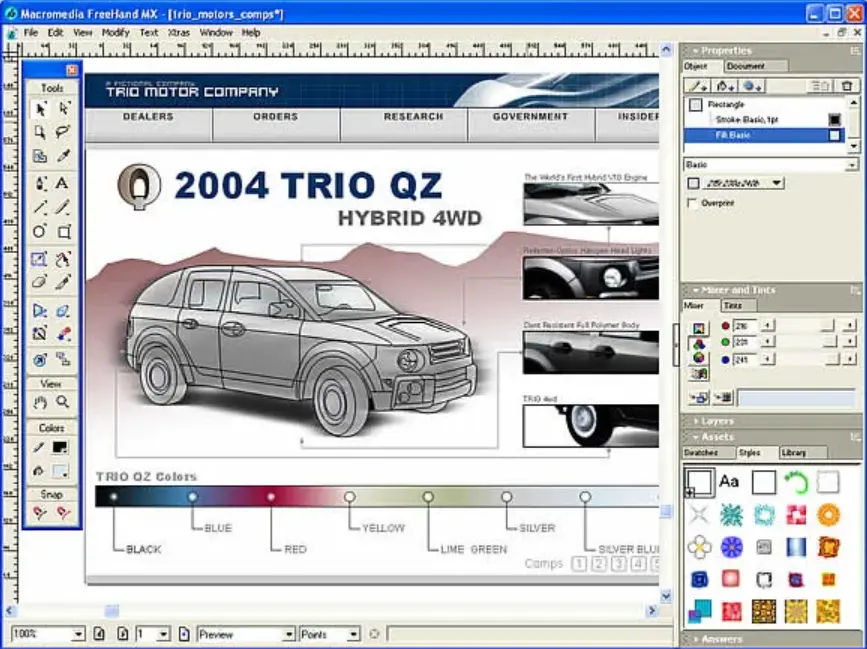
Adobe Freehand was a vector graphics editor software developed by Macromedia and later acquired by Adobe Systems. It was primarily used for creating illustrations, logos, and other scalable designs, offering tools for drawing, editing, and manipulating vector shapes with precision.
Key features included:
– Advanced drawing tools, such as the Pen, Pencil, and Brush, for freehand and precise artwork.
– Support for multiple pages and layers, making it ideal for complex projects like brochures or web graphics.
– Integration with other design software, including compatibility with Adobe’s ecosystem for seamless file sharing.
– Text handling capabilities, allowing for editable text within vector designs.
Historically, Freehand gained popularity in the 1990s and early 2000s for its user-friendly interface and efficiency in professional design workflows. However, Adobe discontinued the software in 2007, shifting focus to Adobe Illustrator as its primary vector graphics tool. Users were encouraged to migrate their files to Illustrator for continued support and updates. Today, Freehand files can still be opened in Illustrator or converted using third-party tools, but it is no longer actively developed.
Table of Contents
- Part 1: Best AI Quiz Making Software for Creating A Adobe Freehand Quiz
- Part 2: 20 Adobe Freehand Quiz Questions & Answers
- Part 3: OnlineExamMaker AI Question Generator: Generate Questions for Any Topic
Part 1: Best AI Quiz Making Software for Creating A Adobe Freehand Quiz
Nowadays more and more people create Adobe Freehand quizzes using AI technologies, OnlineExamMaker a powerful AI-based quiz making tool that can save you time and efforts. The software makes it simple to design and launch interactive quizzes, assessments, and surveys. With the Question Editor, you can create multiple-choice, open-ended, matching, sequencing and many other types of questions for your tests, exams and inventories. You are allowed to enhance quizzes with multimedia elements like images, audio, and video to make them more interactive and visually appealing.
Take a product tour of OnlineExamMaker:
● Create a question pool through the question bank and specify how many questions you want to be randomly selected among these questions.
● Build and store questions in a centralized portal, tagged by categories and keywords for easy reuse and organization.
● Simply copy a few lines of codes, and add them to a web page, you can present your online quiz in your website, blog, or landing page.
● Randomize questions or change the order of questions to ensure exam takers don’t get the same set of questions each time.
Automatically generate questions using AI
Part 2: 20 Adobe Freehand Quiz Questions & Answers
or
1. Question: What is the primary purpose of Adobe Freehand?
Options:
A) Creating raster images
B) Editing vector graphics
C) Video production
D) 3D modeling
Answer: B
Explanation: Adobe Freehand is designed for vector graphics editing, allowing scalable illustrations and designs.
2. Question: Which tool in Adobe Freehand is used to draw straight lines?
Options:
A) Pencil tool
B) Line tool
C) Brush tool
D) Eraser tool
Answer: B
Explanation: The Line tool specifically creates straight lines, making it essential for precise vector drawing.
3. Question: How do you create a new document in Adobe Freehand?
Options:
A) File > Open
B) File > New
C) Edit > Create
D) View > Document
Answer: B
Explanation: The File > New command opens a dialog to set up a new document with custom dimensions and settings.
4. Question: What does the Pen tool allow you to do in Adobe Freehand?
Options:
A) Fill colors
B) Draw freehand paths
C) Create Bézier curves
D) Apply gradients
Answer: C
Explanation: The Pen tool is used for creating precise paths and Bézier curves, enabling detailed vector shapes.
5. Question: In Adobe Freehand, what is a layer?
Options:
A) A color palette
B) A stackable organizational element
C) A file format
D) A brush style
Answer: B
Explanation: Layers help organize elements in a document, allowing users to stack, hide, or lock objects for better management.
6. Question: Which menu contains the options for importing files in Adobe Freehand?
Options:
A) Edit
B) File
C) Window
D) View
Answer: B
Explanation: The File menu includes import options, enabling users to bring in external files like images or vectors.
7. Question: How can you apply a gradient to an object in Adobe Freehand?
Options:
A) Using the Fill tool
B) Through the Swatches panel
C) Via the Gradient tool
D) In the Effects menu
Answer: C
Explanation: The Gradient tool allows users to apply and edit gradients directly on objects for smooth color transitions.
8. Question: What is the function of the Subselect tool in Adobe Freehand?
Options:
A) Selecting entire documents
B) Editing points on paths
C) Creating new layers
D) Applying filters
Answer: B
Explanation: The Subselect tool lets users select and manipulate individual points on vector paths for precise editing.
9. Question: In Adobe Freehand, how do you group objects?
Options:
A) Select and use Ctrl+G
B) Select and choose Object > Group
C) Use the Layer panel
D) Apply a filter
Answer: B
Explanation: The Object > Group command combines selected objects into a single group for easier manipulation.
10. Question: What file format is commonly used for saving Adobe Freehand projects?
Options:
A) JPEG
B) FH11 or FH12
C) PNG
D) PDF
Answer: B
Explanation: Adobe Freehand uses native formats like FH11 or FH12 to save projects, preserving all editable elements.
11. Question: Which feature in Adobe Freehand helps in creating reusable elements?
Options:
A) Symbols
B) Brushes
C) Gradients
D) Filters
Answer: A
Explanation: Symbols allow users to create reusable graphic elements that can be edited once and updated everywhere.
12. Question: How do you zoom in on a specific area in Adobe Freehand?
Options:
A) Using the Hand tool
B) With the Zoom tool
C) Via the View menu
D) Through the Edit menu
Answer: B
Explanation: The Zoom tool enables users to magnify specific parts of the canvas for detailed work.
13. Question: What does the Pathfinder panel do in Adobe Freehand?
Options:
A) Manage colors
B) Combine and divide shapes
C) Add effects
D) Organize layers
Answer: B
Explanation: The Pathfinder panel provides tools to merge, intersect, or subtract shapes, aiding in complex vector designs.
14. Question: In Adobe Freehand, how can you change the stroke color of a path?
Options:
A) Using the Fill panel
B) Through the Stroke panel
C) Via the Color picker
D) In the Effects menu
Answer: B
Explanation: The Stroke panel allows users to select and modify the color, width, and style of a path’s outline.
15. Question: What is the purpose of the Eyedropper tool?
Options:
A) To draw curves
B) To sample and apply attributes
C) To erase parts of an image
D) To create gradients
Answer: B
Explanation: The Eyedropper tool picks up colors, strokes, or fills from one object and applies them to another.
16. Question: How do you align objects in Adobe Freehand?
Options:
A) Using the Align panel
B) Through the Object menu
C) Via keyboard shortcuts
D) In the View menu
Answer: A
Explanation: The Align panel offers options to align or distribute selected objects precisely on the canvas.
17. Question: In Adobe Freehand, what happens when you use the Break Apart command?
Options:
A) Merges objects
B) Splits grouped or compound paths
C) Applies a filter
D) Creates a new layer
Answer: B
Explanation: The Break Apart command separates grouped elements or compound paths into individual components.
18. Question: Which tool is used for freehand drawing in Adobe Freehand?
Options:
A) Pen tool
B) Pencil tool
C) Line tool
D) Rectangle tool
Answer: B
Explanation: The Pencil tool allows for freehand sketching of paths, similar to drawing with a pencil.
19. Question: How can you export a design from Adobe Freehand?
Options:
A) File > Save As
B) File > Export
C) Edit > Export
D) Window > Export
Answer: B
Explanation: The File > Export option converts the design into various formats like EPS or SVG for use in other programs.
20. Question: What is the role of the Transform panel in Adobe Freehand?
Options:
A) To apply colors
B) To scale, rotate, or skew objects
C) To manage layers
D) To add text
Answer: B
Explanation: The Transform panel provides controls for resizing, rotating, and transforming objects accurately.
or
Part 3: OnlineExamMaker AI Question Generator: Generate Questions for Any Topic
Automatically generate questions using AI