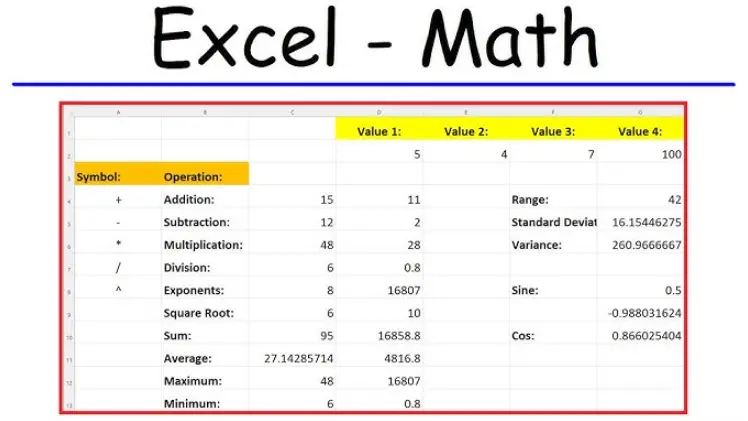
Excel offers a wide range of built-in math functions for calculations, data analysis, and more. Below is an overview categorized by type, highlighting key functions and their primary uses.
Basic Arithmetic Functions
– SUM: Adds up a range of numbers (e.g., =SUM(A1:A10)).
– AVERAGE: Calculates the average of numbers in a range (e.g., =AVERAGE(B1:B5)).
– COUNT: Counts the number of cells containing numbers (e.g., =COUNT(C1:C20)).
– MIN: Returns the smallest number in a range (e.g., =MIN(D1:D15)).
– MAX: Returns the largest number in a range (e.g., =MAX(E1:E10)).
– PRODUCT: Multiplies numbers together (e.g., =PRODUCT(F1:F3)).
Trigonometric and Advanced Math Functions
– SIN: Computes the sine of an angle in radians (e.g., =SIN(PI()/2)).
– COS: Computes the cosine of an angle in radians (e.g., =COS(0)).
– TAN: Computes the tangent of an angle in radians (e.g., =TAN(PI()/4)).
– SQRT: Returns the square root of a number (e.g., =SQRT(16)).
– POWER: Raises a number to a specified power (e.g., =POWER(2,3)).
– EXP: Returns e raised to the power of a number (e.g., =EXP(1)).
– LN: Calculates the natural logarithm of a number (e.g., =LN(2.718)).
Rounding and Absolute Value Functions
– ROUND: Rounds a number to a specified number of digits (e.g., =ROUND(3.14159,2)).
– CEILING: Rounds a number up to the nearest multiple (e.g., =CEILING(4.2,1)).
– FLOOR: Rounds a number down to the nearest multiple (e.g., =FLOOR(4.8,1)).
– ABS: Returns the absolute value of a number (e.g., =ABS(-5)).
Statistical Functions
– STDEV: Estimates standard deviation based on a sample (e.g., =STDEV(G1:G10)).
– VAR: Calculates variance for a sample (e.g., =VAR(H1:H15)).
– MEDIAN: Returns the median of a group of numbers (e.g., =MEDIAN(I1:I20)).
These functions can be combined with cell references, ranges, and other formulas for complex operations. For accurate results, ensure inputs are numeric and consider using absolute or relative references as needed. Always check for errors like #DIV/0! or #VALUE! when working with functions.
Table of Contents
- Part 1: OnlineExamMaker AI Quiz Generator – The Easiest Way to Make Quizzes Online
- Part 2: 20 Excel Math Functions Quiz Questions & Answers
- Part 3: OnlineExamMaker AI Question Generator: Generate Questions for Any Topic
Part 1: OnlineExamMaker AI Quiz Generator – The Easiest Way to Make Quizzes Online
When it comes to ease of creating a Excel Math Functions skills assessment, OnlineExamMaker is one of the best AI-powered quiz making software for your institutions or businesses. With its AI Question Generator, just upload a document or input keywords about your assessment topic, you can generate high-quality quiz questions on any topic, difficulty level, and format.
What you will like:
● AI Question Generator to help you save time in creating quiz questions automatically.
● Share your online exam with audiences on social platforms like Facebook, Twitter, Reddit and more.
● Display the feedback for correct or incorrect answers instantly after a question is answered.
● Create a lead generation form to collect an exam taker’s information, such as email, mobile phone, work title, company profile and so on.
Automatically generate questions using AI
Part 2: 20 Excel Math Functions Quiz Questions & Answers
or
1. Question: What does the SUM function in Excel do?
A. Subtract numbers
B. Add numbers
C. Multiply numbers
D. Divide numbers
Answer: B. Add numbers
Explanation: The SUM function adds up a range of numbers in specified cells, making it easy to calculate totals.
2. Question: Which function calculates the average of a range of numbers?
A. AVERAGE
B. MEAN
C. SUM
D. TOTAL
Answer: A. AVERAGE
Explanation: The AVERAGE function computes the arithmetic mean by summing the numbers and dividing by the count of non-empty cells.
3. Question: What is the purpose of the COUNT function?
A. Counts all cells in a range
B. Counts only numeric values in a range
C. Counts text values
D. Counts blank cells
Answer: B. Counts only numeric values in a range
Explanation: COUNT ignores text and blank cells, focusing solely on cells with numbers to provide a count.
4. Question: How does the MAX function work?
A. Finds the smallest number
B. Finds the largest number
C. Adds all numbers
D. Averages numbers
Answer: B. Finds the largest number
Explanation: MAX identifies and returns the maximum value from a set of numbers in the specified range.
5. Question: What does the MIN function do?
A. Finds the average
B. Finds the smallest number
C. Multiplies numbers
D. Rounds numbers
Answer: B. Finds the smallest number
Explanation: MIN scans a range and returns the minimum value among the numbers provided.
6. Question: Which function is used to round a number to the nearest integer?
A. ROUND
B. FLOOR
C. CEILING
D. INT
Answer: A. ROUND
Explanation: ROUND adjusts a number to a specified number of decimal places, such as rounding 3.7 to 4.
7. Question: What is the function for calculating the square root of a number?
A. SQRT
B. POWER
C. ROOT
D. SQUARE
Answer: A. SQRT
Explanation: SQRT takes a positive number and returns its square root, like SQRT(16) equaling 4.
8. Question: How does the ABS function operate?
A. Adds absolute values
B. Returns the absolute value of a number
C. Subtracts values
D. Averages absolute numbers
Answer: B. Returns the absolute value of a number
Explanation: ABS converts a negative number to positive, such as ABS(-5) resulting in 5.
9. Question: Which function raises a number to a power?
A. POWER
B. EXPONENT
C. RAISE
D. MULTIPLY
Answer: A. POWER
Explanation: POWER calculates a number raised to a specified exponent, like POWER(2, 3) equaling 8.
10. Question: What does the PRODUCT function do?
A. Adds numbers
B. Multiplies numbers
C. Divides numbers
D. Subtracts numbers
Answer: B. Multiplies numbers
Explanation: PRODUCT multiplies all the numbers in a range, providing the result of their multiplication.
11. Question: Which function is used to find the remainder after division?
A. MOD
B. DIVIDE
C. REMAINDER
D. QUOTIENT
Answer: A. MOD
Explanation: MOD returns the remainder of a division operation, such as MOD(10, 3) equaling 1.
12. Question: What is the purpose of the RAND function?
A. Generates a random integer
B. Generates a random decimal between 0 and 1
C. Adds random numbers
D. Counts random values
Answer: B. Generates a random decimal between 0 and 1
Explanation: RAND produces a new random number each time the worksheet recalculates, useful for simulations.
13. Question: How does the FLOOR function work?
A. Rounds up to the nearest integer
B. Rounds down to the nearest multiple of significance
C. Averages numbers
D. Adds numbers
Answer: B. Rounds down to the nearest multiple of significance
Explanation: FLOOR rounds a number down, like FLOOR(3.7, 1) resulting in 3.
14. Question: What does the CEILING function do?
A. Rounds down
B. Rounds up to the nearest multiple of significance
C. Finds the minimum
D. Calculates the sum
Answer: B. Rounds up to the nearest multiple of significance
Explanation: CEILING rounds a number up, such as CEILING(3.2, 1) equaling 4.
15. Question: Which function calculates the sine of an angle?
A. SIN
B. COS
C. TAN
D. ANGLE
Answer: A. SIN
Explanation: SIN computes the sine of an angle in radians, like SIN(0) equaling 0.
16. Question: What is the function for exponential calculations?
A. EXP
B. POWER
C. LOG
D. SQRT
Answer: A. EXP
Explanation: EXP raises the base e (approximately 2.718) to the power of the given number, used in growth formulas.
17. Question: How does the LOG function work?
A. Calculates the logarithm of a number
B. Adds logarithms
C. Multiplies logs
D. Finds the square root
Answer: A. Calculates the logarithm of a number
Explanation: LOG returns the logarithm of a number to a specified base, such as LOG(10, 10) equaling 1.
18. Question: Which function counts non-empty cells in a range?
A. COUNT
B. COUNTA
C. COUNTIF
D. SUM
Answer: B. COUNTA
Explanation: COUNTA counts all cells that are not blank, including numbers, text, and errors.
19. Question: What does the TRUNC function do?
A. Rounds to the nearest integer
B. Truncates a number to an integer by removing the decimal
C. Adds decimals
D. Multiplies by 10
Answer: B. Truncates a number to an integer by removing the decimal
Explanation: TRUNC removes the fractional part of a number without rounding, like TRUNC(3.9) equaling 3.
20. Question: Which function is used to convert radians to degrees?
A. DEGREES
B. RADIANS
C. CONVERT
D. ANGLE
Answer: A. DEGREES
Explanation: DEGREES converts an angle from radians to degrees, such as DEGREES(π) equaling 180.
or
Part 3: OnlineExamMaker AI Question Generator: Generate Questions for Any Topic
Automatically generate questions using AI