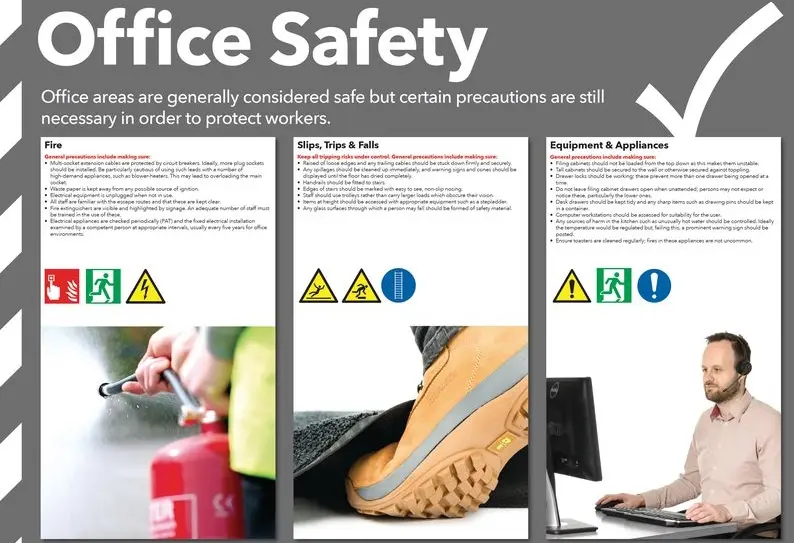
Office safety encompasses a range of measures designed to protect employees and visitors in a workplace environment. It begins with identifying potential hazards, such as cluttered walkways that could cause trips and falls, faulty electrical equipment that might lead to shocks or fires, and poor ergonomics that contribute to repetitive strain injuries. To mitigate these risks, workplaces should implement clear signage for emergency exits, regular maintenance of furniture and machinery, and ergonomic assessments for desks and chairs to ensure proper posture and reduce strain on the body.
Fire safety is paramount, with functional smoke detectors, fire extinguishers, and evacuation plans that are practiced through drills. Adequate lighting in all areas prevents eye strain and accidents, while proper ventilation maintains air quality to minimize respiratory issues. Employers should also promote a culture of safety by providing training on handling hazardous materials, like cleaning chemicals, and encouraging reports of unsafe conditions without fear of reprisal.
Additionally, mental health aspects of office safety cannot be overlooked, including stress management programs and designated break areas to foster well-being. By adhering to regulations such as those from OSHA, offices can create a secure, productive space where employees feel valued and protected, ultimately enhancing overall efficiency and morale.
Table of Contents
- Part 1: Create An Amazing Office Safety Quiz Using AI Instantly in OnlineExamMaker
- Part 2: 20 Office Safety Quiz Questions & Answers
- Part 3: AI Question Generator – Automatically Create Questions for Your Next Assessment
Part 1: Create An Amazing Office Safety Quiz Using AI Instantly in OnlineExamMaker
Nowadays more and more people create Office Safety quizzes using AI technologies, OnlineExamMaker a powerful AI-based quiz making tool that can save you time and efforts. The software makes it simple to design and launch interactive quizzes, assessments, and surveys. With the Question Editor, you can create multiple-choice, open-ended, matching, sequencing and many other types of questions for your tests, exams and inventories. You are allowed to enhance quizzes with multimedia elements like images, audio, and video to make them more interactive and visually appealing.
Recommended features for you:
● Prevent cheating by randomizing questions or changing the order of questions, so learners don’t get the same set of questions each time.
● Automatically generates detailed reports—individual scores, question report, and group performance.
● Simply copy a few lines of codes, and add them to a web page, you can present your online quiz in your website, blog, or landing page.
● Offers question analysis to evaluate question performance and reliability, helping instructors optimize their training plan.
Automatically generate questions using AI
Part 2: 20 Office Safety Quiz Questions & Answers
or
1. What is the primary purpose of a fire extinguisher in an office setting?
A. To clean up spills
B. To put out small fires
C. To provide emergency lighting
D. To block doorways
Answer: B
Explanation: Fire extinguishers are designed to suppress small, contained fires before they spread, allowing for safer evacuation.
2. Which of the following is the best way to prevent slips and falls in an office?
A. Leaving cords across walkways
B. Keeping floors dry and clear
C. Walking quickly on wet surfaces
D. Ignoring spills until later
Answer: B
Explanation: Keeping floors dry and clear of obstacles reduces the risk of slips, trips, and falls, which are common office hazards.
3. What should you do if you notice a frayed electrical cord in the office?
A. Continue using it as is
B. Wrap it with tape and use it
C. Report it immediately and replace it
D. Hide it under a rug
Answer: C
Explanation: Frayed cords can cause electrical shocks or fires, so reporting and replacing them promptly ensures safety.
4. How often should office chairs be adjusted for ergonomic comfort?
A. Only when they are new
B. Daily or whenever you sit down
C. Once a year
D. Never, as they are pre-set
Answer: B
Explanation: Regular adjustments to office chairs help maintain proper posture, reducing strain on the back, neck, and wrists.
5. What is the correct response to an earthquake while in an office?
A. Run to the nearest exit
B. Drop, cover, and hold on
C. Stand in a doorway
D. Go to the windows
Answer: B
Explanation: Dropping to the ground, covering under a sturdy desk, and holding on protects against falling objects during an earthquake.
6. Which item is essential for eye safety when working with computer screens?
A. A loud keyboard
B. An anti-glare screen filter
C. Bright overhead lights
D. A fan for cooling
Answer: B
Explanation: An anti-glare screen filter reduces eye strain and prevents issues like dry eyes from prolonged screen exposure.
7. What should you avoid when lifting heavy boxes in an office?
A. Bending at the knees
B. Using your legs for support
C. Bending at the waist
D. Asking for help if needed
Answer: C
Explanation: Bending at the waist can strain the back; instead, use your legs to lift, minimizing the risk of injury.
8. How should you handle sharp objects like staples or scissors in an office?
A. Leave them on the desk uncovered
B. Store them in designated holders
C. Pass them handle-first to others
D. Throw them in the trash loosely
Answer: B
Explanation: Storing sharp objects in holders prevents accidental cuts or punctures, promoting a safer work environment.
9. What is the main risk of poor ventilation in an office?
A. Increased productivity
B. Buildup of harmful airborne particles
C. Brighter lighting
D. Faster computer speeds
Answer: B
Explanation: Poor ventilation can lead to the accumulation of dust, allergens, or chemicals, causing respiratory issues or discomfort.
10. When should you wash your hands in an office to prevent germ spread?
A. Only after eating
B. Before and after handling shared items
C. At the end of the day
D. Never, as it’s not necessary
Answer: B
Explanation: Washing hands before and after touching shared items like keyboards or doorknobs reduces the transmission of illnesses.
11. What is the proper way to exit during a fire drill in an office?
A. Use the elevator
B. Walk calmly to the nearest stairwell
C. Gather personal belongings first
D. Wait for instructions via email
Answer: B
Explanation: Using stairwells and walking calmly ensures an orderly evacuation without the risks associated with elevators or delays.
12. Which posture is recommended for long hours at a desk?
A. Slouching forward
B. Sitting upright with feet flat
C. Leaning back excessively
D. Crossing legs tightly
Answer: B
Explanation: Sitting upright with feet flat on the floor supports the spine and reduces the risk of musculoskeletal disorders.
13. What should you do if you spill a liquid near electrical equipment?
A. Wipe it up immediately with a cloth
B. Turn off the equipment and unplug it first
C. Ignore it if it’s a small amount
D. Use a vacuum to clean it
Answer: B
Explanation: Turning off and unplugging equipment prevents electrical shorts or shocks when dealing with liquids.
14. How can you reduce the risk of repetitive strain injury from typing?
A. Type as fast as possible
B. Take regular breaks and stretch
C. Use a keyboard without a wrist rest
D. Keep elbows raised high
Answer: B
Explanation: Regular breaks and stretching exercises help prevent strain on wrists, fingers, and arms from repetitive motions.
15. What is the first step in responding to a chemical spill in an office?
A. Clean it up yourself
B. Evacuate the area and alert authorities
C. Cover it with paper
D. Open windows to ventilate
Answer: B
Explanation: Evacuating and alerting trained personnel ensures safety, as some chemicals can be hazardous without proper handling.
16. Why is it important to keep emergency exits clear in an office?
A. To store extra supplies
B. For quick evacuation during emergencies
C. To create more workspace
D. As a decorative feature
Answer: B
Explanation: Clear exits allow for rapid and safe evacuation in events like fires, preventing blockages that could trap people.
17. What protective gear might be needed when handling office cleaning chemicals?
A. Sunglasses
B. Gloves and eye protection
C. A hat
D. Earplugs
Answer: B
Explanation: Gloves and eye protection shield skin and eyes from irritants in cleaning chemicals, reducing exposure risks.
18. How should you position your computer monitor to avoid neck strain?
A. At eye level directly in front
B. Below knee level
C. Tilted sideways
D. On the floor
Answer: A
Explanation: Placing the monitor at eye level directly in front promotes neutral neck posture, minimizing strain during extended use.
19. What is a key sign that your workstation setup needs adjustment?
A. Feeling energized all day
B. Persistent pain in shoulders or back
C. Working faster than usual
D. Having a clean desk
Answer: B
Explanation: Persistent pain indicates poor ergonomics, so adjusting the workstation can prevent long-term health issues.
20. Why should you report unsafe conditions in the office promptly?
A. To avoid extra work
B. To prevent accidents and injuries
C. To impress supervisors
D. Because it’s a rule only
Answer: B
Explanation: Reporting unsafe conditions allows for timely fixes, reducing the potential for accidents and ensuring a safer workplace.
or
Part 3: AI Question Generator – Automatically Create Questions for Your Next Assessment
Automatically generate questions using AI