Adobe Audition is a professional digital audio workstation (DAW) developed by Adobe Inc., designed for recording, editing, mixing, and restoring audio. First released in 1999 as Cool Edit Pro and acquired by Adobe in 2003, it has evolved into a powerful tool for audio professionals.
Key features include:
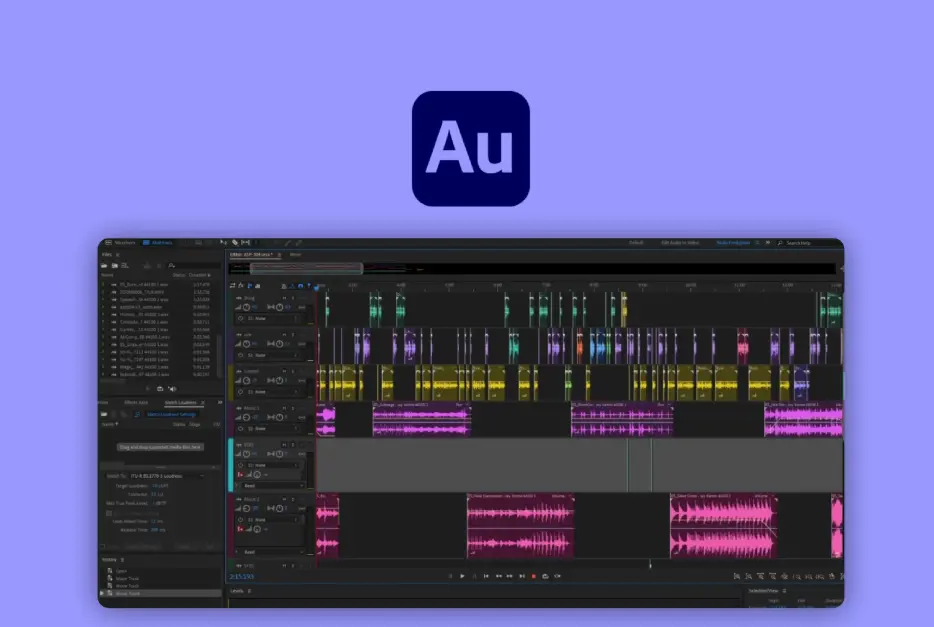
– Multitrack Editing: Allows users to work with multiple audio tracks simultaneously, enabling layering, synchronization, and precise timeline control.
– Audio Restoration Tools: Built-in effects like noise reduction, click and pop removal, and spectral frequency editing help clean up recordings.
– Spectral Analysis: Provides visual representations of audio frequencies for detailed editing, making it ideal for sound design and forensic audio work.
– Integration: Seamlessly connects with other Adobe software, such as Premiere Pro and After Effects, for streamlined video and audio workflows.
– Effects and Plugins: Offers a vast library of built-in effects, plus support for VST, AU, and AAX plugins, along with automation tools for dynamic mixing.
Primarily used by podcasters, musicians, film editors, and sound engineers, Adobe Audition supports a wide range of audio formats and delivers high-fidelity results. Its intuitive interface and real-time preview capabilities make it suitable for both beginners and experts in audio production.
Table of Contents
- Part 1: OnlineExamMaker AI Quiz Generator – The Easiest Way to Make Quizzes Online
- Part 2: 20 Adobe Audition Quiz Questions & Answers
- Part 3: OnlineExamMaker AI Question Generator: Generate Questions for Any Topic
Part 1: OnlineExamMaker AI Quiz Generator – The Easiest Way to Make Quizzes Online
When it comes to ease of creating a Adobe Audition skills assessment, OnlineExamMaker is one of the best AI-powered quiz making software for your institutions or businesses. With its AI Question Generator, just upload a document or input keywords about your assessment topic, you can generate high-quality quiz questions on any topic, difficulty level, and format.
What you will like:
● AI Question Generator to help you save time in creating quiz questions automatically.
● Share your online exam with audiences on social platforms like Facebook, Twitter, Reddit and more.
● Display the feedback for correct or incorrect answers instantly after a question is answered.
● Create a lead generation form to collect an exam taker’s information, such as email, mobile phone, work title, company profile and so on.
Automatically generate questions using AI
Part 2: 20 Adobe Audition Quiz Questions & Answers
or
1. What is the primary function of the Waveform Editor in Adobe Audition?
A. To mix multiple audio tracks
B. To edit a single audio file visually
C. To apply video effects
D. To record live audio
Answer: B
Explanation: The Waveform Editor allows users to visually edit and manipulate a single audio file by displaying it as a waveform, enabling precise cuts, fades, and adjustments.
2. Which tool in Adobe Audition is used for removing background noise from an audio clip?
A. Amplitude and Compression
B. Noise Reduction
C. Equalizer
D. Reverb
Answer: B
Explanation: The Noise Reduction tool specifically analyzes and reduces unwanted background noise by capturing a noise print and applying it to the audio.
3. What does the Multitrack Editor in Adobe Audition allow users to do?
A. Edit images
B. Arrange and mix multiple audio tracks
C. Create video timelines
D. Design graphics
Answer: B
Explanation: The Multitrack Editor provides a timeline-based interface for arranging, editing, and mixing multiple audio tracks together, including adding effects and automation.
4. In Adobe Audition, what is the purpose of the Effects Rack?
A. To organize video clips
B. To apply and manage audio effects on a track
C. To store keyboard shortcuts
D. To export files
Answer: B
Explanation: The Effects Rack is a panel that allows users to add, remove, and adjust various audio effects like reverb, delay, and EQ in real-time on selected tracks.
5. Which format is commonly used for exporting high-quality audio from Adobe Audition?
A. JPEG
B. WAV
C. PDF
D. TXT
Answer: B
Explanation: WAV is a lossless audio format that preserves high quality, making it ideal for professional audio exports from Adobe Audition without compression artifacts.
6. What keyboard shortcut in Adobe Audition is typically used to zoom in on the waveform?
A. Ctrl + Z
B. Ctrl + +
C. Ctrl + S
D. Ctrl + C
Answer: B
Explanation: Pressing Ctrl + + (on Windows) zooms in on the waveform, allowing for more detailed editing of specific sections of the audio.
7. How does the Spectral Frequency Display differ from the standard Waveform view?
A. It shows audio as a 3D model
B. It displays audio frequencies as colors for frequency analysis
C. It only plays audio backwards
D. It edits video files
Answer: B
Explanation: The Spectral Frequency Display visualizes audio as a spectrogram, using colors to represent different frequencies, which helps in identifying and editing specific sounds like hums or clicks.
8. What is the function of the Amplitude and Compression effect in Adobe Audition?
A. To change the pitch of audio
B. To control the dynamic range and volume levels
C. To add echo
D. To reverse audio
Answer: B
Explanation: The Amplitude and Compression effect evens out volume levels by reducing the dynamic range, preventing clipping and making audio more consistent.
9. In Adobe Audition, what does the Match Loudness feature do?
A. It synchronizes video and audio
B. It adjusts the overall volume to meet industry standards
C. It adds random effects
D. It deletes silent parts
Answer: B
Explanation: Match Loudness analyzes and adjusts the audio’s loudness to conform to standards like LUFS, ensuring it plays at an appropriate level without distortion.
10. Which panel in Adobe Audition is used for monitoring and adjusting meters like peak levels?
A. Effects Rack
B. Meters Panel
C. History Panel
D. Files Panel
Answer: B
Explanation: The Meters Panel displays real-time audio levels, including peak and RMS meters, helping users avoid clipping and monitor signal strength.
11. What is the purpose of the Adaptive Noise Reduction tool?
A. To enhance bass frequencies
B. To automatically reduce noise based on learned patterns
C. To speed up audio playback
D. To add distortion
Answer: B
Explanation: Adaptive Noise Reduction intelligently identifies and removes noise by adapting to the audio’s characteristics, making it effective for varying noise levels.
12. In Adobe Audition, how can you create a loop from a section of audio?
A. By using the Export function
B. By marking in and out points and using the Loop feature
C. By applying a filter
D. By reversing the clip
Answer: B
Explanation: Users can mark in and out points on a waveform or multitrack and enable looping, allowing the selected section to repeat seamlessly.
13. What does the DeClicker effect primarily target?
A. Background music
B. Clicks, pops, and scratches in audio
C. Video transitions
D. Image editing
Answer: B
Explanation: The DeClicker effect is designed to detect and remove impulsive noises like clicks and pops, which are common in restored or digitized audio.
14. Which option in Adobe Audition allows for non-destructive editing?
A. Copy and Paste
B. Multitrack Session
C. Save As
D. Render and Replace
Answer: B
Explanation: Multitrack sessions in Adobe Audition enable non-destructive editing, meaning changes can be undone or adjusted without permanently altering the original files.
15. What is the role of the Frequency Analysis tool?
A. To analyze the rhythm of music
B. To display the frequency spectrum of audio for detailed inspection
C. To add visual effects
D. To compress files
Answer: B
Explanation: The Frequency Analysis tool provides a graphical representation of audio frequencies, helping users identify issues like frequency imbalances or unwanted tones.
16. In Adobe Audition, how do you apply a preset effect?
A. By going to File > New
B. By selecting an effect from the Effects menu and choosing a preset
C. By using the keyboard only
D. By importing from external software
Answer: B
Explanation: Presets for effects can be selected directly in the Effects menu, allowing quick application of pre-configured settings for common tasks.
17. What does the Timecode feature assist with in Adobe Audition?
A. Synchronizing audio with video timelines
B. Changing the date of a file
C. Adding timestamps to text
D. Reversing audio
Answer: A
Explanation: The Timecode feature helps align audio edits with video by displaying time-based markers, essential for projects involving multimedia synchronization.
18. Which effect is commonly used to make vocals stand out in a mix?
A. Echo
B. Equalization (EQ)
C. Distortion
D. Normalization
Answer: B
Explanation: Equalization (EQ) adjusts specific frequency bands, allowing users to boost or cut frequencies to make elements like vocals more prominent in the mix.
19. In Adobe Audition, what is the purpose of the Marker panel?
A. To add notes to video clips
B. To place and manage markers on the timeline for reference
C. To apply colors to effects
D. To delete files
Answer: B
Explanation: The Marker panel lets users add, edit, and navigate markers on the timeline, which are useful for noting important sections during editing.
20. How does Adobe Audition handle audio restoration?
A. By using AI to generate new audio
B. Through tools like Click/Pop Remover and Noise Reduction
C. By automatically playing music
D. By converting text to speech
Answer: B
Explanation: Audio restoration in Adobe Audition is achieved via specialized tools that target common issues like noise, clicks, and hums, preserving the original content.
or
Part 3: OnlineExamMaker AI Question Generator: Generate Questions for Any Topic
Automatically generate questions using AI