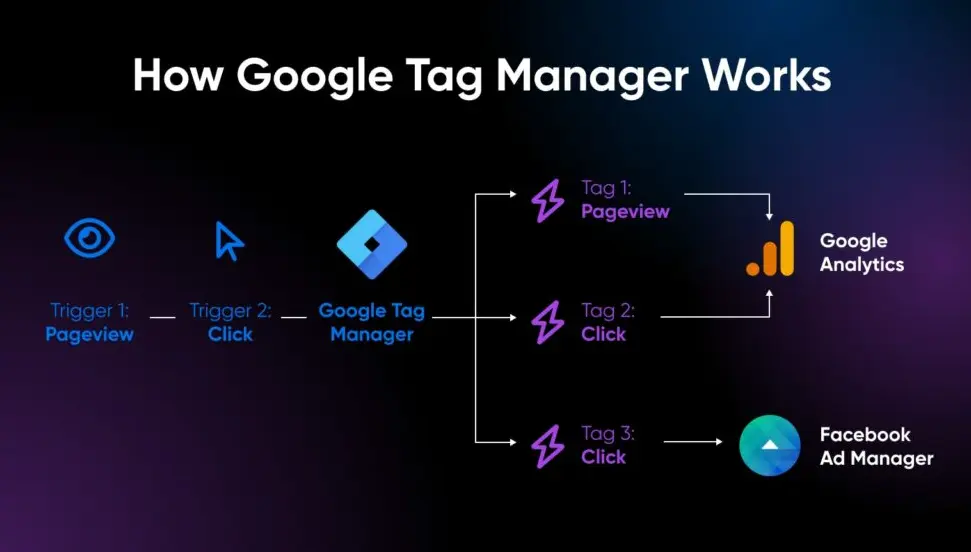
Google Tag Manager (GTM) is a powerful, free tool from Google that simplifies the management of tracking codes and tags on your website or app. When used for ads, GTM enables seamless integration with advertising platforms like Google Ads, allowing you to track conversions, retarget audiences, and measure campaign performance without directly editing your site’s code.
## Key Features for Ads
– Tag Management: Easily add, edit, or remove tags for Google Ads, Facebook Pixel, or other networks in one centralized interface.
– Event Tracking: Set up triggers to fire tags based on user actions, such as form submissions, button clicks, or page views, to capture ad-related data.
– Conversion Tracking: Implement Google Ads conversion tags to measure ROI, attributing sales or leads directly to ad campaigns.
– Remarketing: Deploy remarketing tags to build audiences for retargeting, helping you re-engage website visitors across the web.
– A/B Testing: Use GTM variables and tags to test different ad variations and optimize performance in real time.
## Benefits of Using GTM for Ads
– Efficiency: Reduces the need for developer involvement, speeding up implementation and updates.
– Accuracy: Minimizes errors from manual code changes, ensuring reliable data collection.
– Flexibility: Supports integration with multiple ad platforms, making it easier to manage cross-channel campaigns.
– Scalability: As your advertising efforts grow, GTM allows for quick scaling without site disruptions.
– Compliance: Helps maintain data privacy standards, such as GDPR, by controlling when and how tags fire.
## Getting Started with GTM for Ads
1. Create a GTM Account: Sign up at the Google Tag Manager website and set up a new container for your site.
2. Install the GTM Snippet: Add the provided container code to your website’s header and body sections.
3. Add Tags for Ads: In the GTM interface, create tags for Google Ads conversion tracking or remarketing, using templates from the tag gallery.
4. Configure Triggers and Variables: Define rules for when tags should activate, such as on specific pages or events.
5. Test and Publish: Use GTM’s preview mode to verify tag firing, then publish the container to go live.
6. Monitor Performance: Link GTM with Google Analytics or Ads dashboards to analyze data and refine strategies.
By leveraging GTM for ads, businesses can enhance tracking precision, improve ad spend efficiency, and gain deeper insights into customer behavior, ultimately driving better results from their marketing efforts.
Table of Contents
- Part 1: OnlineExamMaker AI Quiz Generator – Save Time and Efforts
- Part 2: 20 Google Tag Manager For Ads Quiz Questions & Answers
- Part 3: AI Question Generator – Automatically Create Questions for Your Next Assessment
Part 1: OnlineExamMaker AI Quiz Generator – Save Time and Efforts
What’s the best way to create a Google Tag Manager For Ads quiz online? OnlineExamMaker is the best AI quiz making software for you. No coding, and no design skills required. If you don’t have the time to create your online quiz from scratch, you are able to use OnlineExamMaker AI Question Generator to create question automatically, then add them into your online assessment. What is more, the platform leverages AI proctoring and AI grading features to streamline the process while ensuring exam integrity.
Key features of OnlineExamMaker:
● Combines AI webcam monitoring to capture cheating activities during online exam.
● Allow the quiz taker to answer by uploading video or a Word document, adding an image, and recording an audio file.
● Automatically scores multiple-choice, true/false, and even open-ended/audio responses using AI, reducing manual work.
● OnlineExamMaker API offers private access for developers to extract your exam data back into your system automatically.
Automatically generate questions using AI
Part 2: 20 Google Tag Manager For Ads Quiz Questions & Answers
or
1. Question: What is the primary purpose of Google Tag Manager (GTM) in the context of ads?
A. To design ad creatives
B. To manage and deploy marketing tags on a website without code changes
C. To create ad campaigns directly
D. To analyze ad performance in real-time
Answer: B
Explanation: GTM allows marketers to add, update, and manage tags for ads, such as Google Ads conversions, without needing to alter the website’s code, making it efficient for tracking and optimization.
2. Question: Which type of tag in GTM is commonly used for tracking ad conversions?
A. Page View tag
B. Custom HTML tag
C. Google Ads Conversion tag
D. Form Submission tag
Answer: C
Explanation: The Google Ads Conversion tag specifically tracks actions like purchases or sign-ups that result from ad clicks, helping measure ROI.
3. Question: What must be configured in GTM to fire a tag only when a user clicks an ad-related button?
A. A variable
B. A trigger
C. A folder
D. A workspace
Answer: B
Explanation: Triggers in GTM define the conditions, such as a button click, under which a tag (e.g., for ad tracking) is fired, ensuring precision in data collection.
4. Question: In GTM, what is a variable used for in ad tracking?
A. To store static values only
B. To dynamically capture data like user IDs or click values for ads
C. To create new ad campaigns
D. To block all tags
Answer: B
Explanation: Variables in GTM hold dynamic data, such as the value of a clicked element, which can be passed to ad tags for accurate tracking and attribution.
5. Question: How should you handle personally identifiable information (PII) when setting up GTM for ads?
A. Include it in all tags for better targeting
B. Avoid including it to comply with privacy laws like GDPR
C. Use it only for email marketing
D. Share it directly with ad platforms
Answer: B
Explanation: Excluding PII from tags in GTM helps maintain compliance with privacy regulations, reducing the risk of data breaches and legal issues.
6. Question: What is the role of the “Constant Variable” in GTM for ad setups?
A. To change values based on user behavior
B. To hold a fixed value, like a conversion ID for Google Ads
C. To trigger tags automatically
D. To debug errors
Answer: B
Explanation: Constant Variables store unchanging values, such as a Google Ads conversion ID, making it easier to reuse them across multiple tags without errors.
7. Question: Which GTM feature allows you to test tags before publishing them for ad tracking?
A. Preview mode
B. Debug mode
C. Live mode
D. Tag history
Answer: A
Explanation: Preview mode in GTM lets you simulate user interactions to test how tags for ads will behave, ensuring they fire correctly before going live.
8. Question: When integrating GTM with Google Ads, what is the purpose of the “gtag.js” library?
A. To handle server-side rendering
B. To manage client-side tagging for events and conversions
C. To create ad groups
D. To block ad scripts
Answer: B
Explanation: gtag.js is a JavaScript library that simplifies adding Google Ads tags in GTM, enabling tracking of events and conversions on the client side.
9. Question: In GTM, how do you ensure an ad remarketing tag fires only on specific pages?
A. By using a page view trigger with URL conditions
B. By disabling all variables
C. By setting a global tag
D. By ignoring triggers
Answer: A
Explanation: Page view triggers with URL conditions in GTM allow remarketing tags to fire only on targeted pages, improving ad relevance and efficiency.
10. Question: What is the benefit of using a “Custom Event” trigger in GTM for ads?
A. It automates ad creation
B. It fires tags based on custom user interactions, like form fills for lead gen ads
C. It replaces all standard triggers
D. It only works for server-side tracking
Answer: B
Explanation: Custom Event triggers in GTM respond to specific actions defined by code, such as button clicks related to ads, for precise tracking.
11. Question: Which GTM container type is most suitable for ad tracking on a website?
A. iOS Container
B. Web Container
C. Android Container
D. Server Container
Answer: B
Explanation: The Web Container in GTM is designed for browser-based environments, making it ideal for deploying ad tags on websites.
12. Question: How does GTM help in managing multiple ad platforms like Google Ads and Facebook Ads?
A. By merging all platforms into one tag
B. By allowing separate tags and triggers for each platform in a single interface
C. By automatically syncing data between platforms
D. By blocking competing ads
Answer: B
Explanation: GTM’s interface enables you to manage tags for various ad platforms efficiently, reducing code clutter and improving maintenance.
13. Question: In GTM, what should you do if an ad tag is not firing as expected?
A. Immediately publish a new version
B. Use the Preview and Debug console to check triggers and variables
C. Delete the tag
D. Ignore it and move on
Answer: B
Explanation: The Preview and Debug console in GTM helps identify issues with tags, triggers, or variables, allowing for quick fixes in ad tracking setups.
14. Question: What is the purpose of the “Data Layer” in GTM for ad events?
A. To store ad creatives
B. To pass custom data from the website to GTM tags for ad tracking
C. To block data collection
D. To create new variables automatically
Answer: B
Explanation: The Data Layer acts as a bridge, sending event data (e.g., purchase details) from the website to GTM, which then uses it for ad tags.
15. Question: When setting up a Google Ads enhanced conversion tag in GTM, what key element must be included?
A. User email addresses
B. Hashed values of transaction data
C. Random strings
D. Page titles only
Answer: B
Explanation: Enhanced conversions require hashed data for privacy, allowing accurate tracking while complying with regulations like GDPR.
16. Question: How can GTM improve ad performance measurement?
A. By reducing website speed
B. By enabling event-specific tags that provide detailed insights into user interactions
C. By limiting tag usage
D. By disabling analytics
Answer: B
Explanation: GTM’s ability to set up event-based tags helps track specific ad interactions, providing data for optimizing campaigns and measuring effectiveness.
17. Question: In GTM, what is a “Tag Template” for ads?
A. A pre-built configuration for common ad tags, like Google Ads
B. A custom code snippet
C. A trigger type
D. A variable format
Answer: A
Explanation: Tag Templates in GTM offer ready-made setups for ad platforms, simplifying the process of adding and configuring tags without writing code.
18. Question: Why might you use a “Lookup Table” variable in GTM for ad targeting?
A. To map values, like mapping user regions to ad audiences
B. To store large datasets
C. To fire tags immediately
D. To delete variables
Answer: A
Explanation: Lookup Tables allow conditional mapping of values, such as linking user data to ad segments, for more targeted advertising.
19. Question: What best practice should be followed when versioning GTM for ad changes?
A. Publish changes without testing
B. Use versioning to track and revert ad tag modifications if needed
C. Delete old versions regularly
D. Avoid using versions
Answer: B
Explanation: Versioning in GTM maintains a history of changes, enabling safe updates to ad tags and easy rollbacks if issues arise.
20. Question: In GTM, how do you ensure ad tags load asynchronously to avoid slowing down the website?
A. By using synchronous loading only
B. By setting tags to load asynchronously in their configurations
C. By disabling all tags
D. By using custom HTML for everything
Answer: B
Explanation: Asynchronous loading in GTM prevents tags from blocking page load, ensuring fast website performance while still tracking ads effectively.
or
Part 3: AI Question Generator – Automatically Create Questions for Your Next Assessment
Automatically generate questions using AI