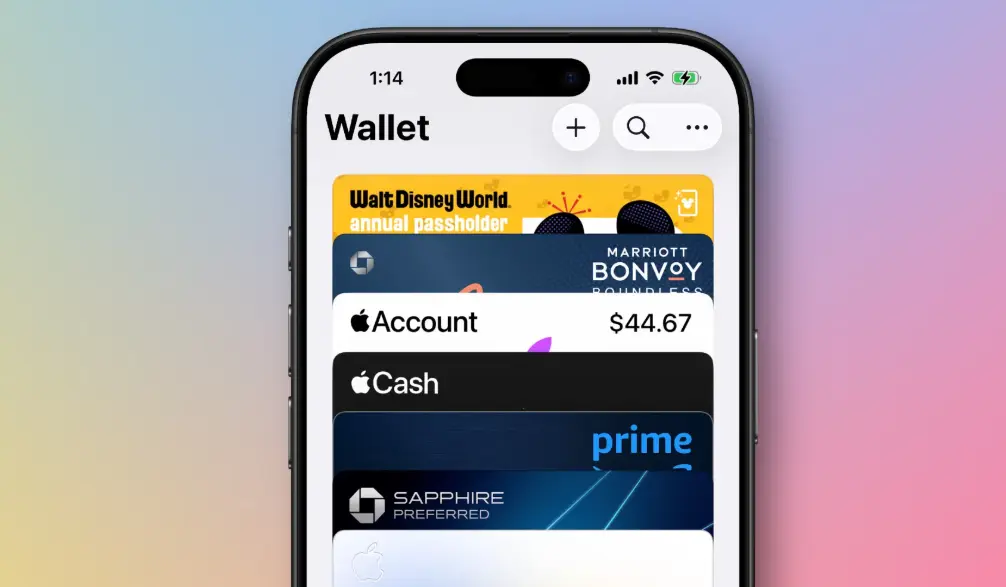
Apple Wallet is a secure digital wallet app built into iOS, iPadOS, and watchOS devices, allowing users to conveniently store and manage a variety of digital items in one place. It serves as a centralized hub for payment cards, transit cards, event tickets, boarding passes, government IDs, and even home or car keys, eliminating the need for physical wallets.
Key features include seamless integration with Apple Pay, enabling contactless payments at millions of locations worldwide. Users can add credit, debit, or prepaid cards from participating banks, with transactions protected by advanced security measures such as Face ID, Touch ID, or a device passcode. Apple Wallet also supports rewards programs, where eligible cards can earn cashback or points directly through the app.
Beyond payments, the app streamlines everyday tasks by organizing digital passes. For instance, event tickets from apps like Ticketmaster can be added for easy scanning at venues, while transit cards for systems like London’s Oyster or New York’s MetroCard allow for quick fare payments. It even integrates with services like hotel keys or corporate badges for hands-free access.
Security is a core focus, with Apple Wallet using end-to-end encryption and tokenization to protect user data. Transactions are authenticated via biometric verification, and sensitive information is never shared with merchants. Available on iPhone, iPad, and Apple Watch, Apple Wallet promotes a more sustainable lifestyle by reducing reliance on paper tickets and plastic cards, making it an essential tool for modern, on-the-go users.
Table of Contents
- Part 1: OnlineExamMaker AI Quiz Generator – The Easiest Way to Make Quizzes Online
- Part 2: 20 Apple Wallet Quiz Questions & Answers
- Part 3: Save Time and Energy: Generate Quiz Questions with AI Technology
Part 1: OnlineExamMaker AI Quiz Generator – The Easiest Way to Make Quizzes Online
Are you looking for an online assessment to test the Apple Wallet skills of your learners? OnlineExamMaker uses artificial intelligence to help quiz organizers to create, manage, and analyze exams or tests automatically. Apart from AI features, OnlineExamMaker advanced security features such as full-screen lockdown browser, online webcam proctoring, and face ID recognition.
Take a product tour of OnlineExamMaker:
● Includes a safe exam browser (lockdown mode), webcam and screen recording, live monitoring, and chat oversight to prevent cheating.
● AI Exam Grader for efficiently grading quizzes and assignments, offering inline comments, automatic scoring, and “fudge points” for manual adjustments.
● Embed quizzes on websites, blogs, or share via email, social media (Facebook, Twitter), or direct links.
● Handles large-scale testing (thousands of exams/semester) without internet dependency, backed by cloud infrastructure.
Automatically generate questions using AI
Part 2: 20 Apple Wallet Quiz Questions & Answers
or
1. Question: What is the primary function of Apple Wallet?
Options:
A. To store photos and videos
B. To manage digital passes, tickets, and cards
C. To edit documents
D. To play music
Correct Answer: B
Explanation: Apple Wallet is designed to securely store and manage digital items like credit cards, boarding passes, and event tickets, making it easier for users to access them from their iPhone or Apple Watch.
2. Question: Which Apple device is required to use Apple Wallet?
Options:
A. iPad
B. MacBook
C. iPhone or Apple Watch
D. Apple TV
Correct Answer: C
Explanation: Apple Wallet is available on iPhone and Apple Watch, as these devices support the necessary NFC and security features for contactless payments and pass management.
3. Question: How can you add a credit card to Apple Wallet?
Options:
A. Through the Settings app only
B. By scanning the card in the Wallet app or using Safari AutoFill
C. Via iTunes on a computer
D. By emailing the card details
Correct Answer: B
Explanation: You can add a credit card by opening the Wallet app, tapping the “+” button, and scanning the card or entering details manually, often with support from Safari AutoFill for seamless integration.
4. Question: What security feature protects transactions in Apple Wallet?
Options:
A. Face ID or Touch ID
B. A simple PIN code
C. Email verification
D. Public Wi-Fi connection
Correct Answer: A
Explanation: Apple Wallet uses biometric security like Face ID or Touch ID to authenticate transactions, ensuring that only the authorized user can make payments or access stored items.
5. Question: Can Apple Wallet be used for international travel?
Options:
A. No, it’s only for domestic use
B. Yes, but only in the United States
C. Yes, it supports boarding passes and payments in many countries
D. Yes, but only for Apple Store purchases
Correct Answer: C
Explanation: Apple Wallet supports international use by allowing users to add boarding passes, tickets, and cards that work with Apple Pay in supported regions worldwide.
6. Question: What types of items can be stored in Apple Wallet besides payment cards?
Options:
A. Only loyalty cards
B. Event tickets, boarding passes, and driver’s licenses
C. Music playlists
D. App icons
Correct Answer: B
Explanation: Apple Wallet can store a variety of items including event tickets, boarding passes, driver’s licenses (in supported regions), and other digital IDs, expanding beyond just payment methods.
7. Question: How does Apple Pay work with Apple Wallet?
Options:
A. It requires a physical card for every transaction
B. It uses tokenization to securely process payments
C. It only works online
D. It shares your card details with merchants
Correct Answer: B
Explanation: Apple Pay, integrated with Apple Wallet, uses tokenization to replace your card number with a unique device-specific number, enhancing security during transactions.
8. Question: Is it possible to remove a card from Apple Wallet?
Options:
A. No, once added, it’s permanent
B. Yes, by going to the Wallet app and selecting the card to delete
C. Yes, but only through iCloud settings
D. No, you must contact your bank
Correct Answer: B
Explanation: You can easily remove a card from Apple Wallet by opening the app, selecting the card, and choosing the remove option, giving users full control over their stored items.
9. Question: What happens if you lose your iPhone with Apple Wallet?
Options:
A. All cards are automatically canceled
B. You can use Find My to lock the device and protect your data
C. The cards become public
D. Nothing, as it’s not connected to your account
Correct Answer: B
Explanation: If you lose your iPhone, the Find My app allows you to remotely lock the device and erase data, protecting the contents of Apple Wallet from unauthorized access.
10. Question: Can Apple Wallet integrate with third-party apps?
Options:
A. No, it’s only for Apple services
B. Yes, apps can add passes directly to Wallet
C. Yes, but only for banking apps
D. No, it requires manual entry
Correct Answer: B
Explanation: Third-party apps can integrate with Apple Wallet using APIs to add items like tickets or cards directly, making it more convenient for users.
11. Question: What is the minimum iOS version required for Apple Wallet?
Options:
A. iOS 10
B. iOS 12
C. iOS 14
D. It varies by device
Correct Answer: D
Explanation: While Apple Wallet is available on devices running iOS 8 and later, full features like Apple Pay require more recent versions, depending on the device model.
12. Question: How do you view transaction history in Apple Wallet?
Options:
A. Through the Settings app
B. In the Wallet app for Apple Pay transactions
C. By checking your email
D. It’s not possible
Correct Answer: B
Explanation: You can view transaction history directly in the Wallet app by selecting your card and accessing the recent transactions section, linked to your Apple Pay activity.
13. Question: Does Apple Wallet support contactless payments?
Options:
A. No, only online payments
B. Yes, via NFC technology
C. Yes, but only in stores without NFC
D. No, it uses QR codes
Correct Answer: B
Explanation: Apple Wallet enables contactless payments through NFC (Near Field Communication) on compatible devices, allowing tap-to-pay functionality at supported terminals.
14. Question: Can you share passes from Apple Wallet with others?
Options:
A. No, sharing is not allowed
B. Yes, via Messages or email
C. Yes, but only with family sharing
D. No, it must be done in person
Correct Answer: B
Explanation: You can share certain passes, like event tickets, from Apple Wallet using the share feature, sending them via Messages, email, or other apps.
15. Question: What is the role of the Wallet app in managing Apple Cash?
Options:
A. It doesn’t support Apple Cash
B. It stores and manages Apple Cash balances
C. It converts cash to physical money
D. It’s only for international currency
Correct Answer: B
Explanation: The Wallet app allows users to store, send, and receive Apple Cash, which is a digital card for peer-to-peer payments integrated within the ecosystem.
16. Question: Is Apple Wallet available on Android devices?
Options:
A. Yes, through an app download
B. No, it’s exclusive to Apple devices
C. Yes, but with limited features
D. Yes, via web browser
Correct Answer: B
Explanation: Apple Wallet is only available on Apple devices like iPhone and Apple Watch, as it’s part of the iOS and watchOS ecosystem.
17. Question: How does Apple Wallet handle expired passes?
Options:
A. They are automatically deleted
B. They remain until manually removed
C. They are hidden but accessible
D. They convert to new passes
Correct Answer: B
Explanation: Expired passes in Apple Wallet stay in the app until the user manually deletes them, allowing for reference if needed.
18. Question: Can you use Apple Wallet for in-store rewards programs?
Options:
A. No, it’s only for payments
B. Yes, by adding loyalty cards
C. Yes, but only online
D. No, rewards are handled separately
Correct Answer: B
Explanation: Apple Wallet supports adding loyalty cards from various programs, enabling users to earn and redeem rewards during in-store purchases.
19. Question: What backup option exists for Apple Wallet items?
Options:
A. None, items are device-specific
B. Through iCloud for synced devices
C. Manual export to a computer
D. Email backups
Correct Answer: B
Explanation: Apple Wallet items can be backed up and synced across devices using iCloud, ensuring that passes and cards are available if you switch devices.
20. Question: Does Apple Wallet require an internet connection for all features?
Options:
A. Yes, always
B. No, some features like payments work offline
C. Yes, but only for adding cards
D. No, it uses Bluetooth exclusively
Correct Answer: B
Explanation: While some features require internet, contactless payments via Apple Pay can work offline in supported locations, using stored tokens for security.
or
Part 3: Save Time and Energy: Generate Quiz Questions with AI Technology
Automatically generate questions using AI