Let’s be honest. Creating quizzes used to be about as exciting as watching paint dry—and twice as time-consuming. You’d spend hours crafting questions, second-guessing difficulty levels, and wondering if your “tricky” question about photosynthesis was actually just confusing.
But here’s the thing: AI has completely transformed quiz creation. What once took hours now takes minutes. And we’re not talking about generic, cookie-cutter questions either. Modern AI tools can generate engaging, targeted quizzes on any topic imaginable, from quantum physics to Renaissance art to proper email etiquette.
- Understanding AI-Powered Quiz Generation
- Types of Questions AI Can Generate (And When to Use Each)
- How to Create Your First AI Quiz with OnlineExamMaker
- Personalizing Quizzes for Different Audiences
- Using AI Quizzes in Educational Settings
- Advanced Features: Analytics and Optimization
Understanding AI-Powered Quiz Generation
Think of AI quiz generators as your tireless teaching assistant—one that never needs coffee breaks and doesn’t judge you for creating a quiz at 2 AM. These tools use advanced language models to analyze topics, extract key concepts, and formulate questions that actually test understanding rather than just memory.
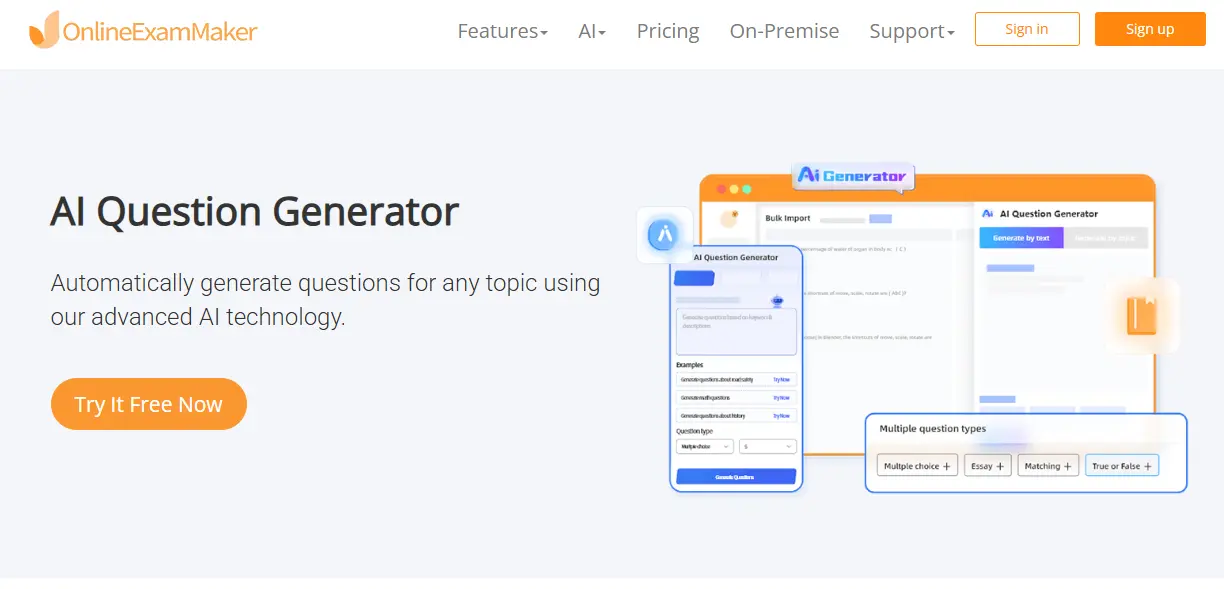
The magic happens in multiple ways. AI can pull from existing content like PDFs, YouTube videos, or web pages. Or it can generate entirely original questions based on a simple topic prompt. Some platforms, like OnlineExamMaker, even integrate real-time web search to ensure your quiz reflects the latest information.
Why Traditional Quiz Creation Wastes Your Time
Consider the traditional workflow: research the topic, outline learning objectives, write questions, create distractors for multiple choice, double-check for accuracy, format everything properly. Even with ChatGPT or Claude, you’re stuck in a conversation, copying and pasting, reformatting. It’s better than manual work, sure, but it’s still clunky.
AI-dedicated quiz platforms streamline this entire process. You input your parameters once, and the system handles everything from question generation to answer key creation to formatting. No back-and-forth. No copy-paste gymnastics.
Types of Questions AI Can Generate (And When to Use Each)
Not all questions are created equal, and thankfully, AI knows the difference. Here’s your field guide to question types and their ideal use cases:
| Question Type | Best Used For | Cognitive Level |
|---|---|---|
| Multiple Choice | Testing knowledge recall and comprehension quickly | Remember, Understand |
| True/False | Rapid assessment of basic concepts | Remember |
| Fill-in-the-Blank | Checking specific terminology and definitions | Remember, Understand |
| Short Answer | Assessing explanation and application skills | Understand, Apply |
| Essay Questions | Evaluating critical thinking and synthesis | Analyze, Evaluate, Create |
| Matching | Testing relationships between concepts | Understand, Apply |
Here’s where AI really shines: it understands Bloom’s Taxonomy. When using OnlineExamMaker’s AI generator, you can select cognitive levels ranging from basic recall to advanced creation. Want to test whether students can apply Newton’s laws to real scenarios rather than just remember them? The AI adjusts question complexity accordingly.
Pro Tip: Mix question types within a single quiz. Use multiple choice for breadth, short answer for depth, and essay questions for the really important stuff. This approach prevents fatigue and gives you a more complete picture of understanding.
The Art of Good Distractors
Multiple choice questions live or die by their wrong answers. Too obvious, and you’re just testing who stayed awake. Too tricky, and you’re testing who can decode your mind games rather than who knows the material.
AI excels at creating plausible distractors—those wrong answers that seem right if you half-understand the topic. It analyzes common misconceptions, similar concepts, and logical-but-incorrect reasoning paths. The result? Questions that genuinely measure understanding.
How to Create Your First AI Quiz with OnlineExamMaker?
Let’s walk through the actual process. No theory, just the practical steps you’ll take from “I need a quiz” to “Here’s your shareable link.”
Create Your Next Quiz/Exam with OnlineExamMaker
Step 1: Choose Your Input Method
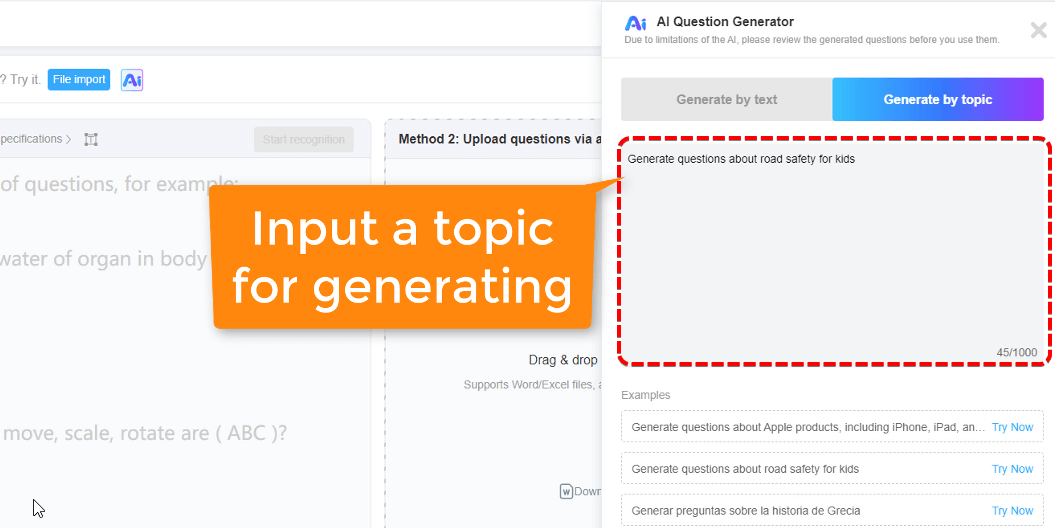
OnlineExamMaker offers multiple starting points:
- Topic-based generation – Simply type “The Role of Technology in Future Work” and let AI do its thing
- Word upload – Upload a word document to get exam questions instaktly
- Powerpoint upload – Perfect for textbook chapters or training materials
- Image recognition – Yes, even diagrams and infographics work
Each method takes roughly the same time to process—usually under a minute. The AI isn’t just scraping content; it’s analyzing, synthesizing, and formulating questions that target genuine understanding.
Step 2: Configure Your Quiz Parameters
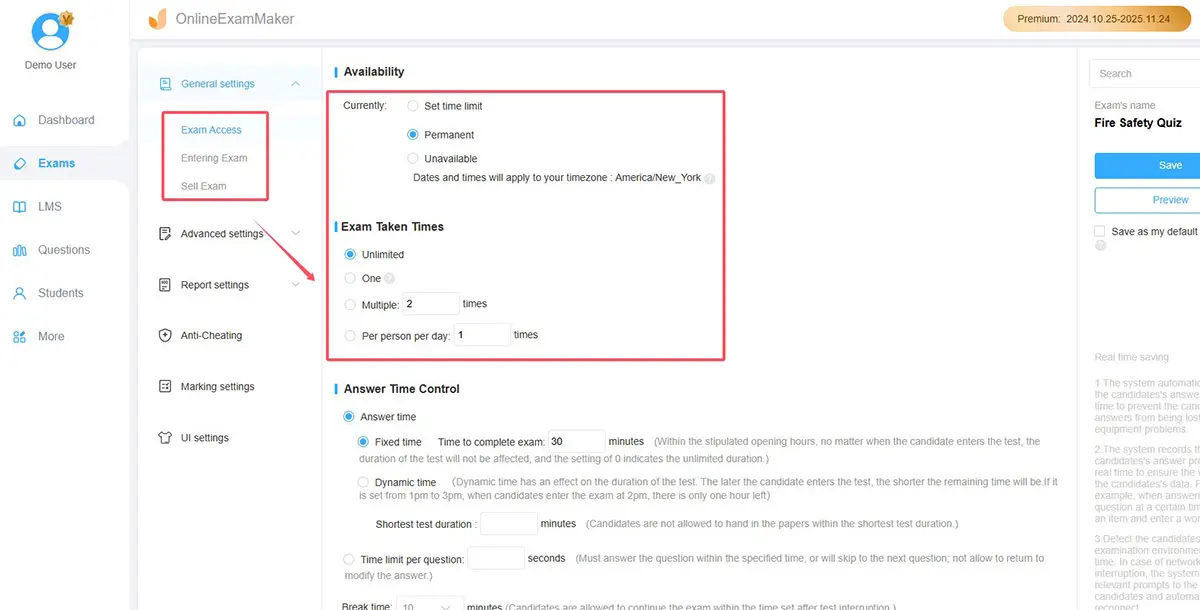
This is where you make it yours. You’ll set:
- Number of questions (10, 15, 20, or custom)
- Passiong score (The score rate that a student can pass the test)
- AI model preference (Google, DeepSeek, Anthropic, or others)
- Anti cheating (Enable webcam procting, apply full-screen mode)
That web search feature? It’s a game-changer for topics that evolve quickly. Asking about current climate policy or latest programming frameworks? The AI pulls fresh data rather than relying solely on training cutoff dates.
Step 3: Generate and Review
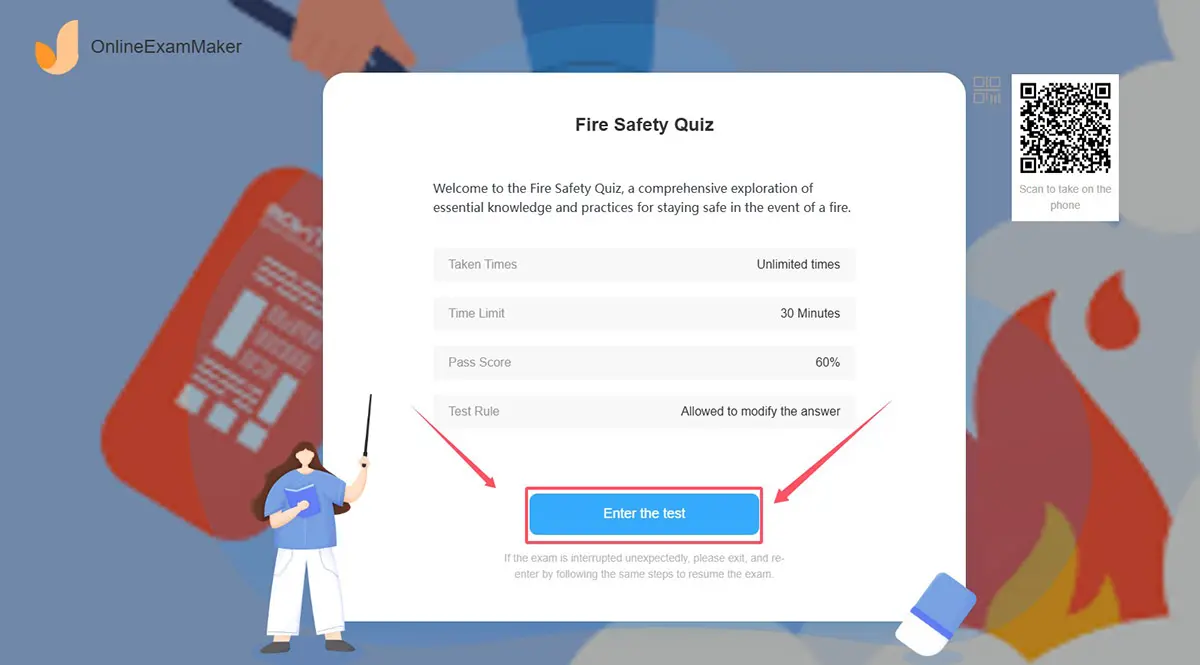
Hit generate and wait about 50-60 seconds. That’s it. You’ll land on a complete quiz interface where you can:
- Preview each question
- Edit wording or answers
- Adjust difficulty on the fly
- Reorder questions for better flow
The editing interface is crucial. While AI is impressive, it’s not infallible. Sometimes you’ll want to rephrase for your specific audience or adjust an answer that’s technically correct but doesn’t fit your teaching approach. The platform makes these tweaks effortless.
Step 4: Share and Deploy

Once satisfied, you’ve got multiple distribution options:
- Direct link sharing – Send a URL to anyone
- QR code – Exam takers can access the exam by scanning the code
- Embed code – Integrate into your website or LMS
The whole process, from initial concept to shareable quiz, takes maybe five minutes. Compare that to the hours you’d spend manually, and suddenly your afternoon is free for actual teaching.
Personalizing Quizzes for Different Audiences
Here’s where good becomes great. A quiz about the human body for medical students should look radically different from one for elementary kids, even if they’re technically covering similar material. AI understands this nuance—if you guide it properly.
Age-Appropriate Question Design
For children (ages 6-12): Questions should be concrete, use simple vocabulary, and often benefit from visual elements. Instead of “Describe the process of photosynthesis,” try “What do plants need to make their food? (Choose two)”
For teenagers (ages 13-18): You can introduce more abstract thinking and real-world applications. “How might climate change affect photosynthesis rates in tropical rainforests?” hits the sweet spot of challenging without overwhelming.
For adults: Don’t hold back on complexity or nuance. Professional learners appreciate questions that mirror actual job challenges. “Given these conflicting stakeholder requirements, which approach to data privacy best balances regulatory compliance with user experience?”
Niche-Specific Customization
Different fields require different question styles. Let’s get specific:
| Field | Quiz Characteristics | Example Question Style |
|---|---|---|
| Medical Training | Case-based scenarios, diagnostic reasoning | “Patient presents with X symptoms. What’s your differential diagnosis?” |
| Coding/Tech | Code snippets, debugging scenarios | “This function returns an error. Identify the bug and explain the fix.” |
| History | Cause-and-effect relationships, primary source analysis | “How did economic factors contribute to the French Revolution?” |
| Business/HR | Situational judgment, policy application | “Employee requests extended leave during busy season. How do you respond?” |
When generating with OnlineExamMaker, include these contextual details in your topic prompt. Instead of just “JavaScript basics,” try “JavaScript debugging for intermediate developers preparing for technical interviews.” The AI picks up on these cues and adjusts accordingly.
Using AI Quizzes in Educational Settings
Theory is nice. Practice is better. Here’s how educators are actually deploying AI-generated quizzes in real classrooms and training programs.
Homework That Doesn’t Feel Like Punishment
Traditional homework often becomes busywork—repetitive problems that test endurance more than understanding. AI-generated quizzes flip this script by creating varied, engaging questions that actually target gaps in knowledge.
Try this approach: After teaching a unit, generate a 10-question quiz with mixed difficulty levels. Students who score 80% or higher demonstrate proficiency and can move forward. Those who struggle get targeted feedback on specific concepts, then a second quiz focusing on those areas.
The beauty? You’re not spending hours creating differentiated assessments. The AI does it in seconds.
Formative Assessment Without the Grading Burden
Formative assessment—checking understanding during the learning process rather than after—is phenomenal in theory. In practice, it often means overwhelming grading loads for teachers.
AI quizzes with instant feedback solve this. Students get immediate results. You get aggregate data showing which concepts the class grasped and which need re-teaching. Nobody drowns in paperwork.
OnlineExamMaker’s analytics dashboard shows you patterns: Are most students missing question 7? That concept needs reinforcement. Did everyone ace questions 3-5? You can move faster through that material next time.
Instant Feedback: The Secret Weapon
We learn best when feedback is immediate. Answer a question, learn whether you’re right, understand why—all in seconds. That tight feedback loop accelerates learning dramatically compared to waiting days for graded assignments.
Modern AI quiz platforms don’t just mark answers correct or incorrect. They provide explanations. “Actually, the answer is B because X, Y, and Z. You might have chosen C because of common misconception about [concept], but here’s why that doesn’t apply in this context.”
This transforms quizzes from evaluation tools into teaching tools. Every question becomes a mini-lesson.
Advanced Features: Analytics and Optimization
Once you’ve got the basics down, it’s time to get sophisticated. Modern platforms like OnlineExamMaker pack serious analytical power under the hood.
Question Quality Metrics
Not all questions are equally effective. Some are too easy, some too hard, some just poorly written. Analytics help you identify which is which:
- Difficulty index – What percentage of test-takers answer correctly? Sweet spot is usually 60-80%
- Discrimination index – Do strong students get this right more often than weak students? If not, something’s wrong with the question
- Time-to-answer – Are students spending too long on supposedly “easy” questions? Might be confusingly worded
Use this data to refine your quiz bank over time. Questions that don’t discriminate well get revised or removed. Those that work perfectly get starred for future use.
Cheating Detection Patterns
Let’s address the elephant in the digital classroom. Yes, students try to cheat on online quizzes. No, you can’t prevent it entirely. But you can make it much harder and catch it when it happens.
AI-powered analytics spot suspicious patterns:
- Multiple accounts with identical wrong answers (copy-paste behavior)
- Impossibly fast completion times
- Sudden jumps in performance between practice and graded quizzes
- Access from multiple locations simultaneously
More importantly, you can design quiz parameters that discourage cheating: randomized question order, time limits, question pools where each student gets slightly different versions, immediate submission after each question (no going back to change answers).
Adaptive Difficulty Optimization
Here’s where it gets really clever. Adaptive quizzes adjust difficulty based on student performance. Answer three hard questions correctly? Here’s an even harder one. Struggling with basics? Let’s back up and reinforce fundamentals.
This requires a robust question bank organized by difficulty and topic. The AI helps build this by:
- Generating multiple questions on the same concept at different difficulty levels
- Analyzing which questions students find harder or easier than predicted
- Suggesting question revisions based on performance data
The result? Each student gets a personalized assessment that’s neither too easy (boring) nor too hard (demoralizing). Everyone ends up challenged at their appropriate level.
AI quiz generation isn’t about replacing teachers or eliminating the human element from education. It’s about reclaiming time for what matters: actual teaching, mentorship, creative curriculum design, one-on-one student interactions.
Those hours you used to spend writing quiz questions? Now you’re using them to redesign your struggling unit, provide extra help to students who need it, or—revolutionary thought—taking an actual lunch break.
The technology isn’t perfect. It requires your expertise to guide it, your judgment to refine it, your understanding of students to apply it effectively. But when you combine AI’s efficiency with your educational insight, something genuinely powerful emerges.
Ready to see what’s possible? Head over to OnlineExamMaker’s AI Question Generator and create your first quiz. You’ll be done before your coffee gets cold. And that, ultimately, is the whole point—spending less time on administrative tasks and more time on the work that actually makes a difference.
Because at the end of the day, great teaching isn’t about perfect quizzes. It’s about understanding students, inspiring curiosity, and helping people learn. AI just helps you do more of that good stuff by handling the tedious bits. And honestly? It’s about time.
