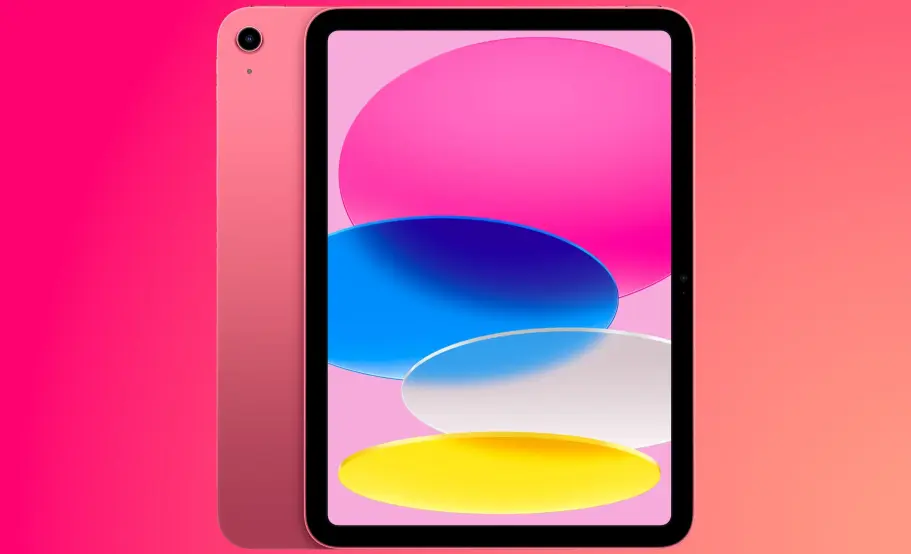
The iPad is a line of tablet computers designed and marketed by Apple Inc., first introduced in 2010 as a portable device that bridges the gap between smartphones and laptops. It features a touchscreen interface powered by iOS (now iPadOS), offering intuitive navigation through gestures and apps.
Key features include:
– Display and Design: High-resolution Retina displays ranging from 10.9 to 12.9 inches, with options for Liquid Retina and Mini-LED technology for vibrant colors and deep contrasts. Models are lightweight, with aluminum bodies for durability and premium feel.
– Performance: Powered by Apple’s A-series chips (e.g., A14 Bionic or M1), providing fast processing, efficient multitasking, and support for demanding tasks like video editing, gaming, and augmented reality.
– Ecosystem Integration: Seamlessly connects with other Apple devices via iCloud, allowing features like Handoff, Sidecar (using iPad as a second screen for Mac), and Apple Pencil support for precise drawing and note-taking.
– Battery and Connectivity: Long battery life (up to 10 hours), with Wi-Fi and cellular options for internet access. USB-C or Thunderbolt ports on newer models enable fast charging and accessory connections.
– Software and Apps: Runs on iPadOS, which supports multitasking with Split View and Slide Over. The App Store offers millions of optimized apps for productivity, creativity, education, and entertainment.
The iPad has evolved through generations, from the original model to specialized versions like the iPad Air, iPad mini, and iPad Pro, catering to different needs such as professional work, casual browsing, or digital art. It’s widely used for reading e-books, streaming media, remote work, and education, thanks to its portability and versatility. With regular updates, the iPad remains a leading device in the tablet market, emphasizing user privacy, security, and innovation.
Table of Contents
- Part 1: OnlineExamMaker – Generate and Share iPad Quiz with AI Automatically
- Part 2: 20 iPad Quiz Questions & Answers
- Part 3: Save Time and Energy: Generate Quiz Questions with AI Technology
Part 1: OnlineExamMaker – Generate and Share iPad Quiz with AI Automatically
The quickest way to assess the iPad knowledge of candidates is using an AI assessment platform like OnlineExamMaker. With OnlineExamMaker AI Question Generator, you are able to input content—like text, documents, or topics—and then automatically generate questions in various formats (multiple-choice, true/false, short answer). Its AI Exam Grader can automatically grade the exam and generate insightful reports after your candidate submit the assessment.
What you will like:
● Create a question pool through the question bank and specify how many questions you want to be randomly selected among these questions.
● Allow the quiz taker to answer by uploading video or a Word document, adding an image, and recording an audio file.
● Display the feedback for correct or incorrect answers instantly after a question is answered.
● Create a lead generation form to collect an exam taker’s information, such as email, mobile phone, work title, company profile and so on.
Automatically generate questions using AI
Part 2: 20 iPad Quiz Questions & Answers
or
Question 1: What company manufactures the iPad?
A) Samsung
B) Apple
C) Microsoft
D) Google
Correct Answer: B
Explanation: Apple designs and manufactures the iPad, making it a key product in their lineup of consumer electronics.
Question 2: When was the first iPad released?
A) 2007
B) 2010
C) 2012
D) 2015
Correct Answer: B
Explanation: The first iPad was released in 2010, marking the beginning of Apple’s tablet computer era.
Question 3: What is the operating system used by iPads?
A) Android
B) Windows
C) iOS
D) macOS
Correct Answer: C
Explanation: iPads run on iOS, which is optimized for touch interfaces and mobile experiences.
Question 4: Which iPad model is known for its larger screen and professional features?
A) iPad mini
B) iPad Air
C) iPad Pro
D) iPad
Correct Answer: C
Explanation: The iPad Pro features a larger screen, more powerful processors, and advanced accessories like the Apple Pencil for professional use.
Question 5: How does Face ID work on compatible iPads?
A) Using a fingerprint scanner
B) Using facial recognition via infrared sensors
C) Using a password entry
D) Using voice commands
Correct Answer: B
Explanation: Face ID uses infrared sensors to create a facial map for secure unlocking and authentication.
Question 6: What is the primary function of the Apple Pencil?
A) To charge the iPad
B) To provide stylus input for drawing and writing
C) To connect to external displays
D) To control music playback
Correct Answer: B
Explanation: The Apple Pencil is designed for precise input, allowing users to draw, write, and navigate with accuracy on the iPad screen.
Question 7: What is the minimum storage capacity available for most iPad models?
A) 16 GB
B) 64 GB
C) 128 GB
D) 256 GB
Correct Answer: B
Explanation: Most modern iPads start with at least 64 GB of storage to accommodate apps, photos, and files.
Question 8: What is iCloud?
A) A physical storage device
B) Apple’s cloud-based service for storing data and syncing devices
C) An app for video editing
D) A type of iPad accessory
Correct Answer: B
Explanation: iCloud is Apple’s service that allows users to store photos, documents, and backups across their Apple devices.
Question 9: How do you take a screenshot on an iPad?
A) Press the Home button and Volume Up
B) Press the Power button and Home button (on older models) or Power and Volume Up (on newer models)
C) Shake the device
D) Use the Settings app
Correct Answer: B
Explanation: Pressing the Power button and Home button (or Volume Up on newer models) captures the screen as an image.
Question 10: What is the main difference between Wi-Fi and Cellular iPad models?
A) Wi-Fi models have better cameras
B) Cellular models can connect to mobile networks for internet access
C) Wi-Fi models are larger
D) Cellular models do not support apps
Correct Answer: B
Explanation: Cellular iPads include a SIM card slot for mobile data, while Wi-Fi models rely on Wi-Fi connections.
Question 11: Which app is NOT typically pre-installed on a new iPad?
A) Safari
B) Photos
C) Microsoft Word
D) App Store
Correct Answer: C
Explanation: Microsoft Word is not pre-installed; it’s an optional app from the App Store, whereas Safari, Photos, and App Store come by default.
Question 12: How do you update the iOS on an iPad?
A) Through iTunes on a computer
B) Via the Settings app under General > Software Update
C) By restarting the device
D) Using the Camera app
Correct Answer: B
Explanation: The Settings app provides an option to check for and install iOS updates wirelessly.
Question 13: What is a Retina display on an iPad?
A) A display with low resolution
B) Apple’s term for high-resolution screens with sharp visuals
C) A black-and-white screen
D) A foldable screen
Correct Answer: B
Explanation: Retina display refers to Apple’s high-pixel-density screens that deliver crisp and clear images.
Question 14: Can iPads run apps designed for macOS?
A) Yes, directly
B) No, iPads use iOS which is different from macOS
C) Only with an adapter
D) Yes, but only on iPad Pro
Correct Answer: B
Explanation: iPads run iOS apps, not macOS apps, though some apps are optimized for both via cross-platform development.
Question 15: What is Haptic Touch on iPads?
A) A feature for vibrating alerts
B) A pressure-sensitive touch technology for long-press actions
C) A way to connect to Bluetooth devices
D) A screen brightness adjustment
Correct Answer: B
Explanation: Haptic Touch provides feedback through vibrations when you long-press on the screen, similar to 3D Touch.
Question 16: How can you connect an iPad to a TV?
A) Using a USB cable only
B) Via AirPlay or an HDMI adapter
C) By mailing the content
D) Through a printer connection
Correct Answer: B
Explanation: AirPlay allows wireless mirroring to a compatible TV, or an HDMI adapter can be used for wired connections.
Question 17: What is the approximate battery life of a standard iPad?
A) 1-2 hours
B) 10-12 hours of usage
C) 24 hours
D) Less than 1 hour
Correct Answer: B
Explanation: Most iPads offer around 10-12 hours of battery life for typical use like browsing and video playback.
Question 18: How do you perform a factory reset on an iPad?
A) Hold the power button
B) Go to Settings > General > Reset
C) Shake the device three times
D) Use the calculator app
Correct Answer: B
Explanation: In Settings under General > Reset, you can choose to erase all content and settings for a factory reset.
Question 19: What is one key feature of the latest iPad models as of 2023?
A) Support for Android apps
B) Advanced chip like the A14 Bionic for better performance
C) Removable batteries
D) Built-in printers
Correct Answer: B
Explanation: Recent iPad models, such as those with the A14 Bionic chip, offer enhanced processing power for tasks like gaming and editing.
Question 20: What is a primary advantage of using an iPad over a traditional computer?
A) It is less portable
B) It offers a touch-based interface and longer battery life for on-the-go use
C) It has more storage options
D) It runs Windows software
Correct Answer: B
Explanation: iPads are designed for portability, with intuitive touch controls and efficient battery use, making them ideal for mobile productivity.
or
Part 3: Save Time and Energy: Generate Quiz Questions with AI Technology
Automatically generate questions using AI