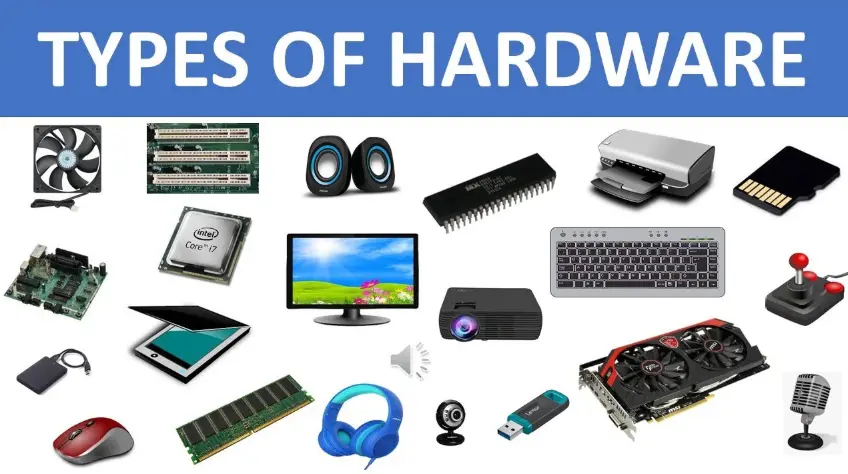
A hardware overview encompasses the physical components of a computing system, including:
– Central Processing Unit (CPU): The brain of the computer, responsible for executing instructions and performing calculations. Modern CPUs, such as Intel Core i7 or AMD Ryzen 7, feature multiple cores for enhanced multitasking and processing power.
– Memory (RAM): Volatile storage that temporarily holds data for active programs. Typical capacities range from 8GB to 64GB, enabling smooth operation of applications and operating systems.
– Storage Devices: Non-volatile options like Solid State Drives (SSDs) or Hard Disk Drives (HDDs). SSDs offer faster read/write speeds (e.g., up to 5000 MB/s) and greater reliability, while HDDs provide larger capacities at lower costs, such as 1TB to 4TB.
– Motherboard: The main circuit board that connects all hardware components, including CPU, RAM, and expansion slots. It supports features like USB ports, PCIe slots, and integrated graphics.
– Graphics Processing Unit (GPU): Handles rendering of images, videos, and graphics-intensive tasks. Discrete GPUs from NVIDIA (e.g., GeForce RTX series) or AMD (e.g., Radeon RX series) deliver high performance for gaming and professional applications.
– Input/Output Devices: Peripherals such as keyboards, mice, monitors, and printers. For example, a 1080p LCD monitor with 60Hz refresh rate for standard display needs.
– Power Supply Unit (PSU): Converts AC to DC power, ensuring stable energy delivery to components. Units range from 300W for basic systems to 1000W for high-end setups.
– Cooling Systems: Fans, heat sinks, or liquid cooling to manage heat from the CPU and GPU, preventing thermal throttling and extending hardware lifespan.
This overview highlights key elements that contribute to a system’s performance, scalability, and efficiency. For optimal functionality, ensure compatibility and regular maintenance.
Table of Contents
- Part 1: OnlineExamMaker – Generate and Share Hardware Quiz with AI Automatically
- Part 2: 20 Hardware Quiz Questions & Answers
- Part 3: Save Time and Energy: Generate Quiz Questions with AI Technology
Part 1: OnlineExamMaker – Generate and Share Hardware Quiz with AI Automatically
OnlineExamMaker is a powerful AI-powered assessment platform to create auto-grading Hardware skills assessments. It’s designed for educators, trainers, businesses, and anyone looking to generate engaging quizzes without spending hours crafting questions manually. The AI Question Generator feature allows you to input a topic or specific details, and it generates a variety of question types automatically.
Top features for assessment organizers:
● Prevent cheating by randomizing questions or changing the order of questions, so learners don’t get the same set of questions each time.
● AI Exam Grader for efficiently grading quizzes and assignments, offering inline comments, automatic scoring, and “fudge points” for manual adjustments.
● Embed quizzes on websites, blogs, or share via email, social media (Facebook, Twitter), or direct links.
● Handles large-scale testing (thousands of exams/semester) without internet dependency, backed by cloud infrastructure.
Automatically generate questions using AI
Part 2: 20 Hardware Quiz Questions & Answers
or
1. Question: What is the primary function of the CPU in a computer?
Options:
A) To store data permanently
B) To process instructions and perform calculations
C) To provide power to the computer
D) To display graphics on the screen
Answer: B
Explanation: The CPU, or Central Processing Unit, executes instructions from programs by performing arithmetic, logical, control, and input/output operations, making it the core component for processing data.
2. Question: Which component is responsible for temporarily storing data that the CPU needs to access quickly?
Options:
A) Hard Disk Drive (HDD)
B) Random Access Memory (RAM)
C) Solid State Drive (SSD)
D) Motherboard
Answer: B
Explanation: RAM provides fast, temporary storage for data and instructions that the CPU is currently using, allowing for quick read and write access during program execution.
3. Question: What type of port is commonly used to connect keyboards and mice to a computer?
Options:
A) HDMI
B) USB
C) VGA
D) Ethernet
Answer: B
Explanation: USB ports are versatile and widely used for connecting peripherals like keyboards and mice, offering plug-and-play functionality and power delivery.
4. Question: Which hardware component is primarily responsible for rendering graphics in a computer?
Options:
A) CPU
B) GPU
C) RAM
D) Power Supply Unit (PSU)
Answer: B
Explanation: The GPU, or Graphics Processing Unit, is specialized for handling complex calculations related to rendering images, videos, and 3D graphics efficiently.
5. Question: What does the acronym BIOS stand for in computer hardware?
Options:
A) Basic Input Output System
B) Binary Input Operating System
C) Built-In Operating Software
D) Basic Interface Operating System
Answer: A
Explanation: BIOS is firmware that initializes hardware during the boot process and provides runtime services for operating systems, ensuring proper hardware detection and configuration.
6. Question: Which storage device uses spinning disks to read and write data?
Options:
A) SSD
B) Flash Drive
C) HDD
D) RAM
Answer: C
Explanation: HDD, or Hard Disk Drive, uses magnetic rotating disks to store and retrieve data, making it a traditional mechanical storage solution.
7. Question: What is the main circuit board that connects all hardware components in a computer?
Options:
A) CPU
B) Motherboard
C) Power Supply
D) Graphics Card
Answer: B
Explanation: The motherboard serves as the central hub, housing the CPU, RAM, and other components, and facilitating communication between them via integrated circuits.
8. Question: Which component converts AC power from the wall outlet to DC power for the computer?
Options:
A) CPU Cooler
B) Power Supply Unit (PSU)
C) Battery Backup
D) Motherboard
Answer: B
Explanation: The PSU regulates and distributes the appropriate DC voltages to various hardware components, ensuring safe and stable power delivery.
9. Question: What type of memory is non-volatile and retains data even when the computer is turned off?
Options:
A) RAM
B) Cache Memory
C) ROM
D) Virtual Memory
Answer: C
Explanation: ROM, or Read-Only Memory, stores permanent data like firmware that does not need to be altered and remains intact without power.
10. Question: Which interface is commonly used for connecting high-definition displays to a computer?
Options:
A) USB
B) HDMI
C) Serial Port
D) Parallel Port
Answer: B
Explanation: HDMI transmits both high-definition video and audio signals, making it ideal for connecting monitors, TVs, and other display devices.
11. Question: What is the purpose of a heat sink in computer hardware?
Options:
A) To increase processing speed
B) To dissipate heat from components like the CPU
C) To store additional data
D) To connect peripherals
Answer: B
Explanation: A heat sink absorbs and dissipates heat generated by components such as the CPU, preventing overheating and maintaining optimal performance.
12. Question: Which hardware device is used to input data by detecting physical movements?
Options:
A) Monitor
B) Mouse
C) Printer
D) Speaker
Answer: B
Explanation: A mouse is an input device that translates physical movements and clicks into digital signals, allowing users to interact with the computer’s interface.
13. Question: What does the term “overclocking” refer to in hardware?
Options:
A) Reducing the clock speed of the CPU
B) Increasing the clock speed beyond the manufacturer’s rating
C) Shutting down the system automatically
D) Updating the BIOS firmware
Answer: B
Explanation: Overclocking involves running hardware, like the CPU or GPU, at higher speeds than intended to achieve better performance, though it can increase heat and risk instability.
14. Question: Which component is essential for expanding the number of USB ports on a computer?
Options:
A) Expansion Card
B) Hard Drive
C) CPU
D) Keyboard
Answer: A
Explanation: An expansion card, such as a USB hub or PCIe card, adds extra ports or functionality by plugging into the motherboard’s expansion slots.
15. Question: What is the difference between DDR4 and DDR3 RAM?
Options:
A) DDR4 is slower than DDR3
B) DDR4 offers higher speed and efficiency compared to DDR3
C) DDR4 is used only for graphics
D) DDR3 consumes less power than DDR4
Answer: B
Explanation: DDR4 RAM provides faster data transfer rates, higher bandwidth, and lower power consumption than DDR3, making it a more advanced memory standard.
16. Question: Which hardware component is responsible for managing network connections in a computer?
Options:
A) Sound Card
B) Network Interface Card (NIC)
C) Graphics Card
D) Modem
Answer: B
Explanation: The NIC enables the computer to connect to a network, such as Ethernet or Wi-Fi, by handling data transmission and reception protocols.
17. Question: What type of bus is used for high-speed communication between the CPU and RAM?
Options:
A) PCI Express
B) Front Side Bus
C) USB Bus
D) SATA Bus
Answer: B
Explanation: The Front Side Bus (FSB) connects the CPU to the northbridge, facilitating rapid data transfer to and from RAM for efficient processing.
18. Question: Which device is an example of an output hardware component?
Options:
A) Keyboard
B) Scanner
C) Printer
D) Microphone
Answer: C
Explanation: A printer outputs digital data as physical documents, converting electronic information into a tangible form for users.
19. Question: What is the role of a fan in computer hardware?
Options:
A) To generate electricity
B) To cool internal components by circulating air
C) To store files
D) To process data
Answer: B
Explanation: Fans help maintain safe operating temperatures by expelling hot air and drawing in cooler air, preventing hardware damage from overheating.
20. Question: Which storage technology uses flash memory and has no moving parts?
Options:
A) HDD
B) SSD
C) CD-ROM
D) Floppy Disk
Answer: B
Explanation: SSD, or Solid State Drive, uses non-volatile flash memory for faster access times and greater durability compared to mechanical drives like HDDs.
or
Part 3: Save Time and Energy: Generate Quiz Questions with AI Technology
Automatically generate questions using AI