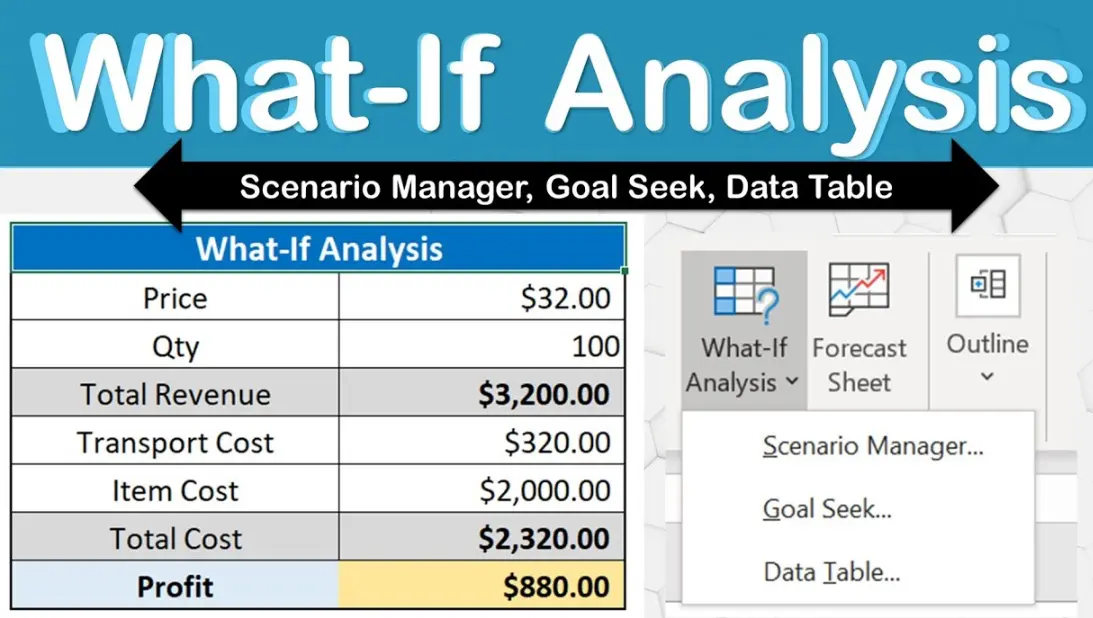
Excel’s What-If Analysis is a powerful set of tools designed to help users explore and predict outcomes by varying input values in spreadsheets. It enables data-driven decision-making through scenario testing. Here’s a breakdown of its key components:
1. Scenario Manager:
This tool allows you to create, save, and switch between multiple scenarios within the same worksheet. For example, you can define “Best Case,” “Worst Case,” and “Most Likely” scenarios by changing specific cells, then compare results side by side. It’s ideal for financial forecasting or risk assessment.
2. Goal Seek:
Goal Seek helps you find the input value needed to achieve a desired result in a formula. For instance, if you want to know what sales figure will reach a specific profit target, Goal Seek calculates the required input automatically. It’s useful for reverse engineering problems.
3. Data Tables:
Data Tables generate a range of possible outcomes by substituting different values into one or two variables in a formula. One-variable tables show results for a single changing input, while two-variable tables compare interactions between two inputs. This is great for sensitivity analysis, like evaluating how interest rates affect loan payments.
Benefits of What-If Analysis include:
– Flexibility: Easily test hypotheses without altering original data.
– Insight: Reveals trends and relationships in data, aiding better planning.
– Efficiency: Automates complex calculations, saving time compared to manual adjustments.
To access these tools, go to the “Data” tab in Excel and select “What-If Analysis.” Remember, accurate results depend on well-structured formulas and data. This feature is available in most versions of Excel, enhancing its utility for business, education, and personal use.
Table of Contents
- Part 1: Create A Excel What-If Analysis Quiz in Minutes Using AI with OnlineExamMaker
- Part 2: 20 Excel What-If Analysis Quiz Questions & Answers
- Part 3: OnlineExamMaker AI Question Generator: Generate Questions for Any Topic
Part 1: Create A Excel What-If Analysis Quiz in Minutes Using AI with OnlineExamMaker
Are you looking for an online assessment to test the Excel What-If Analysis skills of your learners? OnlineExamMaker uses artificial intelligence to help quiz organizers to create, manage, and analyze exams or tests automatically. Apart from AI features, OnlineExamMaker advanced security features such as full-screen lockdown browser, online webcam proctoring, and face ID recognition.
Recommended features for you:
● Includes a safe exam browser (lockdown mode), webcam and screen recording, live monitoring, and chat oversight to prevent cheating.
● Enhances assessments with interactive experience by embedding video, audio, image into quizzes and multimedia feedback.
● Once the exam ends, the exam scores, question reports, ranking and other analytics data can be exported to your device in Excel file format.
● Offers question analysis to evaluate question performance and reliability, helping instructors optimize their training plan.
Automatically generate questions using AI
Part 2: 20 Excel What-If Analysis Quiz Questions & Answers
or
1. What is the primary purpose of the Goal Seek tool in Excel?
A. To create charts and graphs
B. To find an input value that produces a desired result
C. To manage large datasets
D. To automate repetitive tasks
Answer: B
Explanation: Goal Seek is used to determine the input value needed in a formula to achieve a specific output, making it ideal for what-if scenarios involving one variable.
2. Which Excel feature allows you to compare different sets of input values and their outcomes?
A. Data Validation
B. Scenario Manager
C. Conditional Formatting
D. PivotTables
Answer: B
Explanation: Scenario Manager lets you create and switch between multiple scenarios, each with different input values, to see how they affect the results of formulas.
3. In Excel, what does a one-variable Data Table do?
A. It summarizes data from multiple sheets
B. It shows how changing one input affects multiple results
C. It performs advanced statistical analysis
D. It creates a timeline for data entries
Answer: B
Explanation: A one-variable Data Table displays the outcomes of a formula when one input variable is changed across a range of values.
4. How does the Solver add-in differ from Goal Seek?
A. Solver is for simple calculations only
B. Solver can handle multiple constraints and variables for optimization
C. Solver is used for charting data
D. Solver requires no setup
Answer: B
Explanation: Unlike Goal Seek, which works with one variable, Solver optimizes solutions by adjusting multiple variables while considering constraints.
5. What is required to use the What-If Analysis tools in Excel?
A. A specific font style
B. A formula that references cells
C. External data connections
D. Macro-enabled workbooks
Answer: B
Explanation: What-If Analysis tools like Goal Seek and Data Tables require formulas in cells to evaluate how changes in inputs affect outputs.
6. In a two-variable Data Table, what can you analyze?
A. The impact of changing text formats
B. How two different inputs affect a single formula
C. Only historical data trends
D. Sorting and filtering options
Answer: B
Explanation: A two-variable Data Table allows you to see the results of a formula when two inputs are varied simultaneously.
7. Which tool in Excel’s What-If Analysis is best for finding the maximum or minimum value under constraints?
A. Goal Seek
B. Scenario Manager
C. Solver
D. Data Table
Answer: C
Explanation: Solver is designed for optimization problems, such as maximizing profit or minimizing costs, by adjusting variables within defined constraints.
8. What happens when you change an input value in a Scenario Manager setup?
A. It automatically updates all scenarios
B. Only the active scenario is affected
C. The workbook is saved immediately
D. No changes are allowed after creation
Answer: B
Explanation: In Scenario Manager, changing an input value only impacts the currently selected scenario, allowing you to compare it with others.
9. Why might you use a Data Table instead of manually entering values?
A. To add colors to cells
B. To quickly test multiple what-if scenarios without recalculating each time
C. To insert images into Excel
D. To protect sheets from editing
Answer: B
Explanation: Data Tables automate the process of testing various inputs in a formula, saving time compared to manual entry and recalculation.
10. In Goal Seek, what must you specify?
A. The cell to change and the desired result
B. A chart type and data range
C. Multiple output cells
D. External file links
Answer: A
Explanation: Goal Seek requires you to set the cell to adjust, the target value for the result cell, and the value you’re aiming for in that result.
11. What is a key limitation of Goal Seek?
A. It can only handle one variable at a time
B. It requires internet access
C. It works with text data only
D. It cannot be used in shared workbooks
Answer: A
Explanation: Goal Seek is limited to scenarios with a single input variable, whereas tools like Solver can manage multiple variables.
12. How do you access What-If Analysis tools in Excel?
A. Through the Insert tab
B. Via the Data tab in the Analysis group
C. In the Review tab for comments
D. Under the File menu for options
Answer: B
Explanation: The What-If Analysis tools are located in the Data tab, specifically in the What-If Analysis dropdown menu.
13. In Scenario Manager, what do scenarios allow you to do?
A. Edit formulas directly
B. Save and compare different versions of data inputs and outputs
C. Create custom ribbons
D. Import data from web sources
Answer: B
Explanation: Scenarios in Scenario Manager store different sets of input values and their corresponding outputs for easy comparison.
14. What type of problem is best solved with a Data Table?
A. Text editing tasks
B. Exploring how interest rates affect loan payments over time
C. Managing email attachments
D. Creating dashboards
Answer: B
Explanation: Data Tables are ideal for sensitivity analysis, such as seeing how changes in variables like interest rates impact financial formulas.
15. Why would you use Solver over other What-If tools?
A. For basic arithmetic
B. For complex problems with multiple constraints, like resource allocation
C. To format cells
D. To add borders to tables
Answer: B
Explanation: Solver is suited for advanced optimization where multiple variables and constraints need to be balanced to achieve an optimal solution.
16. In a one-variable Data Table, where are the input values typically placed?
A. In the same row as the formula
B. In a column or row adjacent to the formula cell
C. In a separate workbook
D. In the header of a chart
Answer: B
Explanation: Input values for a one-variable Data Table are entered in a row or column next to the formula cell to show varying results.
17. What must be installed for Solver to work in Excel?
A. An additional add-in
B. A specific template
C. Internet connectivity
D. Custom macros
Answer: A
Explanation: Solver is an add-in that needs to be enabled in Excel’s options to access its optimization capabilities.
18. How does changing a scenario in Scenario Manager affect the worksheet?
A. It deletes the original data
B. It temporarily updates the worksheet with the scenario’s values
C. It locks the sheet for editing
D. It exports the data automatically
Answer: B
Explanation: When you switch scenarios, the worksheet displays the input values and results of the selected scenario without permanently altering the original data.
19. What is an example of a real-world use for Goal Seek?
A. Designing a logo
B. Calculating the required sales volume to reach a profit target
C. Sending emails
D. Organizing files
Answer: B
Explanation: Goal Seek can determine the exact input, like sales volume, needed to achieve a specific outcome, such as a desired profit level.
20. Which What-If Analysis tool is most useful for financial forecasting?
A. Conditional Formatting
B. Data Tables
C. Page Layout options
D. Themes and styles
Answer: B
Explanation: Data Tables allow you to forecast financial outcomes by testing various variables, such as inflation rates or expenses, on formulas.
or
Part 3: OnlineExamMaker AI Question Generator: Generate Questions for Any Topic
Automatically generate questions using AI