Excel offers a range of built-in functions for managing dates and times, allowing users to perform calculations, extractions, and manipulations efficiently. Below is a concise summary of the primary functions:
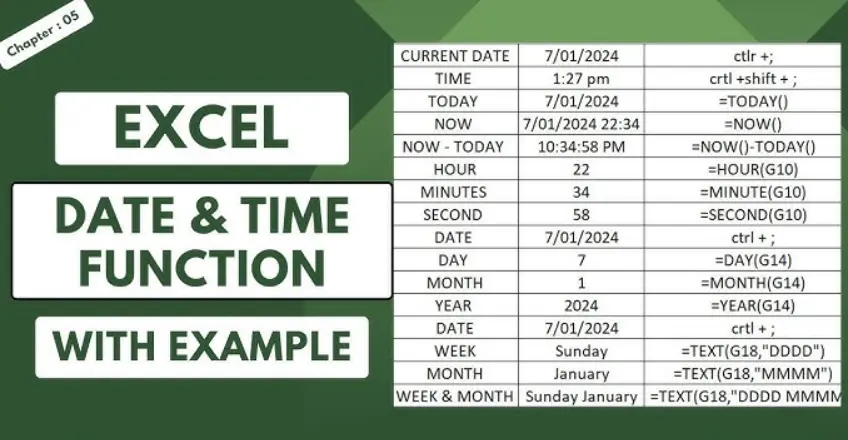
– TODAY(): Returns the current date. Example: =TODAY() displays today’s date.
– NOW(): Returns the current date and time. Example: =NOW() shows the full current datetime.
– DATE(year, month, day): Creates a date from specified year, month, and day values. Example: =DATE(2023, 12, 31) returns December 31, 2023.
– TIME(hour, minute, second): Creates a time from specified hour, minute, and second values. Example: =TIME(14, 30, 0) returns 2:30 PM.
– YEAR(serial_number): Extracts the year from a date. Example: =YEAR(“12/31/2023”) returns 2023.
– MONTH(serial_number): Extracts the month from a date. Example: =MONTH(“12/31/2023”) returns 12.
– DAY(serial_number): Extracts the day from a date. Example: =DAY(“12/31/2023”) returns 31.
– HOUR(serial_number): Extracts the hour from a time. Example: =HOUR(“14:30:00”) returns 14.
– MINUTE(serial_number): Extracts the minute from a time. Example: =MINUTE(“14:30:00”) returns 30.
– SECOND(serial_number): Extracts the second from a time. Example: =SECOND(“14:30:15”) returns 15.
– DATEDIF(start_date, end_date, “unit”): Calculates the difference between two dates in specified units (e.g., “Y” for years, “M” for months, “D” for days). Example: =DATEDIF(“1/1/2023”, “12/31/2023”, “D”) returns the number of days between the dates.
– EDATE(start_date, months): Returns a date that is a specified number of months before or after the start date. Example: =EDATE(“12/31/2023”, 1) returns January 31, 2024.
– EOMONTH(start_date, months): Returns the last day of the month that is a specified number of months before or after the start date. Example: =EOMONTH(“1/15/2023”, 0) returns January 31, 2023.
– NETWORKDAYS(start_date, end_date, [holidays]): Calculates the number of working days (excluding weekends and optional holidays) between two dates. Example: =NETWORKDAYS(“1/1/2023”, “1/31/2023”) returns the working days in January 2023.
– WEEKDAY(serial_number, [return_type]): Returns the day of the week corresponding to a date. Example: =WEEKDAY(“1/1/2023”) returns 1 for Sunday.
– WORKDAY(start_date, days, [holidays]): Returns a date that is a specified number of working days ahead or before the start date. Example: =WORKDAY(“1/1/2023”, 5) returns the date 5 working days after January 1, 2023.
These functions can be combined for more complex operations, such as calculating age, scheduling, or analyzing time-based data. Always ensure dates are entered in a format recognized by Excel for accurate results.
Table of Contents
- Part 1: OnlineExamMaker AI Quiz Generator – The Easiest Way to Make Quizzes Online
- Part 2: 20 Excel Date and Time Functions Quiz Questions & Answers
- Part 3: OnlineExamMaker AI Question Generator: Generate Questions for Any Topic
Part 1: OnlineExamMaker AI Quiz Generator – The Easiest Way to Make Quizzes Online
When it comes to ease of creating a Excel Date and Time Functions skills assessment, OnlineExamMaker is one of the best AI-powered quiz making software for your institutions or businesses. With its AI Question Generator, just upload a document or input keywords about your assessment topic, you can generate high-quality quiz questions on any topic, difficulty level, and format.
What you will like:
● AI Question Generator to help you save time in creating quiz questions automatically.
● Share your online exam with audiences on social platforms like Facebook, Twitter, Reddit and more.
● Display the feedback for correct or incorrect answers instantly after a question is answered.
● Create a lead generation form to collect an exam taker’s information, such as email, mobile phone, work title, company profile and so on.
Automatically generate questions using AI
Part 2: 20 Excel Date and Time Functions Quiz Questions & Answers
or
Question 1:
What function returns the current date in Excel?
A) TODAY()
B) NOW()
C) DATE()
D) TIME()
Answer: A) TODAY()
Explanation: TODAY() returns the current date without the time component.
Question 2:
Which function returns both the current date and time?
A) TODAY()
B) DATE()
C) NOW()
D) TIME()
Answer: C) NOW()
Explanation: NOW() returns the current date and time based on the system clock.
Question 3:
What is the purpose of the DATE() function?
A) To add dates
B) To return the current time
C) To create a date from year, month, and day values
D) To calculate the difference between dates
Answer: C) To create a date from year, month, and day values
Explanation: DATE(year, month, day) constructs a date serial number from the specified components.
Question 4:
How does the TIME() function work?
A) It returns the current date
B) It creates a time from hour, minute, and second values
C) It adds time to a date
D) It calculates the total seconds in a day
Answer: B) It creates a time from hour, minute, and second values
Explanation: TIME(hour, minute, second) builds a time value that can be used in calculations.
Question 5:
What does the YEAR() function extract from a date?
A) The month
B) The day
C) The year
D) The hour
Answer: C) The year
Explanation: YEAR(serial_number) extracts the year portion (e.g., 2023) from a given date.
Question 6:
Which function is used to extract the month from a date?
A) MONTH()
B) DAY()
C) YEAR()
D) EOMONTH()
Answer: A) MONTH()
Explanation: MONTH(serial_number) returns the month number (1-12) from a date.
Question 7:
What does the DAY() function do?
A) Returns the day of the week
B) Extracts the day of the month from a date
C) Adds days to a date
D) Calculates the total days in a year
Answer: B) Extracts the day of the month from a date
Explanation: DAY(serial_number) returns the day of the month (1-31) from a date value.
Question 8:
How is the HOUR() function used?
A) To get the hour from a time value
B) To add hours to a date
C) To return the total hours in a day
D) To convert time to seconds
Answer: A) To get the hour from a time value
Explanation: HOUR(serial_number) extracts the hour (0-23) from a time or datetime value.
Question 9:
What does MINUTE() function return?
A) The minute from a time value
B) The total minutes in an hour
C) The month from a date
D) The second from a time value
Answer: A) The minute from a time value
Explanation: MINUTE(serial_number) returns the minute (0-59) from a time or datetime.
Question 10:
Which function extracts the second from a time?
A) SECOND()
B) MINUTE()
C) HOUR()
D) TIME()
Answer: A) SECOND()
Explanation: SECOND(serial_number) returns the second (0-59) from a time or datetime value.
Question 11:
What is the function to find the last day of the month?
A) EOMONTH()
B) EDATE()
C) TODAY()
D) DATE()
Answer: A) EOMONTH()
Explanation: EOMONTH(start_date, months) returns the last day of the month after a specified number of months.
Question 12:
How does EDATE() work?
A) Adds or subtracts months from a date
B) Adds days to a date
C) Returns the current date
D) Calculates the difference in dates
Answer: A) Adds or subtracts months from a date
Explanation: EDATE(start_date, months) returns a date that is a specified number of months before or after the start date.
Question 13:
What does DATEDIF() calculate?
A) The difference between two dates in various units like days or years
B) The sum of dates
C) The average of dates
D) The current date
Answer: A) The difference between two dates in various units like days or years
Explanation: DATEDIF(start_date, end_date, “unit”) computes the difference between two dates, such as “Y” for years or “D” for days.
Question 14:
Which function calculates the number of workdays between two dates?
A) NETWORKDAYS()
B) WORKDAY()
C) DATEDIF()
D) TODAY()
Answer: A) NETWORKDAYS()
Explanation: NETWORKDAYS(start_date, end_date, [holidays]) returns the number of working days, excluding weekends and optional holidays.
Question 15:
What is the purpose of the WORKDAY() function?
A) To return a date that is a specified number of workdays from a start date
B) To add regular days to a date
C) To calculate total work hours
D) To get the current workday
Answer: A) To return a date that is a specified number of workdays from a start date
Explanation: WORKDAY(start_date, days, [holidays]) adds workdays to a date, skipping weekends and holidays.
Question 16:
How does the TEXT() function relate to dates?
A) It formats a date or time as text in a specified format
B) It converts text to a date
C) It adds text to a date
D) It extracts text from a date
Answer: A) It formats a date or time as text in a specified format
Explanation: TEXT(value, format_text) converts a date or time into a text string with the desired format, like “dd/mm/yyyy”.
Question 17:
What does the WEEKNUM() function do?
A) Returns the week number of the year for a given date
B) Calculates the total weeks in a year
C) Adds weeks to a date
D) Returns the day of the week
Answer: A) Returns the week number of the year for a given date
Explanation: WEEKNUM(serial_number, [return_type]) gives the week number (1-52 or 53) based on the date.
Question 18:
Which function is used to get the weekday from a date?
A) WEEKDAY()
B) DAY()
C) WEEKNUM()
D) MONTH()
Answer: A) WEEKDAY()
Explanation: WEEKDAY(serial_number, [return_type]) returns a number representing the day of the week (e.g., 1 for Sunday).
Question 19:
How can you use the DATEVALUE() function?
A) To convert a date entered as text to a serial number
B) To add values to a date
C) To get the current date value
D) To subtract dates
Answer: A) To convert a date entered as text to a serial number
Explanation: DATEVALUE(date_text) converts a date string (like “1/1/2023”) into an Excel date serial number.
Question 20:
What is the role of the TIMEVALUE() function?
A) To convert a time entered as text to a time serial number
B) To add time values
C) To get the current time value
D) To calculate time differences
Answer: A) To convert a time entered as text to a time serial number
Explanation: TIMEVALUE(time_text) changes a time string (like “14:30”) into an Excel time serial number.
or
Part 3: OnlineExamMaker AI Question Generator: Generate Questions for Any Topic
Automatically generate questions using AI