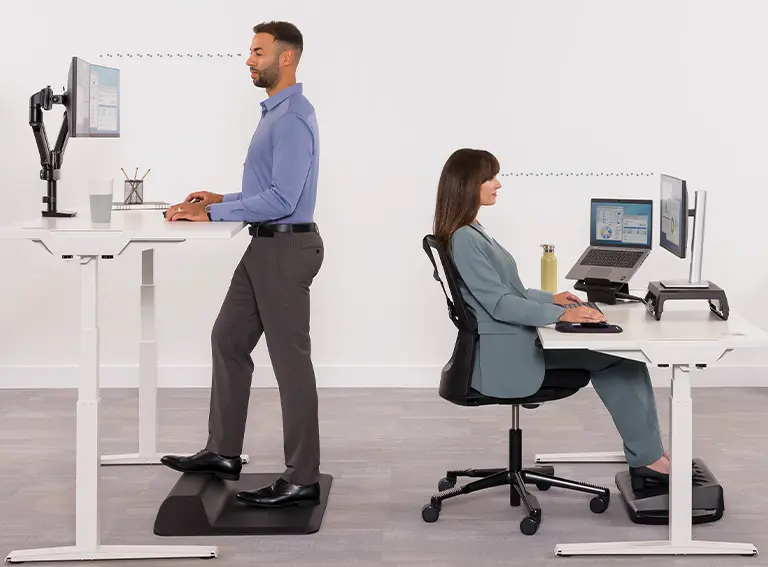
Ergonomics is the scientific discipline focused on designing and arranging workspaces, tools, and systems to optimize human well-being and performance. It emphasizes adapting environments to fit the physical and cognitive capabilities of individuals, reducing the risk of injury and strain. For instance, in an office setting, ergonomic principles might involve adjustable chairs, keyboards at elbow height, and monitors positioned to minimize neck tilt, promoting better posture and comfort. By preventing musculoskeletal disorders like repetitive strain injuries, ergonomics enhances productivity, efficiency, and overall health in everyday activities, from industrial manufacturing to home offices. This approach not only boosts employee satisfaction but also leads to cost savings for organizations through fewer absences and higher output.
Table of Contents
- Part 1: Create A Ergonomics Quiz in Minutes Using AI with OnlineExamMaker
- Part 2: 20 Ergonomics Quiz Questions & Answers
- Part 3: Automatically Generate Quiz Questions Using AI Question Generator
Part 1: Create A Ergonomics Quiz in Minutes Using AI with OnlineExamMaker
When it comes to ease of creating a Ergonomics skills assessment, OnlineExamMaker is one of the best AI-powered quiz making software for your institutions or businesses. With its AI Question Generator, just upload a document or input keywords about your assessment topic, you can generate high-quality quiz questions on any topic, difficulty level, and format.
Overview of its key assessment-related features:
● AI Question Generator to help you save time in creating quiz questions automatically.
● Share your online exam with audiences on social platforms like Facebook, Twitter, Reddit and more.
● Instantly scores objective questions and subjective answers use rubric-based scoring for consistency.
● Simply copy and insert a few lines of embed codes to display your online exams on your website or WordPress blog.
Automatically generate questions using AI
Part 2: 20 Ergonomics Quiz Questions & Answers
or
1. What is the primary goal of ergonomics?
A. To maximize production speed
B. To design workplaces that fit the user’s physical capabilities
C. To reduce costs in manufacturing
D. To eliminate all physical labor
Answer: B
Explanation: Ergonomics aims to adapt the work environment to the human body to prevent strain and injury, enhancing comfort and efficiency.
2. Which posture is recommended for prolonged computer use to avoid neck strain?
A. Slouching forward
B. Keeping the screen at eye level
C. Leaning back excessively
D. Holding the head tilted downward
Answer: B
Explanation: Positioning the screen at eye level maintains a neutral neck position, reducing the risk of musculoskeletal disorders like cervical strain.
3. What is the ideal height for a desk when typing?
A. Elbow height or slightly lower
B. Knee height
C. Shoulder height
D. Above head level
Answer: A
Explanation: Setting the desk at elbow height allows for a 90-degree angle at the elbows, promoting neutral wrist position and preventing repetitive strain injuries.
4. How does an ergonomic chair help prevent lower back pain?
A. By making the seat harder
B. By providing lumbar support
C. By elevating the feet
D. By increasing seat depth
Answer: B
Explanation: Lumbar support in ergonomic chairs maintains the natural curve of the spine, reducing pressure on the lower back during extended sitting.
5. What is carpal tunnel syndrome primarily caused by in ergonomic terms?
A. Poor lighting
B. Repetitive hand movements with improper wrist position
C. Loud noise in the workplace
D. Excessive standing
Answer: B
Explanation: Repetitive motions and awkward wrist positions compress the median nerve, leading to carpal tunnel syndrome, which ergonomics addresses through proper tool design.
6. Which factor is most important in selecting an ergonomic keyboard?
A. Color and aesthetics
B. Split design to reduce wrist pronation
C. Wireless connectivity
D. Key size
Answer: B
Explanation: A split keyboard encourages a more natural hand position, minimizing strain on the wrists and forearms during typing.
7. What should be the angle of the feet when sitting for optimal ergonomics?
A. Pointed upward
B. Flat on the floor or on a footrest
C. Crossed at the ankles
D. Elevated above the knees
Answer: B
Explanation: Keeping feet flat promotes proper blood circulation and maintains a neutral pelvis position, reducing lower body strain.
8. How can ergonomics improve productivity in an office?
A. By adding more tasks
B. By reducing discomfort and fatigue through better workstation design
C. By shortening break times
D. By increasing room temperature
Answer: B
Explanation: Ergonomic designs minimize physical discomfort, allowing workers to focus longer and perform tasks more efficiently.
9. What is the recommended break frequency for repetitive tasks to prevent injury?
A. Every 4 hours
B. Every 20-30 minutes for a short pause
C. Only at the end of the day
D. Never, to maintain momentum
Answer: B
Explanation: Frequent short breaks, such as the 20-20-20 rule, allow muscles to recover and reduce the buildup of fatigue from repetitive motions.
10. Which ergonomic principle helps prevent eye strain from computer screens?
A. Using a larger monitor
B. Following the 20-20-20 rule
C. Dimming the room lights
D. All of the above
Answer: D
Explanation: A larger monitor reduces the need to squint, the 20-20-20 rule gives eyes a rest, and dimming lights balances screen brightness, collectively reducing eye strain.
11. What role does lighting play in ergonomics?
A. It has no role
B. Proper lighting reduces glare and eye fatigue
C. Brighter lights always improve ergonomics
D. Only natural light is ergonomic
Answer: B
Explanation: Adequate, glare-free lighting prevents visual discomfort and supports better posture, as workers won’t need to strain to see their work.
12. How should a mouse be positioned ergonomically?
A. Far from the keyboard
B. Close to the body at elbow height
C. On the floor
D. Held in the lap
Answer: B
Explanation: Positioning the mouse close to the body at elbow height keeps the arm in a neutral position, reducing shoulder and wrist strain during use.
13. What is the main benefit of using an ergonomic standing desk?
A. It eliminates the need for chairs
B. It allows alternation between sitting and standing to reduce static posture risks
C. It increases desk height permanently
D. It saves space
Answer: B
Explanation: Standing desks promote movement and reduce the health risks associated with prolonged sitting, such as back pain and poor circulation.
14. Why is adjustability important in ergonomic tools?
A. To make them more expensive
B. To accommodate different body sizes and preferences
C. To add more features
D. To complicate usage
Answer: B
Explanation: Adjustable tools ensure a personalized fit, allowing users to maintain neutral postures and prevent injury regardless of their physical build.
15. Which ergonomic practice helps with lifting heavy objects?
A. Bending at the waist
B. Squatting and using leg muscles
C. Lifting with one arm
D. Rushing the lift
Answer: B
Explanation: Squatting engages larger leg muscles and keeps the back straight, minimizing the risk of back injuries compared to bending at the waist.
16. How does ergonomics address noise in the workplace?
A. By ignoring it
B. Through sound-absorbing materials to reduce stress and distractions
C. By increasing volume
D. By adding more speakers
Answer: B
Explanation: Controlling noise with ergonomic designs like acoustic panels helps maintain focus and reduces auditory strain, improving overall well-being.
17. What is the ergonomic recommendation for phone use?
A. Holding the phone between the ear and shoulder
B. Using a headset or speakerphone
C. Cradling the phone in one hand while typing
D. Keeping the phone on the floor
Answer: B
Explanation: A headset allows hands-free use and maintains neutral neck and shoulder positions, preventing strain from awkward holding positions.
18. In ergonomics, what does “neutral position” mean?
A. A relaxed, natural alignment of the body
B. A stretched or extended pose
C. Any comfortable position
D. Lying down
Answer: A
Explanation: Neutral positions minimize stress on joints and muscles, such as keeping wrists straight and elbows at 90 degrees, to avoid injury.
19. How can ergonomics reduce the risk of repetitive strain injury (RSI)?
A. By increasing repetition
B. Through proper tool design and varied tasks
C. By working faster
D. By ignoring early symptoms
Answer: B
Explanation: Ergonomic interventions, like rotating tasks and using tools that fit the hand, distribute workload and prevent overuse injuries like RSI.
20. What is the key to implementing ergonomics successfully in a workplace?
A. Employee training and regular assessments
B. Buying the cheapest equipment
C. Forcing a one-size-fits-all approach
D. Ignoring feedback
Answer: A
Explanation: Training and assessments ensure that ergonomic principles are applied correctly and adapted over time, leading to sustained health and productivity benefits.
or
Part 3: Automatically generate quiz questions using OnlineExamMaker AI Question Generator
Automatically generate questions using AI