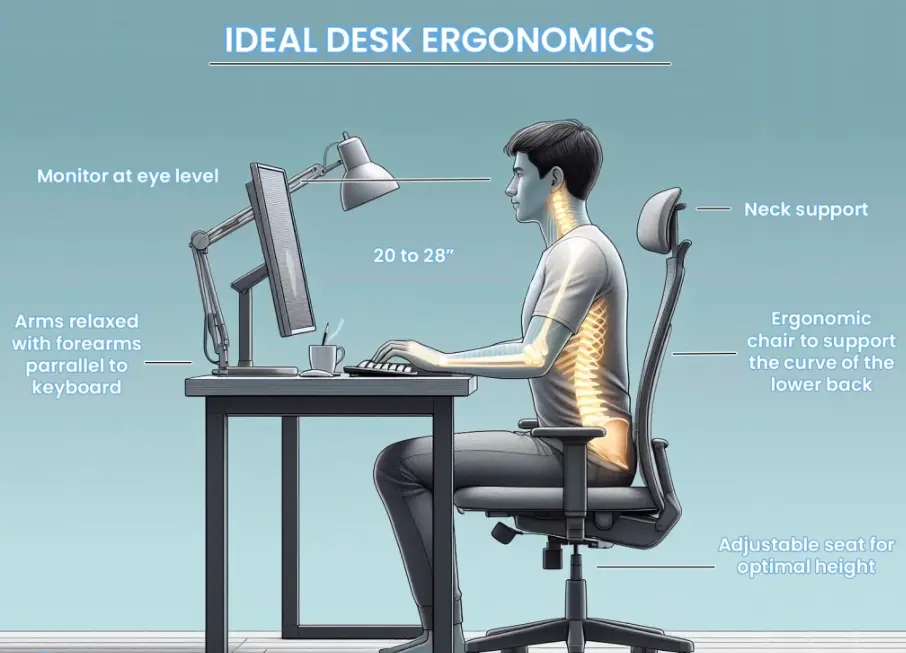
An ergonomic desk setup enhances safety by minimizing physical strain and preventing workplace injuries through thoughtful design and adjustments. Key elements include:
– Chair and Posture Alignment: Position your chair so your feet rest flat on the floor, knees bend at a 90-degree angle, and your lower back is supported by a lumbar cushion. This reduces pressure on the spine and prevents slouching-related back pain.
– Monitor and Screen Placement: Set your monitor at eye level, about an arm’s length away, to avoid neck strain and eye fatigue. Tilt the screen slightly downward to maintain a neutral gaze, reducing the risk of headaches and cervical issues.
– Keyboard and Mouse Ergonomics: Place the keyboard and mouse on a surface that keeps your elbows at a 90-degree angle and wrists straight. Use a keyboard tray if needed to ensure your arms hang naturally, helping to prevent repetitive strain injuries like carpal tunnel syndrome.
– Desk Height and Workspace Organization: Adjust the desk to allow your forearms to rest comfortably on it without hunching. Keep frequently used items within easy reach to minimize twisting or reaching, which can lead to shoulder or back strain.
– Lighting and Breaks: Ensure adequate lighting to reduce glare and eye strain, and incorporate regular breaks (e.g., the 20-20-20 rule: every 20 minutes, look at something 20 feet away for 20 seconds). This promotes circulation and prevents prolonged static postures that could cause fatigue or injury.
By maintaining these practices, an ergonomic desk setup fosters a safer, more productive environment, significantly lowering the risk of long-term health issues.
Table of Contents
- Part 1: OnlineExamMaker AI Quiz Generator – Save Time and Efforts
- Part 2: 20 Ergonomic Desk Setup Safety Quiz Questions & Answers
- Part 3: AI Question Generator – Automatically Create Questions for Your Next Assessment
Part 1: OnlineExamMaker AI Quiz Generator – Save Time and Efforts
What’s the best way to create a Ergonomic Desk Setup Safety quiz online? OnlineExamMaker is the best AI quiz making software for you. No coding, and no design skills required. If you don’t have the time to create your online quiz from scratch, you are able to use OnlineExamMaker AI Question Generator to create question automatically, then add them into your online assessment. What is more, the platform leverages AI proctoring and AI grading features to streamline the process while ensuring exam integrity.
Key features of OnlineExamMaker:
● Combines AI webcam monitoring to capture cheating activities during online exam.
● Allow the quiz taker to answer by uploading video or a Word document, adding an image, and recording an audio file.
● Automatically scores multiple-choice, true/false, and even open-ended/audio responses using AI, reducing manual work.
● OnlineExamMaker API offers private access for developers to extract your exam data back into your system automatically.
Automatically generate questions using AI
Part 2: 20 Ergonomic Desk Setup Safety Quiz Questions & Answers
or
1. Question: What is the recommended height for a chair in an ergonomic desk setup?
A. High enough that your feet dangle
B. Adjusted so your feet are flat on the floor and knees at a 90-degree angle
C. Low enough that your knees bend more than 90 degrees
D. Any height as long as you’re comfortable
Correct Answer: B
Explanation: Adjusting the chair so your feet are flat on the floor and knees at a 90-degree angle supports proper posture, reduces lower back strain, and promotes blood circulation.
2. Question: How far should your computer monitor be placed from your eyes?
A. As close as possible for better visibility
B. About 20-30 inches away
C. Over 40 inches away
D. Less than 10 inches
Correct Answer: B
Explanation: Placing the monitor 20-30 inches away minimizes eye strain and prevents neck strain by allowing a comfortable viewing distance without excessive leaning.
3. Question: What is the ideal position for your keyboard in an ergonomic setup?
A. Directly on your lap
B. At elbow height when your arms are bent at 90 degrees
C. Higher than your shoulders
D. Lower than your waist
Correct Answer: B
Explanation: Positioning the keyboard at elbow height with arms bent at 90 degrees keeps wrists neutral, reduces the risk of repetitive strain injuries, and maintains shoulder relaxation.
4. Question: Which factor is most important for preventing glare on your computer screen?
A. Placing the screen in direct sunlight
B. Using a monitor with anti-glare coating and adjusting its angle
C. Increasing screen brightness to maximum
D. Facing a bright window directly
Correct Answer: B
Explanation: Anti-glare coatings and angle adjustments reduce eye fatigue and discomfort caused by reflections, promoting safer and more focused work.
5. Question: How often should you take breaks during prolonged desk work?
A. Only at the end of the day
B. Every 1-2 hours for at least 5-10 minutes
C. Never, to maintain productivity
D. Only if you feel tired
Correct Answer: B
Explanation: Regular breaks every 1-2 hours help prevent musculoskeletal disorders by allowing muscles to rest, improving circulation, and reducing eye strain.
6. Question: What is the best way to support your lower back while sitting?
A. Slouching forward
B. Using a lumbar support pillow or chair with proper curvature
C. Leaning back at a 45-degree angle
D. Sitting without any backrest
Correct Answer: B
Explanation: A lumbar support pillow maintains the natural curve of the spine, reducing the risk of lower back pain and supporting overall posture during extended sitting.
7. Question: Where should your mouse be placed relative to your keyboard?
A. On the opposite side of your dominant hand
B. Next to the keyboard at the same height and within easy reach
C. On the floor for better arm exercise
D. Far away to encourage stretching
Correct Answer: B
Explanation: Keeping the mouse next to the keyboard at the same height minimizes awkward arm movements, prevents shoulder strain, and supports neutral wrist positions.
8. Question: What is the recommended desk height for most users?
A. Below knee level
B. At elbow level when seated
C. Above shoulder level
D. Variable based on preference only
Correct Answer: B
Explanation: A desk at elbow level allows for comfortable arm positioning, reduces strain on the neck and shoulders, and facilitates proper ergonomic alignment.
9. Question: How should you position your wrists while typing?
A. Bent upward at a sharp angle
B. Straight and in line with your forearms
C. Resting on a sharp edge
D. Twisted to one side
Correct Answer: B
Explanation: Keeping wrists straight and aligned with forearms prevents carpal tunnel syndrome by maintaining neutral positioning and reducing pressure on nerves.
10. Question: What role does proper lighting play in desk safety?
A. It should be as bright as possible
B. Balanced to avoid shadows and glare on the workspace
C. Dimmed to save energy
D. Only from overhead sources
Correct Answer: B
Explanation: Balanced lighting reduces eye strain and fatigue by eliminating harsh shadows and glare, creating a safer and more comfortable working environment.
11. Question: Which accessory is most helpful for foot support in an ergonomic setup?
A. A high stool
B. A footrest if your feet don’t reach the floor
C. Weighted ankle bands
D. No accessory needed
Correct Answer: B
Explanation: A footrest ensures proper leg support and circulation when feet don’t touch the ground, preventing lower back pain and maintaining good posture.
12. Question: What is the safest way to handle phone calls at your desk?
A. Cradling the phone between your ear and shoulder
B. Using a headset or speakerphone
C. Holding the phone with one hand while typing
D. Propping it up with books
Correct Answer: B
Explanation: A headset or speakerphone keeps your neck and shoulders relaxed, avoiding strain from awkward positions during calls.
13. Question: How should you adjust your monitor’s height?
A. At knee level
B. So the top of the screen is at or slightly below eye level
C. Directly on the desk surface
D. Above your head
Correct Answer: B
Explanation: Positioning the monitor at or slightly below eye level reduces neck strain and promotes a neutral head position for prolonged use.
14. Question: What is a key benefit of using armrests on an ergonomic chair?
A. They should be avoided to encourage movement
B. They support your arms and reduce shoulder tension
C. They raise your elbows too high
D. They are only for short-term use
Correct Answer: B
Explanation: Armrests provide support to reduce shoulder and neck tension, helping maintain proper posture and preventing fatigue during work.
15. Question: Why is cable management important in a desk setup?
A. It makes the desk look neat but has no safety benefits
B. It prevents trips, electrical hazards, and keeps the workspace organized
C. Cables can be left loose for flexibility
D. It’s only necessary for standing desks
Correct Answer: B
Explanation: Proper cable management reduces the risk of accidents like trips or electrical issues, ensuring a safer and more efficient workspace.
16. Question: What is the primary advantage of a standing desk?
A. It eliminates the need for a chair
B. It allows alternating between sitting and standing to reduce sedentary risks
C. It should be used exclusively for better posture
D. It requires no adjustments
Correct Answer: B
Explanation: Alternating positions with a standing desk promotes better circulation, reduces back pain from prolonged sitting, and enhances overall ergonomic safety.
17. Question: How can you prevent eye strain from screen time?
A. Staring continuously without blinking
B. Following the 20-20-20 rule (look at something 20 feet away for 20 seconds every 20 minutes)
C. Increasing screen contrast to maximum
D. Working in a completely dark room
Correct Answer: B
Explanation: The 20-20-20 rule gives eyes a break, reducing dryness and strain associated with extended screen exposure.
18. Question: What should you do if your desk setup causes discomfort?
A. Ignore it and continue working
B. Adjust your setup or consult an ergonomic expert
C. Switch to a different task immediately
D. Only make changes at the end of the day
Correct Answer: B
Explanation: Prompt adjustments or professional advice address issues early, preventing chronic injuries and ensuring long-term safety.
19. Question: Which posture is best for typing at a desk?
A. Slumped with rounded shoulders
B. Upright with ears, shoulders, and hips aligned
C. Leaning forward aggressively
D. With legs crossed tightly
Correct Answer: B
Explanation: An upright posture with proper alignment supports the spine, reduces muscle strain, and minimizes the risk of back and neck problems.
20. Question: How does overall workspace organization contribute to safety?
A. It has no real impact
B. It keeps items within reach, reducing unnecessary movements and strain
C. Only clutter improves creativity
D. Organization is purely aesthetic
Correct Answer: B
Explanation: A well-organized workspace minimizes reaching or twisting, which can cause injuries, and promotes efficient, safer movements.
or
Part 3: AI Question Generator – Automatically Create Questions for Your Next Assessment
Automatically generate questions using AI