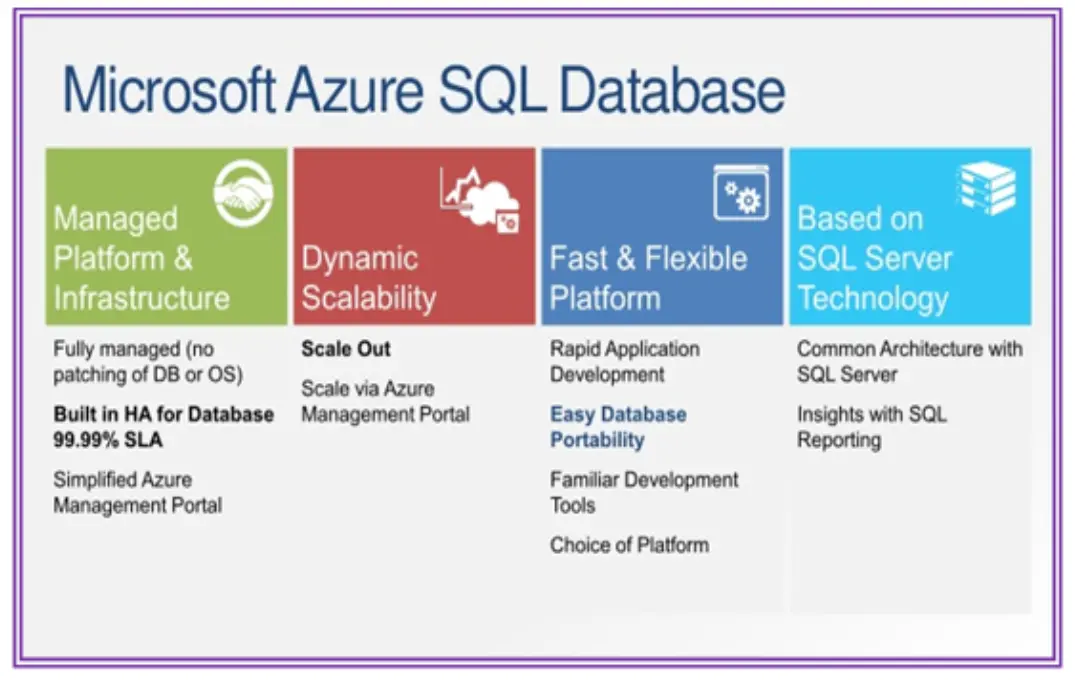
Azure SQL Database is a fully managed, platform-as-a-service (PaaS) relational database engine from Microsoft Azure, built on the latest stable version of the SQL Server database. It provides a scalable, secure, and high-performance solution for modern applications, handling routine tasks like patching, backups, and monitoring automatically.
Key Features
– Scalability and Performance: Offers elastic scaling options, allowing databases to adjust compute and storage resources dynamically based on demand, from small applications to large enterprise workloads.
– Security: Includes built-in features such as Transparent Data Encryption (TDE), Always Encrypted, and advanced threat detection to protect data at rest and in transit.
– High Availability and Disaster Recovery: Provides automatic failover, geo-replication, and zone-redundant configurations to ensure minimal downtime and quick recovery from failures.
– Intelligent Management: Leverages AI-powered tools for automatic tuning, query performance insights, and predictive analytics to optimize database operations.
– Integration and Compatibility: Fully compatible with SQL Server tools and languages, supporting seamless migration from on-premises SQL Server environments.
Benefits
– Cost Efficiency: Pay-as-you-go pricing with serverless options reduces overhead, eliminating the need for hardware management and enabling cost savings through auto-scaling.
– Developer Focus: Automates administrative tasks, allowing developers to concentrate on building applications rather than database maintenance.
– Global Reach: Supports deployment across multiple Azure regions with data residency options, ensuring compliance and low-latency access for worldwide users.
– Hybrid Capabilities: Integrates with on-premises systems via Azure Arc, enabling a hybrid cloud strategy for data management.
Use Cases
– Web and Mobile Applications: Ideal for dynamic, data-driven apps that require real-time processing and frequent updates.
– E-commerce Platforms: Handles high-traffic scenarios with scalable resources to manage transactions, user data, and analytics.
– Data Analytics and Reporting: Supports integration with Azure services like Azure Synapse Analytics for business intelligence and big data processing.
– IoT and Edge Computing: Manages large volumes of device data with real-time querying and edge-to-cloud synchronization.
Azure SQL Database empowers organizations to innovate quickly while maintaining reliability, security, and compliance in a cloud-native environment.
Table of Contents
- Part 1: Create An Amazing Azure Sql Database Quiz Using AI Instantly in OnlineExamMaker
- Part 2: 20 Azure Sql Database Quiz Questions & Answers
- Part 3: Try OnlineExamMaker AI Question Generator to Create Quiz Questions
Part 1: Create An Amazing Azure Sql Database Quiz Using AI Instantly in OnlineExamMaker
The quickest way to assess the Azure Sql Database knowledge of candidates is using an AI assessment platform like OnlineExamMaker. With OnlineExamMaker AI Question Generator, you are able to input content—like text, documents, or topics—and then automatically generate questions in various formats (multiple-choice, true/false, short answer). Its AI Exam Grader can automatically grade the exam and generate insightful reports after your candidate submit the assessment.
Overview of its key assessment-related features:
● Create up to 10 question types, including multiple-choice, true/false, fill-in-the-blank, matching, short answer, and essay questions.
● Automatically generates detailed reports—individual scores, question report, and group performance.
● Instantly scores objective questions and subjective answers use rubric-based scoring for consistency.
● API and SSO help trainers integrate OnlineExamMaker with Google Classroom, Microsoft Teams, CRM and more.
Automatically generate questions using AI
Part 2: 20 Azure Sql Database Quiz Questions & Answers
or
1. Question: What is Azure SQL Database?
Options:
A. A NoSQL database service
B. A fully managed relational database service based on SQL Server
C. A data warehouse specifically for big data analytics
D. A container orchestration platform
Answer: B
Explanation: Azure SQL Database is a platform as a service (PaaS) offering that provides a relational database management system built on SQL Server technology, handling infrastructure management automatically.
2. Question: Which service tier in Azure SQL Database is designed for development and testing with the lowest cost?
Options:
A. Premium
B. Basic
C. Standard
D. Hyperscale
Answer: B
Explanation: The Basic tier is intended for applications with low concurrency and is cost-effective for development, testing, or small-scale production workloads.
3. Question: What does DTU stand for in Azure SQL Database?
Options:
A. Database Transaction Unit
B. Data Transfer Utility
C. Database Throughput Unit
D. Dynamic Tuning Unit
Answer: C
Explanation: DTU (Database Throughput Unit) is a measure of the overall performance level of a database, combining CPU, memory, and I/O resources into a single metric.
4. Question: Which feature allows multiple Azure SQL Databases to share a set of resources?
Options:
A. Geo-replication
B. Elastic pools
C. Automated backups
D. Query Store
Answer: B
Explanation: Elastic pools enable you to manage and scale multiple databases that share a pool of resources, helping optimize costs for databases with varying usage patterns.
5. Question: How does Azure SQL Database ensure high availability?
Options:
A. By using local SSD storage only
B. Through built-in redundancy and automatic failover
C. By requiring manual backups
D. With on-premises replication
Answer: B
Explanation: Azure SQL Database provides high availability via features like zone-redundant configuration and automatic failover to secondary replicas in case of failures.
6. Question: What is the primary benefit of using Hyperscale in Azure SQL Database?
Options:
A. Unlimited storage and rapid scalability
B. Enhanced security features only
C. Cost reduction for small databases
D. Integration with on-premises networks
Answer: A
Explanation: The Hyperscale service tier supports databases up to 100 TB with fast scaling capabilities, making it ideal for large-scale applications that require elastic storage.
7. Question: Which tool is used to migrate on-premises SQL Server databases to Azure SQL Database?
Options:
A. Azure PowerShell
B. Azure Data Factory
C. Azure Database Migration Service
D. Azure Monitor
Answer: C
Explanation: Azure Database Migration Service simplifies the migration process by assessing, migrating, and validating databases from on-premises SQL Server to Azure SQL Database.
8. Question: What encryption method is enabled by default in Azure SQL Database for data at rest?
Options:
A. Transparent Data Encryption (TDE)
B. Column-level encryption
C. Always Encrypted
D. BitLocker
Answer: A
Explanation: Transparent Data Encryption (TDE) is enabled by default to encrypt data at rest, protecting against unauthorized access to the storage media.
9. Question: How can you monitor performance in Azure SQL Database?
Options:
A. Using Azure Cost Management
B. Through Azure Monitor and Query Performance Insight
C. Via Azure Active Directory
D. With Azure Backup Center
Answer: B
Explanation: Azure Monitor and Query Performance Insight provide tools to track metrics, diagnose issues, and optimize query performance in Azure SQL Database.
10. Question: What is geo-replication in Azure SQL Database?
Options:
A. Automatic replication of data across regions for disaster recovery
B. Manual backup to external storage
C. Scaling resources within a single region
D. Encrypting data during transmission
Answer: A
Explanation: Geo-replication creates readable secondary replicas in different regions, ensuring business continuity and disaster recovery by syncing data automatically.
11. Question: Which authentication method supports single sign-on in Azure SQL Database?
Options:
A. SQL authentication
B. Azure Active Directory authentication
C. Windows authentication
D. Certificate-based authentication
Answer: B
Explanation: Azure Active Directory authentication integrates with Azure AD for single sign-on, enhancing security and simplifying user management.
12. Question: What is the maximum size for a single database in the Premium tier?
Options:
A. 4 TB
B. 1 TB
C. 500 GB
D. Unlimited
Answer: A
Explanation: The Premium tier supports up to 4 TB of storage per database, depending on the specific service objective selected.
13. Question: How does Azure SQL Database handle automatic tuning?
Options:
A. It requires manual configuration for indexes
B. It uses machine learning to automatically optimize indexes and queries
C. It only applies to Basic tier databases
D. It is disabled by default
Answer: B
Explanation: Automatic tuning leverages built-in intelligence to monitor and apply performance improvements, such as index creation, without user intervention.
14. Question: What is the purpose of the Query Store in Azure SQL Database?
Options:
A. To store user queries for auditing
B. To track and analyze query performance over time
C. To encrypt query results
D. To manage database backups
Answer: B
Explanation: Query Store captures a history of queries, execution plans, and performance data, helping identify and resolve regression issues.
15. Question: Which feature allows for point-in-time restore in Azure SQL Database?
Options:
A. Long-term retention
B. Automated backups
C. Geo-replication
D. Elastic jobs
Answer: B
Explanation: Automated backups enable point-in-time restore capabilities, allowing you to recover a database to any point within the retention period.
16. Question: What is vCore-based purchasing model in Azure SQL Database?
Options:
A. A model based on virtual machine cores for more granular control
B. A fixed DTU allocation
C. Only available for Hyperscale
D. A pay-per-query system
Answer: A
Explanation: The vCore model lets you choose the number of virtual cores, memory, and storage, providing flexibility and transparency in resource allocation.
17. Question: How does Azure SQL Database support compliance standards?
Options:
A. Through manual auditing only
B. With built-in features like encryption and auditing that align with standards like HIPAA and GDPR
C. By disabling all logging
D. Via third-party tools exclusively
Answer: B
Explanation: Azure SQL Database includes features such as advanced threat protection and auditing to help meet various compliance requirements.
18. Question: What is the role of Azure Arc in relation to Azure SQL Database?
Options:
A. To manage on-premises SQL Server instances as if they were in Azure
B. To create new databases in Azure
C. To handle network routing
D. To encrypt data in transit
Answer: A
Explanation: Azure Arc extends Azure services to on-premises or other cloud environments, allowing you to manage SQL Server instances alongside Azure SQL Database.
19. Question: Which command is used to create a database in Azure SQL Database using T-SQL?
Options:
A. CREATE DATABASE
B. NEW DATABASE
C. ADD DATABASE
D. BUILD DATABASE
Answer: A
Explanation: The T-SQL command CREATE DATABASE is used to provision a new database in Azure SQL Database, similar to on-premises SQL Server.
20. Question: What is a key limitation of Azure SQL Database compared to SQL Server?
Options:
A. Lack of support for CLR integration
B. Full access to the underlying operating system
C. Unlimited database size
D. Automatic patching
Answer: A
Explanation: Azure SQL Database does not support certain features like CLR integration due to its managed PaaS nature, which abstracts some advanced SQL Server capabilities.
or
Part 3: Try OnlineExamMaker AI Question Generator to Create Quiz Questions
Automatically generate questions using AI