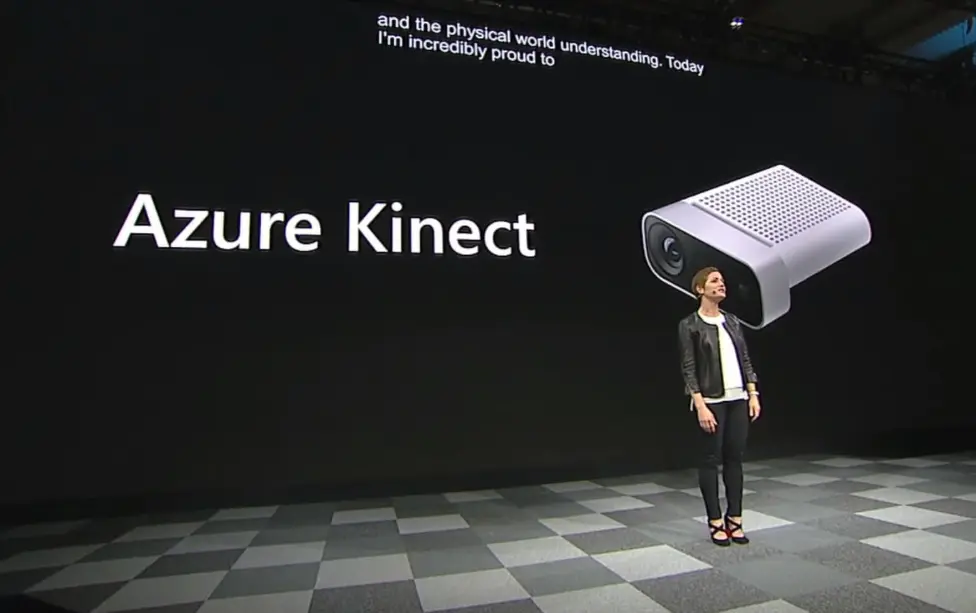
Azure Kinect is a versatile spatial computing device developed by Microsoft, designed to advance AI and machine learning applications through advanced sensing capabilities. It combines a high-resolution depth camera for accurate 3D mapping, a 12-megapixel RGB camera for vivid color imaging, a seven-microphone array for spatial audio capture, and an inertial measurement unit (IMU) for motion tracking. This integration allows for precise body tracking, gesture recognition, and environmental analysis in real time.
Key features include:
– Depth Sensing: Offers up to 2 meters of depth accuracy, supporting applications in object detection and spatial awareness.
– Audio Processing: Enables voice recognition and sound source localization with beamforming technology.
– Integration: Seamlessly connects with Azure cloud services, such as Azure Machine Learning and Azure IoT, for data processing and analytics.
– SDK Support: Provides robust software development kits (SDKs) for Windows and Linux, facilitating custom development in C++, Python, and other languages.
Ideal for industries like healthcare (e.g., patient monitoring), retail (e.g., interactive displays), and robotics (e.g., autonomous navigation), Azure Kinect empowers developers to create immersive experiences. Its compact design and plug-and-play setup make it accessible for both prototyping and production environments, with options for customization to meet specific project needs.
Table of Contents
- Part 1: OnlineExamMaker AI Quiz Generator – The Easiest Way to Make Quizzes Online
- Part 2: 20 Azure Kinect Quiz Questions & Answers
- Part 3: Save Time and Energy: Generate Quiz Questions with AI Technology
Part 1: OnlineExamMaker AI Quiz Generator – The Easiest Way to Make Quizzes Online
When it comes to ease of creating a Azure Kinect skills assessment, OnlineExamMaker is one of the best AI-powered quiz making software for your institutions or businesses. With its AI Question Generator, just upload a document or input keywords about your assessment topic, you can generate high-quality quiz questions on any topic, difficulty level, and format.
What you will like:
● AI Question Generator to help you save time in creating quiz questions automatically.
● Share your online exam with audiences on social platforms like Facebook, Twitter, Reddit and more.
● Display the feedback for correct or incorrect answers instantly after a question is answered.
● Create a lead generation form to collect an exam taker’s information, such as email, mobile phone, work title, company profile and so on.
Automatically generate questions using AI
Part 2: 20 Azure Kinect Quiz Questions & Answers
or
1. Question: What is Azure Kinect primarily used for?
Options:
A. Gaming console accessory
B. Advanced AI-enabled depth sensing and body tracking
C. Smartphone camera enhancement
D. Virtual reality headset
Answer: B
Explanation: Azure Kinect is a spatial computing device from Microsoft that provides high-resolution depth sensing, body tracking, and audio capabilities, making it ideal for applications in robotics, healthcare, and interactive systems.
2. Question: Which of the following sensors is NOT included in Azure Kinect?
Options:
A. RGB camera
B. Depth sensor
C. Infrared emitter
D. GPS module
Answer: D
Explanation: Azure Kinect includes an RGB camera, depth sensor, and infrared emitter, but it does not have a built-in GPS module, as its focus is on spatial and visual data capture.
3. Question: What is the maximum resolution for the depth camera in Azure Kinect?
Options:
A. 512×512 pixels
B. 1024×1024 pixels
C. 1920×1080 pixels
D. 4096×3072 pixels
Answer: B
Explanation: The Azure Kinect depth camera supports up to 1024×1024 pixels resolution, allowing for detailed spatial mapping in various environments.
4. Question: How does Azure Kinect differ from the original Kinect for Xbox?
Options:
A. It lacks body tracking features
B. It is designed for professional and enterprise applications with better sensors
C. It only works with Windows devices
D. It requires an internet connection at all times
Answer: B
Explanation: Azure Kinect is an enhanced version with improved sensors, higher fidelity, and integration for AI and cloud services, unlike the original Kinect which was primarily for gaming.
5. Question: What type of data can Azure Kinect output for body tracking?
Options:
A. Only 2D images
B. Joint positions and orientations
C. Audio only
D. GPS coordinates
Answer: B
Explanation: Azure Kinect’s body tracking feature outputs 3D joint positions and orientations, enabling precise motion capture for applications like gesture recognition.
6. Question: Which SDK is commonly used to develop applications for Azure Kinect?
Options:
A. Android SDK
B. Azure Kinect SDK
C. iOS SDK
D. Unity SDK
Answer: B
Explanation: The Azure Kinect SDK provides tools and APIs for accessing the device’s sensors and features, supporting development in languages like C++ and Python.
7. Question: What is the primary purpose of the Azure Kinect’s microphone array?
Options:
A. Capturing high-resolution images
B. Providing spatial audio and voice recognition
C. Measuring temperature
D. Detecting motion only
Answer: B
Explanation: The microphone array in Azure Kinect enables spatial audio capture and advanced voice processing, which is useful for applications involving sound source localization.
8. Question: In which operating systems can Azure Kinect be used?
Options:
A. Only Windows
B. Windows and Linux
C. macOS only
D. Android only
Answer: B
Explanation: Azure Kinect is compatible with both Windows and Linux operating systems, allowing for broader development and deployment options.
9. Question: What is the field of view for the Azure Kinect depth sensor?
Options:
A. 70° horizontal and 60° vertical
B. 90° horizontal and 58° vertical
C. 120° horizontal and 120° vertical
D. 45° horizontal and 45° vertical
Answer: B
Explanation: The depth sensor has a field of view of approximately 90° horizontal and 58° vertical, which helps in capturing a wide range of spatial data.
10. Question: How does Azure Kinect support AI integration?
Options:
A. Through direct neural network processing
B. Via integration with Azure Machine Learning services
C. It does not support AI
D. Only for basic image processing
Answer: B
Explanation: Azure Kinect can stream data to Azure services like Machine Learning for AI tasks, such as object detection and anomaly identification.
11. Question: What is the typical frame rate for Azure Kinect’s RGB camera?
Options:
A. Up to 5 FPS
B. Up to 30 FPS
C. Up to 60 FPS
D. Up to 120 FPS
Answer: C
Explanation: The RGB camera on Azure Kinect supports up to 60 frames per second, providing smooth video capture for real-time applications.
12. Question: Which calibration process is essential for Azure Kinect setup?
Options:
A. Color balance only
B. Sensor alignment and extrinsic calibration
C. Battery calibration
D. Wi-Fi setup
Answer: B
Explanation: Proper sensor alignment and extrinsic calibration ensure accurate data fusion from multiple sensors in Azure Kinect.
13. Question: What applications are commonly built using Azure Kinect?
Options:
A. Social media filters
B. Gesture-controlled robotics
C. Email clients
D. Web browsing
Answer: B
Explanation: Azure Kinect is often used in gesture-controlled robotics, healthcare monitoring, and interactive installations due to its advanced tracking capabilities.
14. Question: How does Azure Kinect handle low-light environments?
Options:
A. It automatically shuts down
B. Uses infrared for depth sensing
C. Relies solely on RGB
D. Requires external lights
Answer: B
Explanation: The infrared emitter allows Azure Kinect to perform depth sensing in low-light conditions, making it versatile for various lighting scenarios.
15. Question: What is the power requirement for Azure Kinect?
Options:
A. USB-C with at least 65W
B. USB 3.0 with bus power
C. Battery-operated only
D. Wireless charging
Answer: B
Explanation: Azure Kinect typically draws power from a USB 3.0 connection, which supports its operations without needing an external power source.
16. Question: Which programming language is officially supported by the Azure Kinect SDK?
Options:
A. Java only
B. C++ and Python
C. Swift only
D. Ruby
Answer: B
Explanation: The Azure Kinect SDK provides bindings for C++ and Python, facilitating easy integration into various development workflows.
17. Question: What is the accuracy range for Azure Kinect’s body tracking?
Options:
A. Up to 1 meter
B. Millimeter-level for joints
C. Only centimeter-level
D. Inaccurate beyond 2 meters
Answer: B
Explanation: Azure Kinect offers high-precision body tracking with accuracy at the millimeter level for joint positions, depending on the setup.
18. Question: How can Azure Kinect data be visualized?
Options:
A. Only through command-line tools
B. Using tools like the Azure Kinect Viewer
C. Via mobile apps only
D. Through hardware displays
Answer: B
Explanation: The Azure Kinect Viewer is a dedicated tool that allows developers to visualize depth maps, point clouds, and other data outputs in real time.
19. Question: What security features are included in Azure Kinect?
Options:
A. Encrypted data transmission
B. Facial recognition by default
C. None
D. Built-in firewall
Answer: A
Explanation: Azure Kinect supports encrypted data transmission when integrated with Azure services, ensuring secure handling of sensitive spatial data.
20. Question: What is the key benefit of using Azure Kinect in industrial settings?
Options:
A. Low cost
B. Real-time spatial awareness for automation
C. Entertainment features
D. Basic video calling
Answer: B
Explanation: Azure Kinect provides real-time spatial awareness, which is crucial for industrial applications like quality control, robotics, and human-machine interaction.
or
Part 3: Save Time and Energy: Generate Quiz Questions with AI Technology
Automatically generate questions using AI