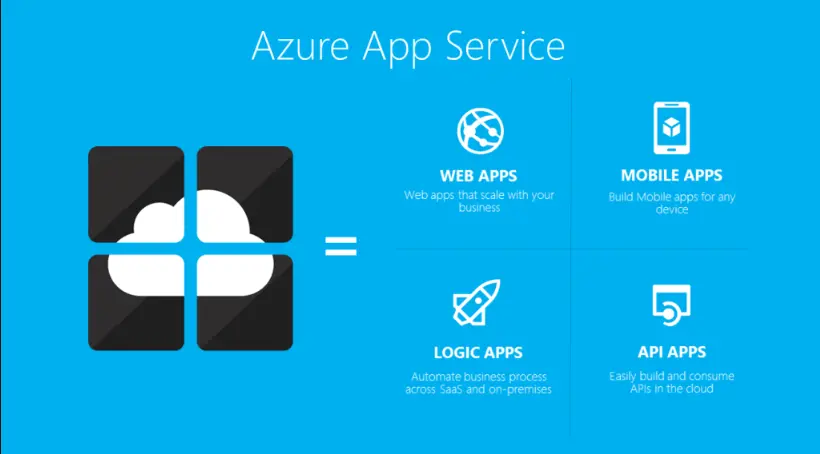
Azure App Services is a fully managed platform for building, deploying, and scaling web applications on Microsoft Azure. It simplifies app development by providing a PaaS (Platform as a Service) solution that supports various languages and frameworks, including .NET, Node.js, Python, Java, and PHP.
Key features include:
– Seamless deployment: Integrate with tools like GitHub, Azure DevOps, or FTP for automated deployments, with built-in CI/CD pipelines.
– Scalability: Easily scale apps vertically (by adjusting resources) or horizontally (by adding instances) to handle traffic spikes, with auto-scaling options.
– Built-in services: Offers integrated features like custom domains, SSL certificates, authentication (via Azure AD), and API management, reducing the need for custom infrastructure.
– Hybrid connectivity: Supports connections to on-premises resources through Azure Hybrid Connections or VPN, enabling secure data access.
– Global availability: Deploy apps across Azure regions for high availability and low-latency performance, with options for staging environments and slot swapping.
Benefits of Azure App Services include cost efficiency through a pay-as-you-go model, enhanced security with automatic patches and compliance certifications, and easy integration with other Azure services like databases (Azure SQL), storage, and AI tools. It’s ideal for web apps, mobile backends, RESTful APIs, and microservices, making it a versatile choice for developers and businesses aiming for rapid innovation.
Table of Contents
- Part 1: OnlineExamMaker – Generate and Share Azure App Services Quiz with AI Automatically
- Part 2: 20 Azure App Services Quiz Questions & Answers
- Part 3: Try OnlineExamMaker AI Question Generator to Create Quiz Questions
Part 1: OnlineExamMaker – Generate and Share Azure App Services Quiz with AI Automatically
OnlineExamMaker is a powerful AI-powered assessment platform to create auto-grading Azure App Services skills assessments. It’s designed for educators, trainers, businesses, and anyone looking to generate engaging quizzes without spending hours crafting questions manually. The AI Question Generator feature allows you to input a topic or specific details, and it generates a variety of question types automatically.
Top features for assessment organizers:
● Prevent cheating by randomizing questions or changing the order of questions, so learners don’t get the same set of questions each time.
● AI Exam Grader for efficiently grading quizzes and assignments, offering inline comments, automatic scoring, and “fudge points” for manual adjustments.
● Embed quizzes on websites, blogs, or share via email, social media (Facebook, Twitter), or direct links.
● Handles large-scale testing (thousands of exams/semester) without internet dependency, backed by cloud infrastructure.
Automatically generate questions using AI
Part 2: 20 Azure App Services Quiz Questions & Answers
or
1. Question: What is Azure App Service primarily used for?
A. Managing virtual machines
B. Hosting and scaling web applications, APIs, and mobile backends
C. Storing data in databases
D. Running containerized applications only
Answer: B
Explanation: Azure App Service is a fully managed platform as a service (PaaS) offering that allows developers to build, deploy, and scale web apps without managing the underlying infrastructure.
2. Question: Which of the following is NOT a type of App Service available in Azure?
A. Web Apps
B. API Apps
C. Mobile Apps
D. Database Apps
Answer: D
Explanation: Azure App Service includes Web Apps, API Apps, and Mobile Apps, but there is no specific “Database Apps” type; databases are handled through separate Azure services like Azure SQL Database.
3. Question: What is an App Service plan in Azure?
A. A template for deploying applications
B. A container for hosting apps and defining their compute resources
C. A security policy for apps
D. A billing method for Azure services
Answer: B
Explanation: An App Service plan represents the compute resources that your apps run on, including the number of instances, size, and location, which determines the cost and performance.
4. Question: How can you scale an Azure App Service?
A. Only manually through the Azure portal
B. Automatically using autoscale rules based on metrics like CPU usage
C. By adding more storage accounts
D. Through email notifications
Answer: B
Explanation: Azure App Service supports autoscale, which automatically adjusts the number of instances based on predefined rules and metrics, ensuring optimal performance and cost efficiency.
5. Question: Which pricing tier in Azure App Services offers the highest level of resources?
A. Free
B. Shared
C. Basic
D. Premium V3
Answer: D
Explanation: The Premium V3 tier provides the most advanced features, including larger instance sizes, more memory, and enhanced capabilities for high-traffic applications compared to lower tiers.
6. Question: What deployment method is commonly used for Azure App Services?
A. FTP only
B. Git integration or Azure DevOps
C. Manual file upload via email
D. USB drive connection
Answer: B
Explanation: Azure App Services support continuous integration and deployment through Git, Azure DevOps, or other CI/CD tools, making it easy to automate deployments from source code repositories.
7. Question: Which feature of Azure App Service allows you to run code in multiple languages?
A. Custom domains
B. Built-in support for languages like .NET, Node.js, Python, and Java
C. SSL certificates only
D. App Service Environment
Answer: B
Explanation: Azure App Service natively supports multiple programming languages and frameworks, allowing developers to build apps in their preferred language without additional configuration.
8. Question: What is the purpose of Azure App Service slots?
A. To store app data
B. To create staging environments for testing before swapping to production
C. To manage user authentication
D. To handle network traffic
Answer: B
Explanation: Deployment slots in Azure App Service enable you to deploy different versions of your app for testing and then swap them with the production slot with minimal downtime.
9. Question: How does Azure App Service handle security for web applications?
A. By disabling all firewalls
B. Through features like authentication, HTTPS enforcement, and integration with Azure AD
C. By exposing all ports by default
D. Only via manual code reviews
Answer: B
Explanation: Azure App Service provides built-in security features, including Azure Active Directory integration, SSL/TLS enforcement, and IP restrictions to protect apps from common threats.
10. Question: What is the maximum number of instances you can scale an Azure App Service to in the Standard tier?
A. 10
B. 20
C. 30
D. Unlimited
Answer: A
Explanation: In the Standard tier, Azure App Service allows up to 10 instances for scaling, while higher tiers like Premium offer more to handle increased demand.
11. Question: Which Azure service can be integrated with App Service for monitoring?
A. Azure Storage
B. Azure Monitor
C. Azure Virtual Network
D. Azure Key Vault
Answer: B
Explanation: Azure Monitor integrates with App Service to provide metrics, logs, and alerts, helping you track performance and diagnose issues in real-time.
12. Question: What is the benefit of using Azure App Service for mobile backends?
A. It only supports web apps
B. It provides easy integration with push notifications and offline sync via Azure Mobile Apps
C. It requires custom coding for all mobile features
D. It limits API calls
Answer: B
Explanation: Azure App Service, through its Mobile Apps feature, simplifies building mobile backends with built-in support for authentication, data sync, and notifications.
13. Question: In Azure App Service, what does “Always On” do?
A. Keeps the app running continuously to prevent idle timeouts
B. Turns off the app after a certain period
C. Only applies to free tiers
D. Manages app updates
Answer: A
Explanation: The “Always On” feature ensures that your app remains active and doesn’t go idle, which is crucial for apps that need to handle background tasks or scheduled jobs.
14. Question: How can you customize the domain for an Azure App Service app?
A. Only using Azure-provided subdomains
B. By mapping a custom domain and configuring DNS settings
C. Through email requests to Microsoft
D. By changing the app name
Answer: B
Explanation: You can map a custom domain to your App Service app by updating DNS records, allowing you to use your own branding while leveraging Azure’s hosting.
15. Question: What is Azure App Service Environment (ASE)?
A. A public hosting plan
B. An isolated environment for running App Services in your virtual network
C. A free tier option
D. A database management tool
Answer: B
Explanation: ASE provides a dedicated and isolated runtime environment for App Services, ideal for scenarios requiring high security and network isolation.
16. Question: Which protocol is enforced for secure communication in Azure App Services?
A. HTTP only
B. HTTPS with SSL certificates
C. FTP
D. SMTP
Answer: B
Explanation: Azure App Service supports HTTPS enforcement, ensuring that all traffic to your app is encrypted using SSL/TLS certificates for data security.
17. Question: What is the role of Azure Traffic Manager with App Services?
A. It manages internal app code
B. It distributes traffic across multiple App Service instances for high availability
C. It handles app deployment
D. It monitors database queries
Answer: B
Explanation: Azure Traffic Manager can route traffic to different App Service regions or instances, improving availability and performance through load balancing.
18. Question: How does Azure App Service support continuous integration?
A. Only through manual deployments
B. Via integration with GitHub, Azure DevOps, and webhooks for automated builds and deployments
C. By requiring separate tools
D. Through physical server access
Answer: B
Explanation: App Service integrates with CI/CD pipelines from tools like GitHub and Azure DevOps, automating the build, test, and deploy process.
19. Question: What happens when you exceed the limits of your App Service plan?
A. The app automatically scales up
B. You may experience throttling, errors, or additional costs based on the tier
C. The app is deleted
D. Nothing, as limits are unlimited
Answer: B
Explanation: Exceeding limits in an App Service plan can lead to performance issues or require upgrading to a higher tier to accommodate more resources.
20. Question: Which Azure feature allows you to backup and restore App Service apps?
A. Azure Backup Vault
B. Built-in backup and restore options in App Service
C. Azure File Storage
D. Azure Cache
Answer: B
Explanation: Azure App Service includes native backup and restore capabilities, allowing you to schedule backups of your app’s content and databases for disaster recovery.
or
Part 3: Try OnlineExamMaker AI Question Generator to Create Quiz Questions
Automatically generate questions using AI