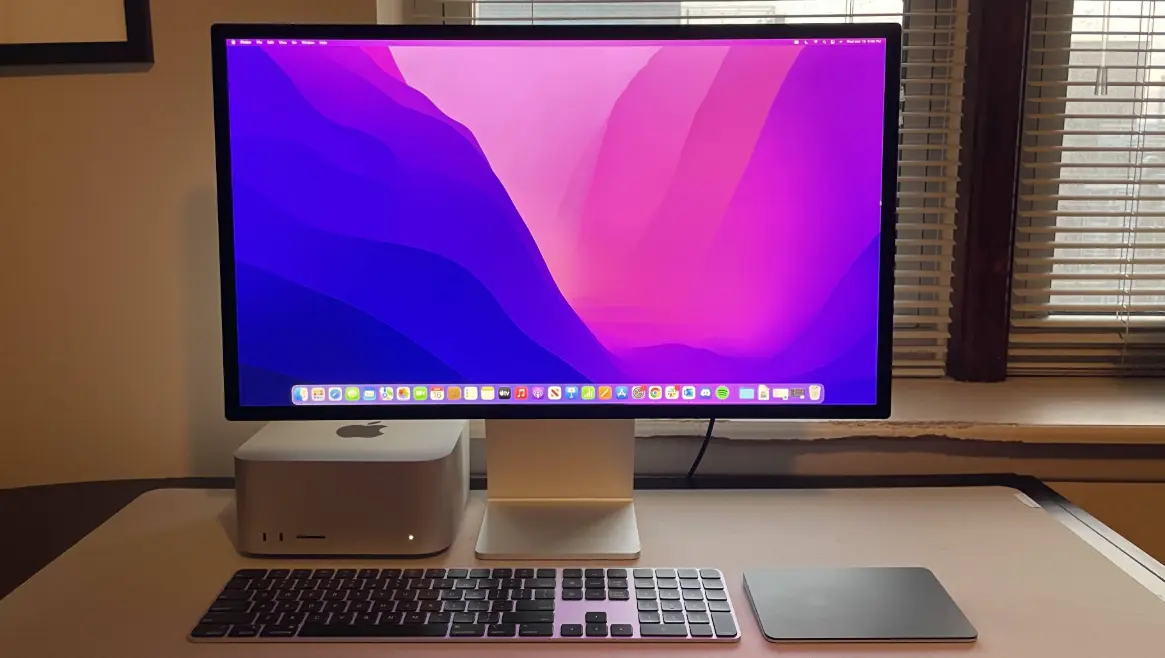
Apple Studio Display is a high-performance 27-inch 5K Retina display designed for creative professionals and power users. It delivers stunning visuals with over a billion colors, 600 nits of brightness, and support for P3 wide color gamut, making it ideal for photo editing, video production, and design work.
Built-in features include a 12MP Ultra Wide camera with Center Stage for intelligent framing during video calls, a studio-quality three-mic array for crystal-clear audio, and a six-speaker system with Spatial Audio for immersive sound.
Connectivity is robust, with one Thunderbolt 3 port for high-speed data transfer and charging, plus three USB-C ports for peripherals. The display integrates seamlessly with Mac computers, offering a tilt- and height-adjustable stand for ergonomic viewing.
Priced as a premium accessory, it’s perfect for enhancing productivity in home offices, studios, or professional environments.
Table of Contents
- Part 1: OnlineExamMaker – Generate and Share Apple Studio Display Quiz with AI Automatically
- Part 2: 20 Apple Studio Display Quiz Questions & Answers
- Part 3: Save Time and Energy: Generate Quiz Questions with AI Technology
Part 1: OnlineExamMaker – Generate and Share Apple Studio Display Quiz with AI Automatically
OnlineExamMaker is a powerful AI-powered assessment platform to create auto-grading Apple Studio Display skills assessments. It’s designed for educators, trainers, businesses, and anyone looking to generate engaging quizzes without spending hours crafting questions manually. The AI Question Generator feature allows you to input a topic or specific details, and it generates a variety of question types automatically.
Top features for assessment organizers:
● Prevent cheating by randomizing questions or changing the order of questions, so learners don’t get the same set of questions each time.
● AI Exam Grader for efficiently grading quizzes and assignments, offering inline comments, automatic scoring, and “fudge points” for manual adjustments.
● Embed quizzes on websites, blogs, or share via email, social media (Facebook, Twitter), or direct links.
● Handles large-scale testing (thousands of exams/semester) without internet dependency, backed by cloud infrastructure.
Automatically generate questions using AI
Part 2: 20 Apple Studio Display Quiz Questions & Answers
or
1. Question: What is the screen size of the Apple Studio Display?
A. 24 inches
B. 27 inches
C. 32 inches
D. 34 inches
Answer: B. 27 inches
Explanation: The Apple Studio Display has a 27-inch screen, designed for professional workflows with ample space for multitasking.
2. Question: What is the resolution of the Apple Studio Display?
A. 4K
B. 5K
C. 6K
D. 8K
Answer: B. 5K
Explanation: It features a 5K Retina display, delivering over 14.7 million pixels for exceptional clarity and detail.
3. Question: What type of display technology does the Apple Studio Display use?
A. LCD
B. OLED
C. IPS
D. Retina
Answer: D. Retina
Explanation: The Apple Studio Display uses Retina display technology, which is an IPS-based panel enhanced for color accuracy and brightness.
4. Question: What is the peak brightness of the Apple Studio Display?
A. 400 nits
B. 500 nits
C. 600 nits
D. 700 nits
Answer: C. 600 nits
Explanation: It supports up to 600 nits of brightness, making it suitable for well-lit environments and HDR content.
5. Question: Does the Apple Studio Display support HDR?
A. No
B. Yes, but only basic HDR
C. Yes, with full HDR10 support
D. Yes, with Dolby Vision support
Answer: D. Yes, with Dolby Vision support
Explanation: The display supports Dolby Vision, HDR10, and HLG, providing enhanced contrast and color for video editing.
6. Question: How many Thunderbolt 3 ports does the Apple Studio Display have?
A. 1
B. 2
C. 3
D. 4
Answer: C. 3
Explanation: It includes three Thunderbolt 3 ports, allowing for daisy-chaining of devices and high-speed data transfer.
7. Question: What camera resolution is featured on the Apple Studio Display?
A. 8MP
B. 10MP
C. 12MP
D. 14MP
Answer: C. 12MP
Explanation: The built-in camera is 12MP with Center Stage technology, which uses machine learning to keep users in frame during video calls.
8. Question: What audio features are included in the Apple Studio Display?
A. Stereo speakers only
B. Six-speaker system
C. Four-speaker system with spatial audio
D. No built-in speakers
Answer: C. Four-speaker system with spatial audio
Explanation: It has a four-speaker system that supports spatial audio, delivering immersive sound for music and calls.
9. Question: Is the Apple Studio Display height-adjustable by default?
A. Yes, with the standard stand
B. No, but an optional stand adds adjustability
C. Yes, via a separate mount
D. No adjustability at all
Answer: B. No, but an optional stand adds adjustability
Explanation: The base model does not include a height-adjustable stand; it’s sold separately for ergonomic positioning.
10. Question: What is the refresh rate of the Apple Studio Display?
A. 60Hz
B. 120Hz
C. 144Hz
D. 240Hz
Answer: A. 60Hz
Explanation: It operates at a 60Hz refresh rate, which is standard for most professional displays but not as high as some gaming monitors.
11. Question: Which color spaces does the Apple Studio Display support?
A. sRGB only
B. P3 and sRGB
C. Adobe RGB only
D. All of the above
Answer: B. P3 and sRGB
Explanation: It supports the wide P3 color gamut and sRGB, making it ideal for color-critical tasks like photo and video editing.
12. Question: Can the Apple Studio Display be used with non-Apple devices?
A. No
B. Yes, but with limited features
C. Yes, fully compatible
D. Only with Windows PCs
Answer: B. Yes, but with limited features
Explanation: It works with non-Apple devices via Thunderbolt or USB-C, but some features like macOS-specific optimizations may not be available.
13. Question: What is the primary use case for the Apple Studio Display?
A. Gaming
B. Professional creative work
C. Basic office tasks
D. Portable setups
Answer: B. Professional creative work
Explanation: It’s designed for professionals in fields like graphic design, video editing, and music production due to its high-quality display.
14. Question: How much does the Apple Studio Display weigh?
A. Under 5 kg
B. Around 7 kg
C. Around 10 kg
D. Over 15 kg
Answer: B. Around 7 kg
Explanation: The display weighs approximately 7 kg without the stand, making it sturdy yet manageable for desk setups.
15. Question: Does the Apple Studio Display include a built-in webcam?
A. No
B. Yes, a basic one
C. Yes, with advanced features
D. Optional add-on
Answer: C. Yes, with advanced features
Explanation: It has a 12MP webcam with Center Stage, which automatically adjusts to keep the user centered.
16. Question: What ports are available on the Apple Studio Display besides Thunderbolt?
A. HDMI and USB-A
B. USB-C and Ethernet
C. Only Thunderbolt
D. MagSafe
Answer: B. USB-C and Ethernet
Explanation: In addition to Thunderbolt 3 ports, it includes a USB-C port and an Ethernet port for versatile connectivity.
17. Question: Is the Apple Studio Display VESA mount compatible?
A. No
B. Yes, with an adapter
C. Yes, out of the box
D. Only for specific models
Answer: B. Yes, with an adapter
Explanation: It requires a separate VESA mount adapter to be compatible with standard mounting systems.
18. Question: What is the standard price range for the Apple Studio Display?
A. Under $500
B. $1,000–$1,500
C. $1,500–$2,000
D. Over $2,500
Answer: C. $1,500–$2,000
Explanation: The base model is priced around $1,599, with options like the stand increasing the total cost.
19. Question: Can the Apple Studio Display charge devices?
A. No
B. Yes, via USB-A ports
C. Yes, via Thunderbolt ports
D. Only wireless charging
Answer: C. Yes, via Thunderbolt ports
Explanation: The Thunderbolt 3 ports can deliver up to 96W of power, allowing it to charge connected devices like MacBooks.
20. Question: What makes the Apple Studio Display suitable for video conferencing?
A. High resolution only
B. Camera and microphone quality
C. Speakers alone
D. All of the above
Answer: D. All of the above
Explanation: It combines a high-resolution camera, quality microphones, and speakers, enhancing video call experiences with features like Center Stage.
or
Part 3: Save Time and Energy: Generate Quiz Questions with AI Technology
Automatically generate questions using AI