The Apple Pencil is a precision stylus designed by Apple for use with compatible iPad models, enhancing digital creativity and productivity. Available in two main generations, it offers advanced features like pressure sensitivity, tilt recognition, and palm rejection, allowing for a natural writing and drawing experience.
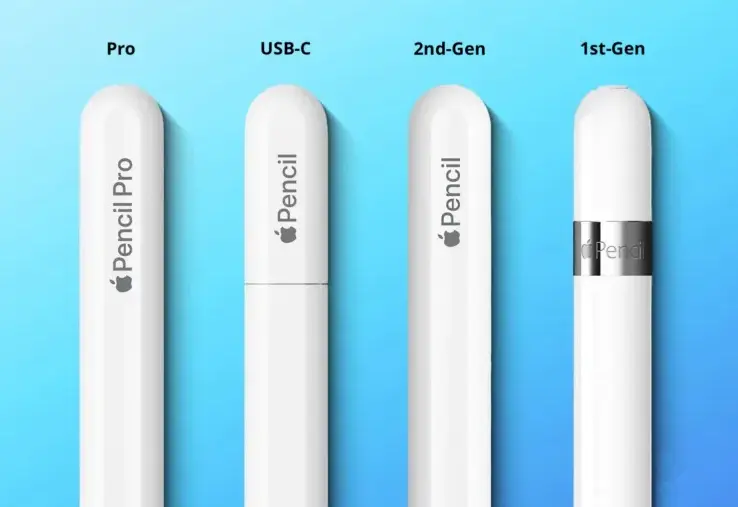
The first-generation Apple Pencil, introduced in 2015, pairs with older iPad models via a Lightning connector and provides low-latency input for smooth sketching and note-taking. It features a replaceable tip and integrates seamlessly with apps like Notes and Procreate.
The second-generation Apple Pencil, released in 2018, improves on the original with wireless charging, magnetic attachment for storage and pairing, and double-tap gestures for quick tool switching. It’s compatible with newer iPads, such as the iPad Pro, iPad Air, and iPad mini, and offers even lower latency for a more responsive feel.
Key features across both generations include:
– Pressure Sensitivity: Varies line weight and opacity based on applied pressure, mimicking traditional pens and brushes.
– Tilt Support: Detects the angle of the Pencil for shading and brush effects in supported apps.
– Precision and Accuracy: Pixel-perfect control with minimal lag, ideal for artists, students, and professionals.
– Integration with iOS: Works effortlessly with Apple Pencil-compatible apps, supporting features like markup tools and handwriting recognition.
Priced starting at around $99, the Apple Pencil is praised for its ergonomic design, long battery life (up to 12 hours), and ability to transform the iPad into a digital canvas or notebook. It’s a versatile tool for creative professionals, educators, and everyday users seeking enhanced interaction with their devices.
Table of Contents
- Part 1: Create An Amazing Apple Pencil Quiz Using AI Instantly in OnlineExamMaker
- Part 2: 20 Apple Pencil Quiz Questions & Answers
- Part 3: Save Time and Energy: Generate Quiz Questions with AI Technology
Part 1: Create An Amazing Apple Pencil Quiz Using AI Instantly in OnlineExamMaker
The quickest way to assess the Apple Pencil knowledge of candidates is using an AI assessment platform like OnlineExamMaker. With OnlineExamMaker AI Question Generator, you are able to input content—like text, documents, or topics—and then automatically generate questions in various formats (multiple-choice, true/false, short answer). Its AI Exam Grader can automatically grade the exam and generate insightful reports after your candidate submit the assessment.
Overview of its key assessment-related features:
● Create up to 10 question types, including multiple-choice, true/false, fill-in-the-blank, matching, short answer, and essay questions.
● Automatically generates detailed reports—individual scores, question report, and group performance.
● Instantly scores objective questions and subjective answers use rubric-based scoring for consistency.
● API and SSO help trainers integrate OnlineExamMaker with Google Classroom, Microsoft Teams, CRM and more.
Automatically generate questions using AI
Part 2: 20 Apple Pencil Quiz Questions & Answers
or
1. Question: What is the primary function of the Apple Pencil?
Options:
A. To take photos
B. To write and draw on compatible iPads
C. To play music
D. To control smart home devices
Answer: B
Explanation: The Apple Pencil is a stylus designed specifically for use with iPads, enabling precise writing, drawing, and navigation through its pressure-sensitive technology.
2. Question: Which generation of Apple Pencil features wireless charging?
Options:
A. 1st generation
B. 2nd generation
C. USB-C version
D. None of the above
Answer: B
Explanation: The 2nd generation Apple Pencil supports wireless charging via magnetic attachment to compatible iPads, making it more convenient than the 1st generation’s Lightning connector method.
3. Question: What type of connector does the 1st generation Apple Pencil use for charging?
Options:
A. USB-C
B. Lightning
C. Magnetic
D. Wireless pad
Answer: B
Explanation: The 1st generation Apple Pencil charges via a Lightning connector that plugs into the iPad or a power source, distinguishing it from later models.
4. Question: Which iPad model is NOT compatible with the 2nd generation Apple Pencil?
Options:
A. iPad Pro 12.9-inch (3rd generation)
B. iPad Air (4th generation)
C. iPad (9th generation)
D. iPad mini (6th generation)
Answer: C
Explanation: The 2nd generation Apple Pencil is compatible with iPad Pro, iPad Air, and iPad mini models from certain generations, but the standard iPad (9th generation) only supports the 1st generation.
5. Question: How does the Apple Pencil enhance note-taking?
Options:
A. By adding keyboard shortcuts
B. Through pressure sensitivity for varied line weights
C. By increasing screen brightness
D. With built-in voice recording
Answer: B
Explanation: The Apple Pencil’s pressure sensitivity allows users to create strokes of different thicknesses and opacities, mimicking real pen and paper for better note-taking.
6. Question: What is the approximate battery life of the 2nd generation Apple Pencil?
Options:
A. 1 hour
B. 12 hours
C. 24 hours
D. It doesn’t have a battery
Answer: B
Explanation: The 2nd generation Apple Pencil offers up to 12 hours of battery life on a full charge, making it suitable for extended use sessions.
7. Question: Can the Apple Pencil be used with Mac computers?
Options:
A. Yes, with all models
B. No, it’s only for iPads
C. Yes, but only with specific iMacs
D. Yes, through third-party apps
Answer: B
Explanation: The Apple Pencil is designed exclusively for compatible iPad models and is not natively supported on Mac computers.
8. Question: What feature does the Apple Pencil offer for artists?
Options:
A. Palm rejection
B. Tilt sensitivity
C. Automatic color mixing
D. Built-in eraser tool
Answer: B
Explanation: Tilt sensitivity in the Apple Pencil allows users to shade and create varied effects based on the angle of the stylus, which is particularly useful for digital artists.
9. Question: How do you pair the 2nd generation Apple Pencil with an iPad?
Options:
A. Via Bluetooth settings
B. By attaching it magnetically
C. Through the App Store
D. Using a cable
Answer: B
Explanation: The 2nd generation Apple Pencil pairs automatically when attached magnetically to the side of a compatible iPad, simplifying the connection process.
10. Question: What is the latency of the Apple Pencil?
Options:
A. Over 100 milliseconds
B. Around 20 milliseconds
C. 1 second
D. It varies by app
Answer: B
Explanation: The Apple Pencil has a low latency of about 9-20 milliseconds, providing a near-instant response that feels natural for writing and drawing.
11. Question: Which Apple Pencil model includes a double-tap feature?
Options:
A. 1st generation
B. 2nd generation
C. USB-C version
D. Both B and C
Answer: D
Explanation: The 2nd generation and USB-C versions of the Apple Pencil support a double-tap gesture for quick actions like switching tools in compatible apps.
12. Question: What material is used for the tip of the Apple Pencil?
Options:
A. Rubber
B. Metal
C. Plastic
D. A proprietary composite
Answer: D
Explanation: The Apple Pencil uses a durable, proprietary composite material for its tip, designed to feel like a real pencil on the iPad screen while reducing wear.
13. Question: Can you replace the tip of the Apple Pencil?
Options:
A. No, it’s fixed
B. Yes, with a special tool
C. Yes, it’s magnetic and easy to swap
D. Only through Apple Store
Answer: C
Explanation: The tip of the Apple Pencil is user-replaceable and can be swapped easily without tools, allowing for maintenance as it wears down.
14. Question: What is the weight of the 2nd generation Apple Pencil?
Options:
A. 10 grams
B. 20 grams
C. 50 grams
D. 100 grams
Answer: B
Explanation: The 2nd generation Apple Pencil weighs approximately 20 grams, making it lightweight and comfortable for prolonged use.
15. Question: Which app is commonly used with the Apple Pencil for drawing?
Options:
A. Pages
B. Procreate
C. Safari
D. Mail
Answer: B
Explanation: Procreate is a popular digital illustration app that fully utilizes the Apple Pencil’s features like pressure and tilt sensitivity for advanced drawing capabilities.
16. Question: Does the Apple Pencil work with older iPad models?
Options:
A. Yes, all models
B. Only with iPads from 2018 onwards
C. No, only newest models
D. Depends on the generation
Answer: D
Explanation: Compatibility varies by Apple Pencil generation; for example, the 1st generation works with older iPads like the iPad Air 2, while the 2nd generation requires newer models.
17. Question: What charging method is used for the USB-C Apple Pencil?
Options:
A. Lightning cable
B. USB-C cable
C. Wireless only
D. Solar power
Answer: B
Explanation: The USB-C version of the Apple Pencil charges via a USB-C cable, offering a modern and versatile connection option.
18. Question: How does the Apple Pencil improve handwriting recognition?
Options:
A. By adding autocorrect
B. Through precise input for apps like Notes
C. By enlarging the screen
D. With voice-to-text
Answer: B
Explanation: The Apple Pencil’s accuracy enhances handwriting recognition in apps like Notes, allowing for better conversion of handwritten text to digital format.
19. Question: What accessory might you need for the 1st generation Apple Pencil?
Options:
A. A case
B. An adapter for charging
C. A stylus holder
D. Both A and B
Answer: B
Explanation: The 1st generation Apple Pencil often requires a Lightning adapter for charging if the iPad lacks a direct port, though it’s not always necessary.
20. Question: Is the Apple Pencil water-resistant?
Options:
A. Yes, fully waterproof
B. No, not at all
C. Slightly resistant to splashes
D. Only the 2nd generation
Answer: C
Explanation: The Apple Pencil has some resistance to light splashes but is not fully waterproof, so it’s best to avoid submerging it in water.
or
Part 3: Save Time and Energy: Generate Quiz Questions with AI Technology
Automatically generate questions using AI