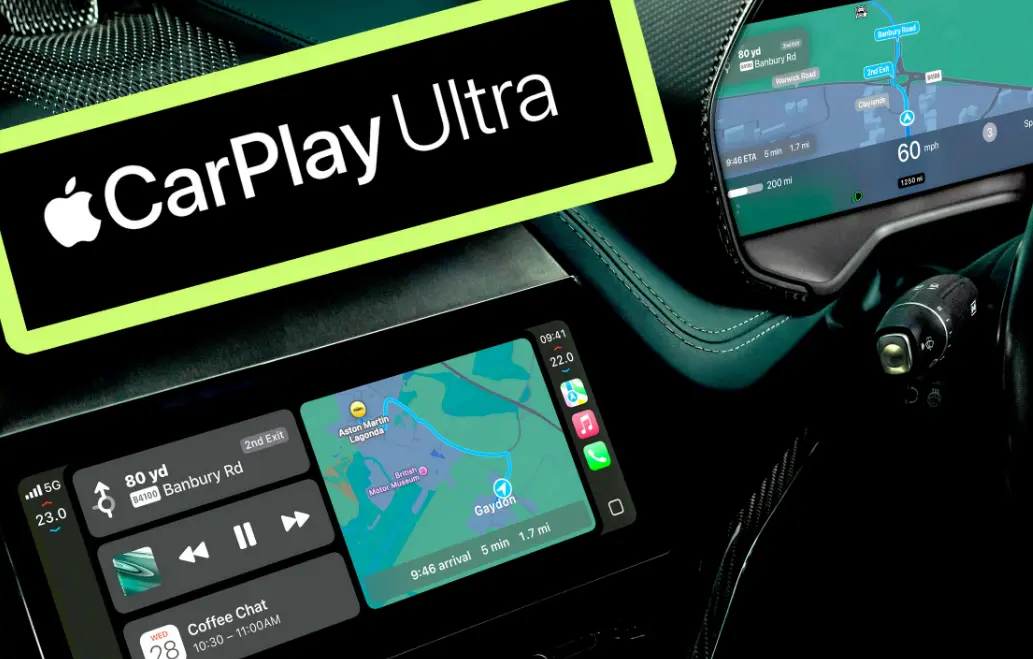
Apple CarPlay is a smart in-vehicle system developed by Apple that integrates an iPhone with a car’s infotainment display, allowing drivers to access essential apps and features while keeping their focus on the road.
It works by mirroring a simplified iOS interface on the car’s screen, enabling seamless interaction via the vehicle’s touchscreen, steering wheel controls, or voice commands through Siri. Users can connect their iPhone via USB cable or wirelessly, depending on the car’s compatibility.
Key features include:
– Navigation: Access Apple Maps or third-party apps like Google Maps for turn-by-turn directions.
– Communication: Hands-free calling, texting, and reading messages using Siri to minimize distractions.
– Entertainment: Stream music from Apple Music, Spotify, or podcasts, with easy control over playback.
– Productivity: Manage calendars, audiobooks, and other apps in a driver-friendly layout.
Benefits of Apple CarPlay include enhanced safety by reducing the need to handle your phone, improved user experience with familiar iOS design, and support for third-party apps that meet Apple’s guidelines.
Compatibility requires an iPhone running iOS 7.1 or later and a vehicle from manufacturers like BMW, Ford, Honda, or Tesla that supports CarPlay. It’s available in over 800 car models worldwide, with ongoing updates adding new features and refinements.
Table of Contents
- Part 1: OnlineExamMaker AI Quiz Maker – Make A Free Quiz in Minutes
- Part 2: 20 Apple Carplay Quiz Questions & Answers
- Part 3: Save Time and Energy: Generate Quiz Questions with AI Technology
Part 1: OnlineExamMaker AI Quiz Maker – Make A Free Quiz in Minutes
What’s the best way to create a Apple Carplay quiz online? OnlineExamMaker is the best AI quiz making software for you. No coding, and no design skills required. If you don’t have the time to create your online quiz from scratch, you are able to use OnlineExamMaker AI Question Generator to create question automatically, then add them into your online assessment. What is more, the platform leverages AI proctoring and AI grading features to streamline the process while ensuring exam integrity.
Key features of OnlineExamMaker:
● Create up to 10 question types, including multiple-choice, true/false, fill-in-the-blank, matching, short answer, and essay questions.
● Build and store questions in a centralized portal, tagged by categories and keywords for easy reuse and organization.
● Automatically scores multiple-choice, true/false, and even open-ended/audio responses using AI, reducing manual work.
● Create certificates with personalized company logo, certificate title, description, date, candidate’s name, marks and signature.
Automatically generate questions using AI
Part 2: 20 Apple Carplay Quiz Questions & Answers
or
1. What is Apple CarPlay primarily designed for?
A. Playing games on your car’s screen
B. Integrating iPhone features with a vehicle’s infotainment system
C. Remote controlling home devices from the car
D. Streaming TV shows while driving
Answer: B
Explanation: Apple CarPlay is a smarter, safer way to use your iPhone in the car, allowing access to apps like navigation and music through the vehicle’s display.
2. Which iPhone models are compatible with Apple CarPlay?
A. iPhone 4 and later
B. iPhone 5 and later
C. iPhone 6 and later
D. iPhone 8 and later
Answer: C
Explanation: Apple CarPlay requires iOS 7.1 or later, which means iPhone 5 and later, but full compatibility is optimized for iPhone 6 and newer models.
3. How does Apple CarPlay connect to a vehicle?
A. Via Bluetooth only
B. Via USB cable or wirelessly with compatible cars
C. Through a dedicated Apple adapter
D. Using FM radio transmitters
Answer: B
Explanation: Apple CarPlay can connect via a USB cable for older vehicles or wirelessly in cars that support it, ensuring seamless integration.
4. What is the main safety feature of Apple CarPlay?
A. Allowing hands-free texting
B. Enabling video playback while driving
C. Providing voice control through Siri
D. Displaying full web browsers
Answer: C
Explanation: Siri integration allows drivers to use voice commands for tasks like navigation and calls, minimizing the need to handle the phone.
5. Which app is NOT typically available on Apple CarPlay?
A. Apple Maps
B. Spotify
C. Instagram
D. Podcasts
Answer: C
Explanation: Social media apps like Instagram are not designed for use while driving due to safety concerns, whereas music and navigation apps are optimized.
6. Can Apple CarPlay work with Android phones?
A. Yes, with an adapter
B. Yes, natively
C. No, it’s exclusive to iPhones
D. Only with rooted Android devices
Answer: C
Explanation: Apple CarPlay is designed specifically for iPhones and iPads, requiring iOS devices for compatibility.
7. What does Apple CarPlay use for navigation by default?
A. Google Maps
B. Waze
C. Apple Maps
D. TomTom
Answer: C
Explanation: Apple CarPlay defaults to Apple Maps for turn-by-turn directions, though other apps like Google Maps can be added if supported.
8. How can you access messages on Apple CarPlay?
A. By typing on the screen
B. Through voice dictation with Siri
C. Manually scrolling through emails
D. Using a physical keyboard
Answer: B
Explanation: For safety, Apple CarPlay uses Siri to read and respond to messages via voice, avoiding manual interaction.
9. What is the maximum number of apps that can be displayed on Apple CarPlay at once?
A. 5
B. 10
C. Unlimited
D. It varies by car model
Answer: D
Explanation: The number of apps displayed depends on the vehicle’s interface, but Apple CarPlay typically shows a limited, customizable home screen.
10. Which of these is a common way to update Apple CarPlay?
A. Through the car’s software update
B. By reinstalling iOS on your phone
C. Via a separate Apple CarPlay app
D. Manually downloading files to a USB
Answer: A
Explanation: Updates to Apple CarPlay often come through the vehicle’s infotainment system software, which integrates with your iPhone’s iOS.
11. Can you make phone calls using Apple CarPlay?
A. No, it’s only for media
B. Yes, through the car’s speakers and microphone
C. Yes, but only with a headset
D. No, it requires a separate Bluetooth device
Answer: B
Explanation: Apple CarPlay supports hands-free calling using the vehicle’s audio system, enhancing safety and convenience.
12. What happens if you disconnect your iPhone from Apple CarPlay?
A. The car reverts to its native system
B. All apps freeze on the screen
C. The connection remains active
D. You lose access to the car’s radio
Answer: A
Explanation: Disconnecting your iPhone switches the infotainment system back to the vehicle’s default interface.
13. Which audio platforms are supported by Apple CarPlay?
A. Only Apple Music
B. Apple Music and Spotify
C. All streaming services
D. Only FM radio
Answer: B
Explanation: Apple CarPlay supports various audio apps like Apple Music and Spotify, but not all services are compatible without developer integration.
14. Is Apple CarPlay available in all cars?
A. Yes, as a standard feature
B. No, it depends on the manufacturer’s support
C. Yes, through aftermarket adapters
D. Only in electric vehicles
Answer: B
Explanation: Not all cars have built-in Apple CarPlay; it requires specific hardware and software from the automaker.
15. How does Apple CarPlay handle notifications?
A. It displays them as pop-ups on the screen
B. It reads them aloud via Siri
C. It blocks all notifications while driving
D. Both A and B
Answer: D
Explanation: Apple CarPlay can display and read notifications aloud, but it prioritizes safety by limiting visual distractions.
16. What is Do Not Disturb mode in Apple CarPlay?
A. A feature to silence all sounds
B. A mode that filters notifications while driving
C. A way to lock the screen
D. An option to play only podcasts
Answer: B
Explanation: Do Not Disturb mode in Apple CarPlay silences non-essential notifications to help drivers focus on the road.
17. Can you customize the Apple CarPlay interface?
A. No, it’s fixed
B. Yes, by rearranging app icons
C. Only through iPhone settings
D. Yes, with third-party themes
Answer: B
Explanation: Users can customize the home screen by rearranging apps, making it more personalized for their needs.
18. What is the primary difference between Apple CarPlay and Android Auto?
A. Apple CarPlay is for Android devices
B. Android Auto is exclusive to Apple
C. Apple CarPlay works only with iOS
D. They are identical in features
Answer: C
Explanation: Apple CarPlay is designed for iPhone users, while Android Auto is for Android devices, though both serve similar purposes.
19. How does Apple CarPlay improve music playback?
A. By limiting song options
B. By integrating with car audio controls
C. By requiring a subscription
D. By blocking album art
Answer: B
Explanation: Apple CarPlay allows seamless control of music apps using the car’s steering wheel or dashboard buttons.
20. What should you do if Apple CarPlay isn’t connecting?
A. Restart your iPhone
B. Check the USB cable or wireless settings
C. Update your car’s software
D. All of the above
Answer: D
Explanation: Common troubleshooting includes restarting the device, verifying connections, and ensuring software is up to date.
or
Part 3: Save Time and Energy: Generate Quiz Questions with AI Technology
Automatically generate questions using AI